How Do You Keep a Growing Conversation Cached?
In a chat, every request is longer than the one before, so the end of the prompt keeps moving. This post follows one support bot turn by turn: where the cache markers go, what each turn really costs, the 20-position lookback, and how to shrink a long history without breaking the cache, worked through on the Claude API.
In the previous post, we discussed what a prompt cache stores and where a cached part ends. You don't have to read it first. The next section sums up the five facts from it that this post needs.
The last post kept one thing simple. Its prompt always started the same way. The tools and the system prompt came first and never changed. Only the question at the end was new. You put one marker between the two, and every request reused the start.
A chat doesn't work like that. Each request sends the whole conversation so far, plus the new question. Turn 1 sends one question. Turn 10 sends nine questions, nine replies, and the new question. Every request is longer than the one before. So the end of the prompt is somewhere new every time.
That leaves you with three questions:
- Where does a marker go when the end keeps moving?
- Do you pay to store the whole history again on every turn?
- What happens when the history gets too long and has to shrink?
We'll answer them in five steps. For most of the way, we'll follow one customer-support bot through a long chat.
- The test for a marker. One question decides where a marker belongs.
- Markers in a real chat. Where they sit, turn by turn, and what each turn costs.
- The 20-position lookback. How far back the server searches, and two real ways to go past it.
- Shrinking the history. Why one common way breaks the cache every turn, and another doesn't.
- The full layout. Four markers in a long chat, and one catch with the timer.
What you need from the last post
Five facts carry this whole post:
- Prefix. The model sees your request as one long line of tokens. On the Claude API, the order is tools, then system, then messages. A prefix is the stretch from the first token up to some point you pick.
- Byte-exact match. The server stores the model's computed work for a prefix. A later request reuses that work only if its prefix is exactly the same, byte for byte.
- Marker. On the Claude API, you mark where a cached prefix ends with a
cache_controlfield on one block. Its proper name is a breakpoint. This post mostly calls it a marker. A marker only marks the end. The start is always the first token. You get up to four per request. - Entry. One stored, reusable prefix is an entry. Entries nest: each one runs from the first token to its own marker. The server uses the longest stored entry that still matches.
- Prices and timer. On the Claude API, storing an entry (a write) costs 1.25× the normal input price. Reusing it (a read) costs about 0.1×. An entry lasts 5 minutes by default, or 1 hour if you ask. That lifetime is its time-to-live (TTL). Every read resets the timer for free.
The question that decides where a marker goes
Start with the easy part. The tools and the system prompt sit at the very start, and they never change. One marker at their end gets read on every request, chat or not.
In a chat, you also want the history cached. That needs a second marker, somewhere near the end. But on which block? Ask one question about it:
Will the next request send this block again, unchanged?
If yes, a marker there gets read on the next turn. If no, the marker stores bytes nobody will read again. You pay the write price for nothing.
The answer depends on what kind of app you're building:
- A plain chat: yes. The newest message becomes part of the history. The next request sends it again, byte for byte, with the new turn added after it.
- An agent loop: yes. In an agent loop, the model asks to call a tool. Your code runs it and sends back the result. Then it repeats. Every call and every result stays in the history, so the next request sends them all again.
- A one-off question with retrieved chunks: no. Chunks are pieces of your documents, fetched for this one question. The chunks and the question are used once and thrown away.
- A RAG chat: usually no. This is a chat that fetches fresh chunks on every turn. The newest message carries those chunks. Most RAG chats don't keep chunks in the history. So the next request won't send that message again as it is.
Automatic caching follows the end
On the Claude API, there is a shortcut called automatic caching. You put a single cache_control at the top level of the request, not on a block. The server then puts a marker on the last block for you. As the conversation grows, it moves that marker forward.
A marker on the last block is exactly right when the test says yes. So in a plain chat or an agent loop, a good setup uses both kinds of marker:
- One explicit marker at the end of tools plus system, the part that never changes.
- The automatic marker, left on to follow the growing conversation.
Why both? If the history part ever misses, the explicit marker still hits. Tools and system don't have to be processed again.
In a RAG chat, leave automatic caching off. The last block holds this turn's chunks, so the automatic marker would land right on them. The rest of this post works out where the moving marker should go instead.
Where the markers go in a RAG chat
Meet the bot we'll follow from here on. It's a customer-support bot, built as a RAG chat. It has three tools: lookup_order, search_kb, and create_ticket. Its system prompt holds a persona and an escalation policy. On every turn, it fetches fresh chunks for the customer's question.
Before placing any marker, you make one design choice. Everything else follows from it: what goes into the history?
Most RAG chats use each turn's chunks once. The chunks sit next to the question in this turn's request. When the turn is over, your code saves only the plain question and the reply into the history. On the next turn, it fetches new chunks for the new question.
Now run the test on the newest message, the one with the chunks. Will the next request send it again, unchanged? No. Next time, the question comes back without its chunks. So a marker there would be wasted.
Step back one block, to the previous reply. That one will be sent again, unchanged. So the last safe spot for a marker is the end of the previous turn.
That gives every request in this chat two markers:
- Marker A, on the last block of the system prompt. It caches tools plus system. It sits in the same place on every request.
- Marker B, on the last block of the previous turn, which is the previous reply. It caches the conversation so far. It never covers this turn's chunks or this turn's question.
Some apps do keep the chunks in the history, so a later question can refer back to them. Then the newest message is sent again, and marker B goes on it, like in a plain chat. The catch is that the window fills faster, so you'll have to shrink the history sooner.
Each request, marker B lands somewhere new
Marker A never moves. Marker B moves forward one turn on every request. Below are the bot's first three turns. q is a question, r is a reply, and c is that turn's chunks. Each box is one block. The first box is the exception: it stands for all the tools and the system prompt together.
Turn 1:  [tools + system]  [c1 + q1]
                       A

Turn 2:  [tools + system]  [q1] [r1]  [c2 + q2]
                       A           B

Turn 3:  [tools + system]  [q1] [r1] [q2] [r2]  [c3 + q3]
                       A                     B
Turn 1 has no marker B, because there is no previous turn yet. Notice also that from turn 2 on, q1 is back in the history without its chunks.
Now look at turn 3 from the server's side. It wants to reuse as much stored work as it can. So it starts at marker B and checks backwards, one block at a time:
- "Have I stored everything up to r2?" No. r2 only just joined the history.
- "Up to q2?" No. No request ever put a marker there.
- "Up to r1?" Yes. Turn 2 stored that, with its marker B.
Two things about this search are worth knowing.
It goes backwards because anything you could reuse came from an earlier, shorter request. So it always ends before your marker, never after it.
It can only stop where an earlier request put a marker. That is the only place an entry ends. q2 hasn't changed at all. But no entry ends there, so the search walks right past it.
Marker B isn't the only one searching. Marker A runs a check of its own, starting from its own spot. An entry ends exactly there, so A matches on its very first check.
So the server has two matches. A's covers tools and system. B's reaches r1. It uses the longest one, which is B's.
So turn 3 reads everything up to r1 from the cache. That leaves q2 and r2, sitting between the stored entry and marker B. What they cost is the next question.
What each turn costs
Here's the worry. Marker B moves every turn. Does that mean you pay the write price on the whole conversation every time?
No. On the Claude API, a write is billed only for what comes after the longest prefix the server could read.
Let's jump ahead to turn 6 of the bot's chat. Turn 5 stored everything up to r4. So turn 6 reads that. It writes only the turn that just joined the history, q5 and r5. This turn's chunks and question come after marker B, so they pay the normal price. Costs below are in units, where one unit is the price of one normal input token.
| Part of turn 6 | Tokens | Billed as | Cost (units) |
|---|---|---|---|
| tools + system + history up to r4 | 14,000 | read, 0.1× | 1,400 |
| q5 + r5 (last turn, now in the history) | 600 | write, 1.25× | 750 |
| c6 + q6 (after marker B) | 3,200 | normal price, 1× | 3,200 |
| Total | 17,800 | 5,350 |
The same request with no caching costs 17,800. With caching, it costs 5,350, less than a third. Each turn writes about one turn's worth of tokens. Everything before it is read at a tenth of the price. And the small write pays for itself on the very next turn, which reads it back.
The chunks are never written to the cache. You pay normal price for them once, which you would pay anyway.
When the worry does come true. You pay to write the whole history only when the read fails. Say the bot's tools and system prompt are 10,000 of those 14,000 tokens, and the history is the other 4,000. On a miss, nothing after marker A can be reused, so all of it is written again:
miss on turn 6:  read 10,000 × 0.1   =  1,000
                 write 4,600 × 1.25   =  5,750
                 normal 3,200 × 1     =  3,200
                                       ───────
                                         9,950   ← almost double the 5,350
Without marker A, it gets worse. A miss would write all 14,600 tokens again. That costs 21,450, which is more than not caching at all.
You can tell which case you're in from your logs. On the Claude API, every response reports cache_creation_input_tokens, the number of tokens written by that request. In a healthy chat, it is about the size of one turn. If it's about the size of the whole history on every turn, something is causing misses. The next section covers one cause.
The 20-position lookback
That backwards search has a limit. Each step back is called a position. On the Claude API, a marker's search checks at most 20 positions. If it hasn't found a stored entry by then, it gives up. That's a miss for that marker, even though nothing in the prompt changed.
The limit is per marker. Each marker gets its own 20 steps, starting from its own spot. Two things follow from that:
- One marker's search doesn't carry on into another's. Marker B stops after 20 steps, and that's the end of its search. Marker A starts fresh from its own spot. Say A sat 25 blocks before B. Then the few blocks between B's limit and A would never be checked by anyone.
- Marker A's check is not a backup plan. It runs on every request, whether B finds something or not. When B finds a longer match, B's wins, because the server always uses the longest one.
So when B's search fails, marker A's entry still hits. Tools and system are still read from the cache. That's one more reason to use more than one marker.
On turn 3, the bot's search needed 3 steps. A normal chat always needs only a few, because each turn adds only a couple of blocks. So when does anyone go past 20? There are two real ways, and our bot can run into both.
Case 1: an agent that only marks customer messages. Say the bot grows into an agent. The customer writes, and the bot works through the problem on its own. It looks up the order, checks the shipping status, reads the refund policy, and so on. Each step is a tool call followed by its result. Your code sends a new request after every step. Every call and result stays in the history, so each one is sent again on the next request.
That makes this the agent-loop case from the test, where the answer is yes. So marker B now goes on the newest block, not on the end of the previous turn.
Now say your code only moves marker B when the customer writes, never after a tool result. While the bot works, marker B stays put. None of the steps after it get marked. Twelve steps add 24 blocks:
[tools + system] [q1] [call] [result] [call] [result] ... [q2]
               A    B └──────── 12 steps = 24 blocks ───┘    B
                    ▲ last stored entry                      ▲ new marker
When the customer writes again, marker B jumps to the new message. The last stored entry is now 25 blocks back. The search stops after 20, so it misses. The whole history after marker A is written again. And that happens every time the bot runs a long chain of steps.
The fix is to move marker B on every request, tool results included. Tool results are sent again on the next request, so they pass the test. Then each step leaves a stored entry just two blocks behind the next one.
Case 2: one very large message. Say a customer uploads a 30-page scanned contract, and your code sends one image block per page. That one message adds 30 blocks at once. If you keep the pages in the history, a marker after the last page sits more than 20 blocks past the previous entry.
Let's work out exactly what that request costs. Keep it small: the chat so far is one question and one reply, and the last request stored an entry ending at r1. The contract is the next message. Its pages stay in the history, so the newest message passes the test, and marker B goes after the last page:
[tools + system] [q1] [r1] [page 1] [page 2] ... [page 30]
               A        ▲                                B
                        last stored entry
Each marker runs its own search:
- Marker B starts at page 30 and steps back. After 20 steps it has only reached page 10 or so. The entry at r1 is about 30 positions back, out of reach. Miss.
- Marker A starts at the end of the system prompt. An entry ends right there, so it matches on the first check. Hit.
The server uses the longest match it found, which is A's. Then the write rule from the costs section applies: everything after the longest read is written. So this request is billed like this:
- Tools and system are read, at 0.1×.
- q1, r1 and all 30 pages are written, at 1.25×.
The pages are new, so they had to be written anyway. The waste is q1 and r1. They haven't changed, and they are already stored in the entry ending at r1. But no search reached that entry, so they are written again. In a long chat, that is the whole history, not two messages.
The old entry at r1 isn't deleted. Nothing reads it, so it expires when its timer runs out.
The damage is one-time. This request stored a new entry ending at page 30. The next request finds it a few steps back, and hits resume.
You can avoid even that one rewrite by adding a marker to this request. Either one works:
- A marker partway through the long message, about every 15 blocks. A marker on page 15 is within 20 steps of r1, so its search reaches that entry. q1 and r1 are read, and only the pages are written.
- A marker on the old spot, the end of r1. An entry ends exactly there, so this marker hits on its first check. Again, only the pages are written. This is what the spare marker in the layout at the end of this post is for.
What counts as one position
Mostly, one block is one position. There is one exception, and it helps you.
A run of blocks of the same kind, right next to each other, counts as one position:
- Several
tool_useblocks in a row are one position. - Several
tool_resultblocks in a row are one position, however many there are.
So say the bot looks up three orders in parallel, and you send back three results. That adds only two positions: one for the calls and one for the results.
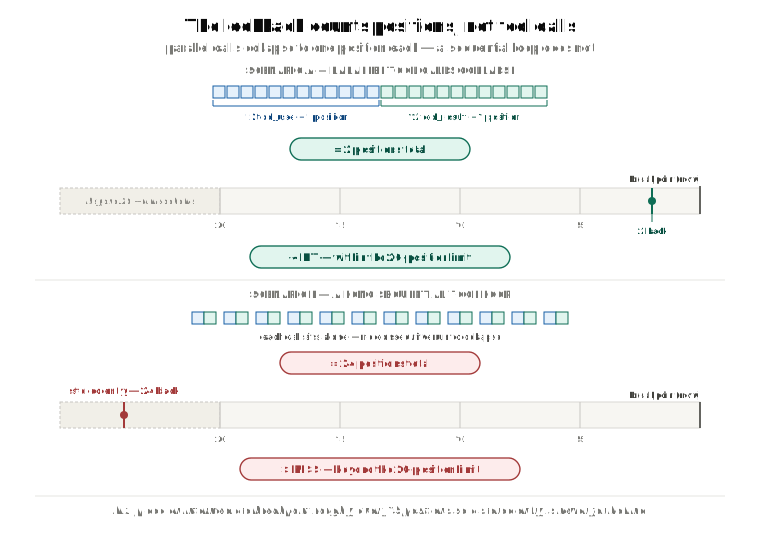
Notice what does not matter here: how long the conversation is. A chat with 500 turns is fine, as long as each request adds only a few blocks after the last marker. Turn 500 searches back 3 steps, to the entry turn 499 stored. It never needs to reach the start. So shrinking the history helps your window and your bill. It just isn't the fix for this limit.
Shrinking the history without breaking the cache
Still, the bot's chat can't grow forever. Sooner or later it runs out of room in the context window, and the history has to shrink. An earlier post, What Fills Your Context Window?, showed two ways to do that. They look alike. For caching, they are very different.
Sliding-window trim drops the oldest message on every turn:
Turn 10:  [tools + system] [m1] [m2] [m3] ... [m20]
Turn 11:  [tools + system] [m2] [m3] [m4] ... [m21]
                            ↑ this spot held m1 last turn
The first message after the system prompt is different on every turn. So the prefix changes right there, every turn. The history part of the cache misses on every request. Only marker A's entry, tools plus system, still hits.
Batch summarization leaves the history alone until it reaches a size you choose. Then it folds all those old turns into one summary, in one go:
Turns 1–20:   [tools + system] [m1] ... [m20]               ← only grows: hits every turn
Turn 21:      [tools + system] [SUMMARY] [m21]               ← one miss, here
Turns 22–40:  [tools + system] [SUMMARY] [m21] ... [m40]     ← only grows: hits again
Between folds, the conversation only grows at the end. So every request reads the history from the cache. The prefix changes only on the turn the summary is written. Even on that turn, marker A's entry still hits.
After the fold, put another marker right at the end of the summary. The summary won't change until the next fold, so that entry keeps getting read.
What happens at the second fold? At turn 41 the history is big again, so you summarize m21 to m40. You can do that in two ways:
Option A, stack:      [tools + system] [S1] [S2] [m41]
                                             ↑ first change
Option B, merge all:  [tools + system] [S] [m41]
                                       ↑ first change
- Option A writes a second summary, S2, and leaves S1 exactly as it was. S1 hasn't changed by a single byte, so everything up to S1 still hits. Only S2 and what follows are new.
- Option B folds S1 and m21 to m40 into one new summary, S. S is new text, so the history misses from S onwards. Only tools and system still hit. It does use less of the window.
A good habit is to stack (option A), and move the summary marker to the end of the newest summary. When the stack of summaries gets long itself, merge it into one. You take one bigger miss once in a while, instead of one on every fold.
So a sliding window breaks the history cache on every turn. Batch summarization breaks it once every N turns, where N is how many turns you fold at a time. If you need to shrink a chat and you care about caching, summarize in batches.
One last detail. Writing the summary is a separate request to the model. Build it from the same system, tools, and model as the chat, copied exactly. Then it starts with the same prefix as the chat, so it can read the chat's cache too. If it rebuilds any of those three with even one small difference, it misses the chat's cache and starts from nothing. A different key order or a slightly different string is enough.
Putting it together: four markers in a long RAG chat
By now the bot's chat is long and summarized in batches. You get four markers per request, and this layout uses all of them. Marker 1 is marker A from earlier, and marker 3 is marker B.
| Marker | Where | Why |
|---|---|---|
| 1 | End of tools + system | Never changes. Still hits when the history changes. |
| 2 | End of the newest summary | Changes only on a fold. Between folds, it is the stable base for the history. |
| 3 | End of the previous turn, moved forward each turn | Caches the conversation so far. Each request finds the previous entry a few steps back. |
| 4 | Spare | The end of the turn before that, as a safety margin. Or a mid-way marker in a huge message. |
Two rules go with it:
- Never put a marker after this turn's chunks or this turn's question. Nothing after marker 3 is sent again.
- Don't turn on automatic caching here. It would mark the last block, which is the chunks.
One catch: the timer. Marker 3 only works if the previous turn's entry is still alive. Say the customer goes quiet for more than 5 minutes, on the default TTL. By the time they reply, that entry has expired. The next request misses the history, wherever the markers are.
You can't keep the history cached through a long pause like that, but you can keep the base. Put marker 1 on the 1-hour TTL by adding "ttl": "1h" to its cache_control field. Then at least tools and system stay cached across those gaps. Mixing the two TTLs is allowed. On the Claude API, an entry with a longer TTL must come earlier in the prompt than one with a shorter TTL, and marker 1 comes first.
Recap
- In a conversation, the end of the prompt moves every turn. One question decides where a moving marker goes: will the next request send this block again, unchanged?
- In a plain chat or an agent loop, the answer is yes for the newest block, so automatic caching works well there. Pair it with an explicit marker on tools plus system.
- In a RAG chat that uses chunks once, the moving marker goes on the end of the previous turn. Never put a marker after this turn's chunks.
- A moving marker writes only the newest turn, not the whole history. You pay the write price on everything only when a read fails.
- On the Claude API, each marker looks back only 20 positions for a stored entry, on its own, and the server uses the longest match any marker found. If the moving marker's search fails, marker A still hits, and only the part after it is written again.
- Move the moving marker forward on every request, tool results included, and the limit never bites. Conversation length doesn't matter.
- To shrink a long chat, summarize in batches and stack the summaries. A sliding window breaks the history cache on every turn. A batch summary breaks it once every N turns.
- A quiet gap longer than the TTL loses the history entry. A 1-hour marker on tools plus system keeps the base cached through it.
Next up: everything here assumes the cache hits when it should. Why Isn't Your Prompt Cache Hitting? covers what to do when it doesn't:
- the misses that aren't bugs,
- the ordering mistakes that are,
- and how to catch a broken cache before your bill does.