What Fills Your Context Window, and Why Does the Answer Run Out of Room?
A context window is not just the text you send. Tool schemas, images, thinking tokens and cached prefixes all sit in it — and the answer has to fit in whatever is left. What counts, why there are two limits and not one, what max_tokens really does, how a cut-off answer comes back as a normal 200, and how to plan the space so it doesn’t.
Every language model has a limit on how much it can read and write in a single request. That limit is called the context window, and the number itself is public — 200,000 tokens for one model, 1,000,000 for another.
You have probably already run into this limit without knowing it. A chatbot that answers well early in a conversation, then gets vaguer or stops mid-sentence twenty turns later, even though your questions didn't change. Or a reply that looks fine, until the code that reads it crashes. Both have the same cause: the window was fuller than anyone realised, and the answer ran out of room.
This post builds the idea up one step at a time:
- What the window is. One space. Your question and the model's answer both have to fit inside it.
- How it fills up. The model forgets everything after each reply, so your code sends the whole conversation again every time. That pile keeps growing.
- What's in it that you didn't count. Tool definitions, images and a few other things take up space too, even though you never typed them.
- The second limit. Even with plenty of space left, there is a separate cap on how long one answer can be.
- What happens when it runs out. Sometimes you get an error. Sometimes you get a normal-looking reply that has quietly been cut short.
At the end, how to plan the space before you need it, instead of fixing things after it's already full. Here's the picture. You don't need to understand it yet.
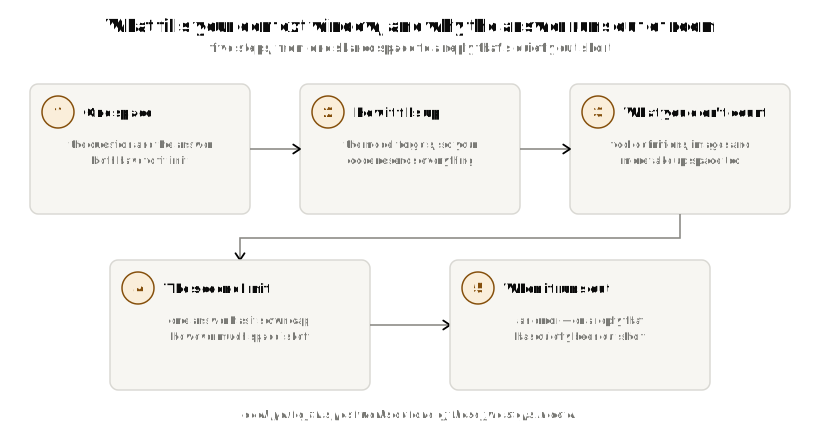
The window is one space, and the answer has to fit in it
First, a word you'll see everywhere: token. A model doesn't read letters or whole words. It reads tokens. A token is a small piece of text — a short word, part of a long word, or a punctuation mark. Every limit in this post is counted in tokens. Different models split the same text into slightly different tokens, and that will matter later.
A context window is the most tokens a model can handle in one request. It covers both what you send in and what the model writes back, added together. There is no separate space for the reply. The question and the answer share the same space.
Say a model's window is 20,000 tokens, and you want an answer of 3,000 tokens. You can't send 20,000 tokens of input. You can only send 17,000.
window:  20,000
input:   17,000
output:   3,000
Those last 3,000 tokens have to be left empty on purpose. If your input fills the whole window, the model has nowhere left to write.
The model writes its answer in the same space you put your question. Fill the space with your question, and there's no room left for the answer.
That's the whole idea. It's simple. Everything that goes wrong comes from the space being fuller than you think it is. The rest of this post is about why that happens.
The space starts empty every time — and you are the one filling it
Think back to the chatbot from the introduction. On turn 3, everything fits. By turn 40, the answers are getting cut off. You never pasted in anything big. So where did all the extra tokens come from?
Here's the key fact: the model forgets everything after each reply. LLM has no memory between calls. There is no session, no saved history on the server, nothing linking your 40th request to your 39th. If you want the model to remember the conversation, your code has to send the whole conversation again, from the start, every single time.
Turn 1 input:  [system][tools][user 1]
               → output: [reply 1]

Turn 2 input:  [system][tools][user 1][reply 1][user 2]
               → output: [reply 2]

Turn 3 input:  [system][tools][user 1][reply 1][user 2][reply 2][user 3]
               → output: [reply 3]

                                    ↑ grows every turn, forever
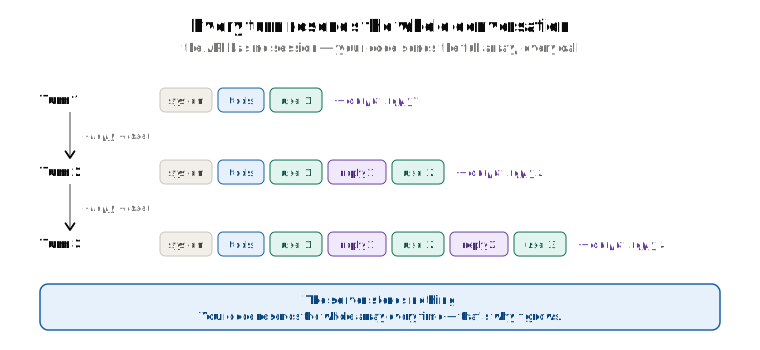
The window filling up over a long conversation isn't something happening to you. It's something your code is doing, one message at a time.
Nobody chose this to be annoying. It's just what "no memory" means. The server keeps nothing, so the only way it can see turn 1 again is if you send turn 1 again, along with everything after it. The space didn't get smaller between turn 3 and turn 40. The pile you put in it got bigger.
What the request looks like
A request has three parts. Your tools (things the model is allowed to call — more on those soon), your system prompt (the standing instructions, like "you are a support assistant"), and your messages (the conversation so far).
One detail about system: it's its own field at the top of the request. It is not a message inside the messages list. There's no {"role": "system", ...} entry there. The only roles inside messages are user and assistant.
That's how you send it. The model sees something different. Before the model reads anything, all three parts get joined into one long line of tokens, with small marker tokens showing where one part ends and the next begins. The model has no special "instructions channel". A system prompt is just text after a certain marker, and the model learned during training to treat text after that marker as instructions.
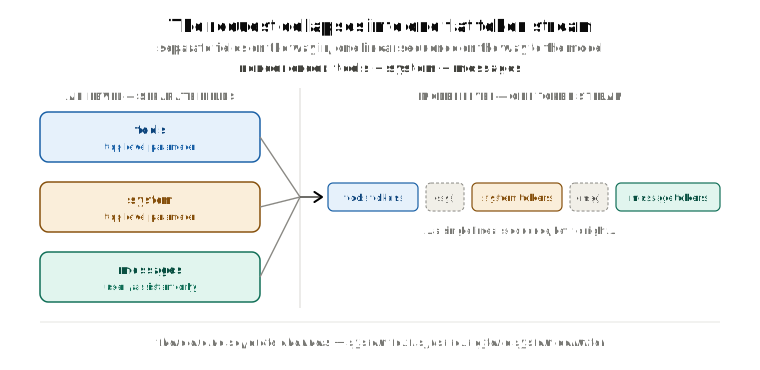
The order is always the same: tools first, then system, then messages. It doesn't matter what order you write them in your code. This is worth remembering — the next post in this series, about caching, depends on it.
Where do retrieved documents go?
Many apps look up a few relevant documents (or pieces of documents, called "chunks") and give them to the model along with the user's question. If you use LangChain, you'll notice it has SystemMessage, HumanMessage, AIMessage, and ToolMessage — but nothing called RetrievedContext. That's because retrieved chunks aren't a message type. They're just text you put inside one of the normal messages.
The usual pattern:
prompt = ChatPromptTemplate.from_messages([
    ("system", SYSTEM_PROMPT),
    MessagesPlaceholder("history"),
    ("human", "Context:\n{context}\n\nQuestion: {question}"),
])
The chunks go in the human message, right next to the question they're supposed to help with. A common mistake is to put them in the system message instead — it feels right, because they're "context". But the system message should stay the same for the whole conversation, and the retrieved chunks change with every question. Put them in the system message and the system message changes every call. Keep them in the human message and the system message stays the same.
One small note for later: to cache a LangChain SystemMessage, its content has to be a list of blocks with a cache_control field, not a plain string. The next post explains what that field does.
What actually counts as input
So far the space holds three things: the system prompt, the conversation, and the reply. That's what most people count. It's not everything.
Say you add it up like this:
system prompt:      2,000 tokens
chat history:       5,000 tokens
retrieved chunks:   4,000 tokens
user message:         500 tokens
──────────────────────────────
total (you think):  11,500 tokens
Now say your app also gives the model twelve tools it can call — a "search the database" tool, a "send email" tool, and so on. Each tool comes with a description in JSON: its name, what inputs it takes, and what type each input is. Those descriptions go into the request too, at the front, as the last section showed. Twelve of them can easily add up to 3,000 to 5,000 tokens. They're in every single request, whether or not the model ever uses one. So your real total is closer to 16,000, not 11,500.
That's the tool trap. Tool descriptions take up space like any other tokens, and they're the easiest thing to forget when counting by hand, because nobody typed them.
Once you know to look, here's the full list of what counts as input:
| What | Easy to forget? |
|---|---|
| System prompt | No |
| Every message in the conversation | No |
| Tool definitions (JSON schemas) | Yes |
| Tool results | Yes |
| Images and documents | Yes |
| Structured-output schemas | Yes |
| Cached prefixes | Yes — caching doesn't shrink this |
| Message formatting tokens | Minor, but real |
| Thinking tokens | Yes — will discuss soon |
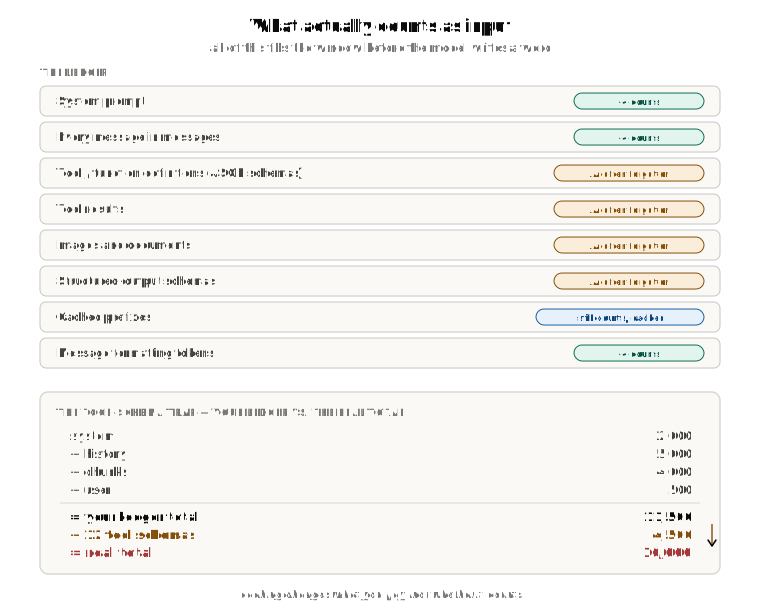
The "cached prefixes" row deserves a closer look, because it's the opposite of what most people expect. Caching changes what you pay for a token. It never changes whether the token counts. A cached part of your prompt still takes up its full size in the window. The server just skips some work on it and charges you less. If you think "the system prompt and tools are cached, so they don't count," that's wrong. They count exactly the same as if they weren't cached. Only the price is different.
There are two limits, not one
The space has one size. But there's a second limit inside it: a separate cap on how long a single answer can be, no matter how much of the space is still empty.
Every model has two numbers, and they're different:
| Limit | What it caps |
|---|---|
| Context window | Total capacity — input and output combined |
| Max output tokens | How much the model can generate in one response, on its own |
The room you actually have for an answer is whichever of these is smaller:
usable_generation = min(context_window − input_tokens, model_max_output)
Real numbers make the trap obvious.
Claude Opus 5 has a context window of 1,000,000 tokens and a max output of 128,000 tokens. Say you send it 11,500 tokens of input:
window:            1,000,000
input:                 11,500
free space:           988,500   ← looks like the output budget
max output:           128,000   ← is the actual ceiling
988,500 tokens of the window are empty. But the answer still can't be longer than 128,000 tokens. The max-output cap is a fixed number for the model. It does not grow just because there's more empty space.
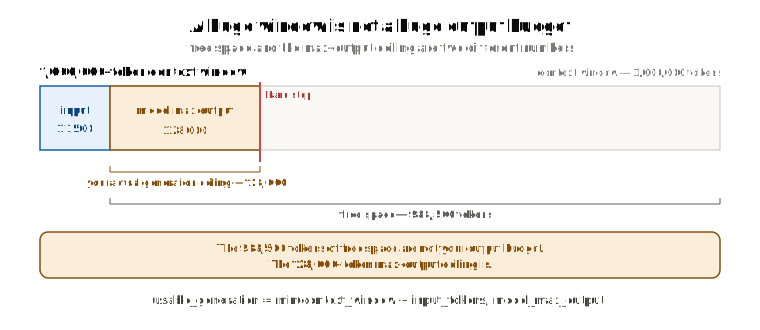
Don't hard-code either number. They're different for every model, and they can change. Ask the API instead: client.models.retrieve(id) or client.models.list(). Since March 2026, every model it returns has two fields: max_input_tokens (the context window) and max_tokens (the model's output cap). There's no field called context_window — max_input_tokens is the one you want.
Two different things are called max_tokens
This is where people get lost, so let's slow down. There are two settings with the exact same name, and they mean different things:
| Where it lives | What it means | Who sets it |
|---|---|---|
On the model, returned by client.models.retrieve() | The most output this model can ever produce in one reply | Anthropic |
In your request, the max_tokens=... you pass | The most output you are willing to accept for this one call | You |
The model's number is fixed. You can read it, but you can't change it. Your request's number is up to you, and you set it on every call.
Here's how they fit together, with Claude Opus 5 again:
model's max_tokens:      128,000   ← the most it can ever write
your request max_tokens:   4,000   ← the most you asked for this time
                          ─────
answer stops at:           4,000   ← the smaller one wins
The model's cap is the ceiling of the building. Your request's cap is how high you chose to go on this call. You never get more than the smaller of the two.
From here on, max_tokens means the one in your request — the one you set. That's the one that causes trouble, because it doesn't do what most people think.
What people think max_tokens does, and what it actually does
Most people read max_tokens as a target — "give me an answer of about this length." It isn't. To see what it really is, follow one answer from start to finish.
The model writes one token at a time
The model doesn't plan a whole answer and then hand it over. It writes one token, then the next, then the next, like someone talking rather than someone writing an essay to a word count. At any moment, it only knows what it has written so far. It has no idea how long the finished answer will be.
The server counts, not the model
Between you and the model sits a server. Every token the model writes passes through that server on its way to you, and the server counts them: 1, 2, 3, ... That count is where max_tokens lives. The model isn't counting anything. The server is.
At the limit, the server stops the model
When the count reaches max_tokens, the server tells the model to stop. Right there. Not at the end of the sentence, not at the end of the JSON object — at that exact token. Whatever the model was in the middle of saying stays unfinished.
To make it concrete, pretend each word is one token and set max_tokens = 8:
what the model was going to write:
  "The capital of France is Paris, and its population is about two million."

what you actually get (8 tokens):
  "The capital of France is Paris, and its"
Tokens 9 onward were never written. There is no hidden full answer that got trimmed. The model was stopped mid-sentence and that's all there is.
Why the model doesn't plan around it
Here's the part that surprises people. Why doesn't the model just write a shorter answer when it knows the limit is 8?
Because it doesn't know. The model only ever sees the text in its window — the tools, the system prompt, and the messages. max_tokens isn't in that text. It's a setting on your request that the server reads. From the model's side, there is no limit. It writes as if it has all the room in the world, and then it gets cut off.
That's also why the fix is in the prompt. If you want a short answer, say so in the prompt — "answer in one sentence." The prompt is text, and the model reads text. max_tokens is a number the model never sees.
The prompt is the only thing that talks to the model.
max_tokenstalks to the server.
Three things that follow
Once you see it this way, three facts fall out:
- It's a cut-off, not a length control. The model doesn't aim for it. The server enforces it after the fact.
- It can't be exceeded. The model doesn't write extra and have it trimmed. Token number
max_tokens + 1simply never gets written. - It reserves nothing. Setting
max_tokens=8000doesn't set aside 8,000 tokens of anything. If the answer is 400 tokens long, you pay for 400 — the other 7,600 were never used and never charged.
Why setting it too low costs more than setting it too high
The natural instinct is to set max_tokens small, to keep the bill small. But that backfires. Here's a worked example.
The setup. One request. Your input is 12,000 tokens (system prompt, conversation, documents — everything from the "what counts" list). The correct answer happens to need 1,500 tokens. You don't know that number in advance; you only find out by asking.
Attempt 1 — you set max_tokens = 1,024. The model starts writing. The server counts. At token 1,024 the server stops it — but the answer needed 1,500, so it's cut off mid-sentence. You pay for: 12,000 input tokens + 1,024 output tokens. But what you got is unusable.
Attempt 2 — you try again with max_tokens = 4,096. Same input, sent again: another 12,000 input tokens. This time the model finishes at 1,500 tokens on its own, well under the limit. You pay for 1,500 output tokens, not 4,096 — remember, an unused limit costs nothing. Now you have the answer.
Attempt 1 — max_tokens = 1,024
  pay:  12,000 input + 1,024 output
  get:  the answer cut off mid-sentence — unusable
──────────────────────────────────────
wasted:         12,000 input + 1,024 output

Attempt 2 — max_tokens = 4,096
  pay:  12,000 input + 1,500 output
  get:  the correct, complete answer

──────────────────────────────────────
if done right:  12,000 input + 1,500 output
What it cost you. The 1,024 wasted output tokens are the part you notice. The 12,000 wasted input tokens are the real cost: you paid to send the same input twice, because the first try was cut off before it could finish. In most apps the input is ten times bigger than the output, or more. So the money went on resending the input — and your max_tokens setting never had any effect on that number, on either attempt.
| Cost | |
|---|---|
Setting max_tokens too low | A wasted call, in full, every time the model needed more room |
Setting max_tokens too high | Nothing. It's a ceiling. An unused ceiling costs nothing. |
If Attempt 1 had used 4,096 from the start, the total would have been 12,000 input and 1,500 output, and nothing wasted.
So why does max_tokens exist at all?
Fair question. If setting it too low causes trouble and setting it high costs nothing, why have it? Two reasons, and they change how you should think about it.
You can't leave it out. max_tokens is a required field on every request. So the question was never "should I set it" — it's "what should I set it to."
It's a circuit breaker, not a length control. The model can't see the limit, and that's the point: the limit is there for when the model goes wrong. A prompt that accidentally makes it repeat itself forever. A user who asks it to "list every number from 1 to a million." A bug in your code that sends a 500-page document without the word "briefly." Without a cap, any of those could run all the way to the model's own maximum — 128,000 tokens on Opus 5. At $25 per million output tokens, that's about $3.20 for one call, plus the minutes you'd wait for it. max_tokens is the most you're willing to pay and wait for if something goes wrong.
Think of it like the spending limit on a card. You don't set it to what you plan to spend today. You set it to the most you'd ever accept.
That also explains why "too high costs nothing" is only about the bill. There are two other things it touches:
- Waiting time. A big
max_tokenson a normal (non-streaming) request tells the server "this might take a while," and a very long answer can run past the HTTP timeout. That's why the SDKs require streaming for very large values. Without streaming, around 16,000 is a sensible ceiling. With streaming, 64,000 or more is fine. - The window.
input + max_tokensstill has to fit inside the context window — the maths from the start of this post. Set it to 128,000 on a request that already has 950,000 tokens of input, and you're back in the quiet cut-off case from the "when it runs out" section below.
And it has a couple of small jobs of its own. For a yes/no classifier, you'd set it to something like 256 on purpose — a longer answer means the model misunderstood, and you want the hard stop. And max_tokens: 0 is the trick for warming a cache: send the prompt, generate nothing, pay for no output.
Put together, the rule is:
Set
max_tokensto the worst case you're willing to pay for, not the answer you expect. Well above your realistic longest answer, belowwindow − input, and use streaming if it's large. Control the length itself with the prompt.
Treat it as "at what point has this clearly gone wrong?" and it stops causing problems.
Thinking tokens: a hidden cost inside your answer limit
The table of what counts as input left one row for later. Some requests turn on extended thinking: the model reasons privately first, then writes the visible answer. That private reasoning is made of real tokens too, and they count against three things at once:
| Budget | What happens |
|---|---|
| The context window | Thinking tokens occupy window space like any other token |
Your max_tokens | Thinking is a subset of it — it shares the same ceiling as the visible answer |
| Billing | Charged as output when generated; charged again as input on a later turn, on models that keep the block in history |
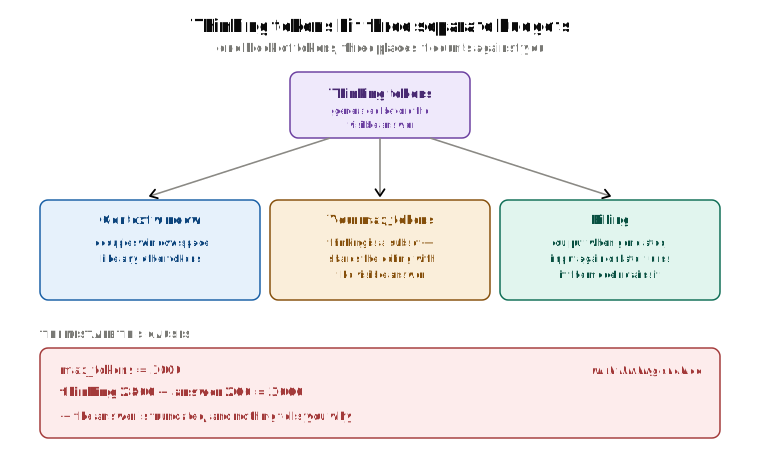
The middle row is the painful one. Say you set max_tokens=3000 with thinking on, expecting a 3,000-token answer:
max_tokens = 3000  # with thinking enabled

# what you assumed:  3,000 tokens of visible answer
# what you get:      thinking (2,800) + answer (200) = 3,000
#                     → a 200-token answer, truncated, no visible sign why
The answer wasn't cut short for any special reason. It was cut for the usual reason: the limit was hit. The thinking just used up most of the limit before the answer got started. The server's counter from the last section doesn't know the difference between thinking and answering. It only counts.
The settings, one at a time
There are three settings involved, and one of them only applies to older models. Here they are in order.
1. Turning thinking on. On current Claude models, you switch thinking on with one setting:
thinking={"type": "adaptive"}
"Adaptive" means the model decides for itself how much to think on each request — a little for an easy question, more for a hard one.
2. How hard it thinks. You don't set a number of tokens. You set an effort level, from low to max, and it goes inside output_config:
output_config={"effort": "high"} # low | medium | high | xhigh | max
Higher effort means more thinking tokens, which means more of your max_tokens used before the visible answer starts — exactly the problem from the example above.
3. The old way: budget_tokens. Before effort existed, you set a fixed number of thinking tokens, like this: thinking={"type": "enabled", "budget_tokens": 4000}. That setting still exists, but only for older models, and it has three rules there: it's required, it must be a smaller number than max_tokens, and it can't be below 1,024.
Which one you use depends on the model:
| Model | Use | What happens if you send budget_tokens |
|---|---|---|
| Opus 5, Opus 4.8, Opus 4.7, Sonnet 5, the Fable 5 models | adaptive + effort | A 400 error |
| Opus 4.6, Sonnet 4.6 | adaptive + effort | It works, but it's deprecated |
| Haiku 4.5 and older | enabled + budget_tokens | It's required |
4. Whether you get to see the thinking. One more setting, thinking.display, decides whether the reasoning is shown to you:
thinking={"type": "adaptive", "display": "summarized"}
On current models the default is "omitted", which means the thinking block comes back with empty text. Set it to "summarized" to get a readable summary.
This one is easy to misread, so to be clear: display changes what you see, not what happens. The thinking still happens, still takes up window space, still uses your max_tokens, and is still billed — exactly the same under both settings. It only decides whether the tokens you've already paid for show you anything.
If the model forgets everything, how is a thinking block "kept"?
The billing row said thinking is charged again as input on later turns, "on models that keep the block in history." But earlier we said the server keeps nothing. Both are true. The answer is that you already have the block.
response.content isn't a plain string. It's a list of blocks, and one of them can be a thinking block:
{
  "role": "assistant",
  "content": [
    {
      "type": "thinking",
      "thinking": "internal reasoning text",
      "signature": "EqQBCgIYAhIM..."
    },
    {
      "type": "text",
      "text": "the visible answer"
    }
  ]
}
You add that whole assistant message — every block, unchanged — back into messages, and send it on the next call. "Keeping" a thinking block just means you didn't delete it from the list before resending. It's the same resend-everything rule as every other message.
So what does "the API strips thinking blocks on some models" mean? Not that the server remembered something. It means the server edits the request you just sent, before the model reads it. On models that keep thinking by default (Opus 4.5 and later, Sonnet 4.6 and later, and the Fable and Mythos 5 models), the thinking block you send back stays in, and you pay for it as input on every later turn it's still there. On older Opus and Sonnet models, and every Haiku model up to 4.5, the server removes old thinking blocks from the list before the model sees them. It never stored anything. It just filtered what you sent.
One case where you have no choice: in the middle of a tool call, the thinking block must be sent back along with the tool result. It carries a signature, so it can't be edited, and leaving it out breaks the tool call.
What happens when it runs out
Everything so far has been about the space being fuller than it looks. Now, what actually happens when the answer doesn't fit in what's left. There are two very different outcomes, and they don't look alike.
-
If the input alone is bigger than the window, you get a loud failure: a
400 invalid_request_errorbefore the model writes anything, on every model. You can't miss it. -
If the input fits, the request is accepted and the model starts writing. The server only checks the input. It doesn't check whether the answer will fit in what's left. Cause server doesn't know how long the answer will be. So one of two things happens next:
- The answer finishes inside the space that's left. The call works, even if it was close.
- The answer needs more space than what's left. The model writes until it hits the wall, then stops mid-sentence. You still get a 200. Nothing about the response says anything went wrong.
Numbers make it concrete. Say the window is 20,000 tokens and your input is 18,000. That fits, so the request goes through. There are 2,000 tokens of space left for the answer.
window:          20,000
input:           18,000   ← fits, so the request is accepted
space left:       2,000

answer needs 1,500  → fits in the 2,000 → complete answer, 200
answer needs 3,000  → hits the wall at 2,000 → cut off mid-sentence, still 200
Both calls return a 200. Only one of them has a complete answer in it.
The rule of thumb: if the input can't fit, you get a loud error. If the input fits but the answer doesn't, you get a quiet stop.
The rest of this section is about the quiet one, because that's the one that reaches production.
A 200 does not mean the answer is complete
Here's what the quiet case looks like. Your request comes back with HTTP status 200. The body is valid JSON. You take the model's text out of it, and it's supposed to be JSON too. You run json.loads() on it — and it crashes. The model's answer stopped halfway through an object: a field cut in half, a closing brace that never came. Nothing in the response said anything went wrong. The request succeeded. The answer just didn't fit.
A 200 only tells you the request was received and handled. It says nothing about whether the model finished its sentence. An answer that was cut off halfway is still a 200 — a perfectly good envelope around a broken letter. If you take .text and hand it straight to json.loads(), you won't notice until something crashes.
The field that actually tells you what happened is stop_reason. Every successful response has one:
stop_reason | Meaning |
|---|---|
end_turn | Finished naturally |
max_tokens | Hit the cap you set |
model_context_window_exceeded | Hit the model's window itself — the room ran out, not your cap |
stop_sequence | Hit one of your stop_sequences |
tool_use | The model wants a tool run |
pause_turn | A long-running turn paused; it's resumable |
refusal | Declined by a safety classifier |
Two of those rows are the two limits from earlier, each with its own value. max_tokens means your own limit was hit — the one you set. model_context_window_exceeded (on Claude 4.5 and later) means the quiet case really happened: the input fit, the answer didn't, and the window itself ran out. They need different fixes. For the first, raise the cap. For the second, shrink the input.
Check it before you do anything else with the response:
resp = client.messages.create(...)

if resp.stop_reason == "max_tokens":
    # TRUNCATED — do not treat this as a complete answer
    # retry with a higher max_tokens, or ask the model to continue
    handle_truncation(resp)

elif resp.stop_reason == "model_context_window_exceeded":
    # TRUNCATED, but raising max_tokens won't help — the window is full
    # compact or trim the conversation, then retry
    handle_overflow(resp)

elif resp.stop_reason == "tool_use":
    run_tools(resp)

else:
    deliver(resp)
This is why checking stop_reason isn't optional. It's the only place the quiet case ever shows up.
Three more ways a 200 can hide a problem
stop_details is usually empty. It's only filled in when stop_reason == "refusal". For every other stop reason, including the normal end_turn, it's null. If you read it without checking, you'll eventually get null where you expected an object with type, category and explanation. Check stop_reason first, every time.
A cut-off tool call is worse than a cut-off sentence. If stop_reason == "max_tokens" and the last block is a tool_use, the tool call itself was cut off while being written. Its arguments are a broken piece of JSON, not a shorter-but-valid version of the real call. Look for that exact combination, and retry with more room. Never run it. A truncated tool call isn't a simpler tool call. It's a broken one.
Server-side tools don't raise errors. Web search and web fetch, when they fail, still come back as a normal 200. The difference is inside the result block: content holds a single error object (like {error_code: "max_uses_exceeded"}) instead of the list of results you expected. On success, content is a list. On failure, it's an object. Check which one you got before you index into it. Same habit as stop_reason. A 200 on its own never proves the thing inside it worked.
Planning the space on purpose
Everything so far has been about understanding the window. This section is about deciding, ahead of time, how to use it. The alternative — cutting things only when you're about to run out — gives you worse results and less predictable ones.
Start by counting, not guessing
Every number in this post so far assumed you know how big your input is. In practice, guessing it is where a lot of this quietly goes wrong.
The usual shortcuts — len(text) / 4, or the tiktoken library — don't work for Claude. tiktoken is OpenAI's tokenizer. It was built for a different vocabulary, and it undercounts Claude's real token count by about 15 to 20% on normal text, and by a lot more on code. A plan built on that number is already wrong before the first request.
The fix is to count with the model you're actually using: client.messages.count_tokens(...) returns .input_tokens for the exact payload you're about to send. Pass the same model ID you'll use for the real request, because different models count differently. The endpoint has no memory, so to see how much a change adds, count before and after and subtract.
Even with a real count, keep a 5 to 10% safety margin on top. Counting removes the guesswork, but not every source of drift, and a margin is cheaper than a retry.
Fixed budgets beat last-minute trimming
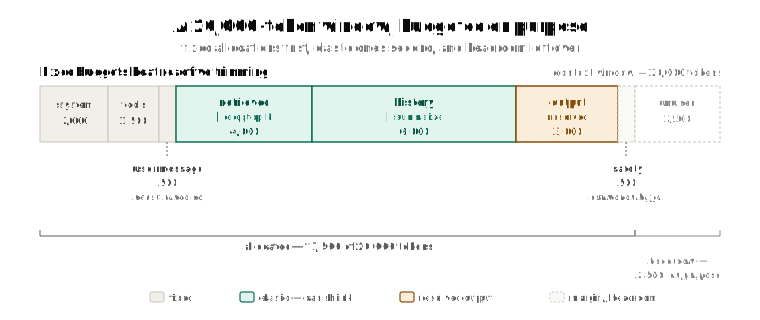
Last-minute trimming — cut something once you're about to overflow — makes your app behave differently depending on how big the retrieved documents happened to be that turn. The better way is to give each part a budget up front, before you know how big any of them will be:
BUDGET = {
    "system":    2_000,   # fixed
    "tools":     1_500,   # fixed
    "user_msg":    500,   # fixed — never truncate
    "retrieved": 4_000,   # elastic — drop lowest-ranked chunks
    "history":   6_000,   # elastic — summarize
    "output":    3_000,   # reserved
    "safety":      500,   # margin for estimation error
}
# total: 17,500 of a 20,000 window — deliberately under
The total is deliberately less than the window. That gap is the safety margin from the counting step above, planned on purpose instead of discovered by accident.
What to shrink first
Not every part can shrink, and the ones that can aren't equally cheap to shrink.
| Component | Elastic? | How to shrink it |
|---|---|---|
| System prompt | No | — |
| Tool definitions | No | Fewer tools, if truly desperate |
| Current user message | No — never truncate | — |
| Retrieved chunks | Yes | Lower top-k, or rerank down to fewer |
| Chat history | Yes | Summarize in batches |
The common mistake is to treat chat history as the only thing that can shrink. In a typical app, the retrieved documents are often the second-biggest part. Sending 4 chunks instead of 8, or picking the best 3 with a reranker, is often a better trade than a lossy summary of the conversation. Shrink retrieval before you shrink history.
Trim or summarize?
When history does need to shrink, there are two ways to do it, and they behave differently.
Sliding-window trim drops the oldest message every turn:
Turn 10:  [system][tools][m1][m2][m3] ... [m20]
Turn 11:  [system][tools][m2][m3][m4] ... [m21]
                          ↑ m2 now sits where m1 used to
Every message moved one position. Nothing stays the same from one turn to the next.
Batch summarization lets history grow untouched, then folds many turns into one summary once it hits a threshold:
Turns 1–20:   [system][tools][m1]...[m20][m21]   ← stable prefix
Turn 21:      [system][tools][SUMMARY]           ← one change, here
Turns 22–40:  [system][tools][SUMMARY][m22]...   ← stable again
Why this matters is a story for a later post in this series, in its section on shrinking the history: a start of the request that stays the same is what makes caching work at all. For now, the simple version: one of these changes something on every turn, and the other changes something once every N turns.
There's also a server-side option that's related but different, and the two are easy to mix up. Compaction summarizes older context for you, on the server, as the conversation gets close to a default trigger of 150,000 tokens. You opt in with context_management: {edits: [{"type": "compact_20260112"}]}. One thing you must do: add the full response.content back into messages every turn, or the compacted state is silently lost. Context editing is something else. It deletes chosen content — old tool uses, old thinking blocks — instead of summarizing it, using strategies like clear_tool_uses_20250919 and clear_thinking_20251015. Compaction keeps the information in a shorter form. Context editing throws it away. Don't pick one when you mean the other.
Leave room even when you have room
There's a reason to stay well under the limit even when nothing forces you to. As you put more text into a request, the model gets worse at using it — it misses things and gets details wrong more often. This pattern is common enough to have a name: context rot. A 1,000,000-token window is the most that fits. It's not a target.
Plan your budget well below the hard limit. "We have a million tokens, so let's send forty retrieved chunks" is how answer quality quietly gets worse.
Choosing what goes in the window matters as much as how much of it you use.
Recap
- A context window is one space shared by the question and the answer. Fill it with input, and there's no room left to write back.
- The model forgets everything after each reply. Your code resends the whole conversation every turn, so the space fills up one message at a time. The request is joined into one line of tokens: tools, then system, then messages.
- Lots of things you didn't type count as input: tool definitions, tool results, images, output schemas, thinking tokens and cached text. Caching changes the price, never the count.
- Every model has two limits: the context window, and a separate cap on one answer. Empty space in the window is not extra room to write.
max_tokensis a cut-off the server enforces and the model never sees. It's a circuit breaker, not a length control: set it to the worst case you'd accept, not the answer you expect. Too low wastes the whole call, input included; too high costs nothing on the bill, but keep it underwindow − inputand stream if it's large. Task budgets are the setting the model can see.- Thinking tokens take up window space, share your
max_tokenswith the visible answer, and only come back next turn because you resent them. - Input alone over the window is a loud
400. Input that fits but an answer that doesn't is a quiet200— andstop_reasonis the only place it shows:max_tokenswhen your cap hit,model_context_window_exceededwhen the window ran out. Checkstop_detailsonly for refusals, and never run a cut-offtool_useblock. - Count tokens with the model's own counting endpoint, never
tiktoken. Then plan the space up front, with fixed and flexible parts, and stay well below the hard limit — a bigger window isn't permission to fill it.
Next up: none of this changed what you pay for a token, only what counts as one. How Does Prompt Caching Actually Cut Your Bill? picks up where the caching note in this post left off — caching changes the price of the tokens in your window, never how much room they take. It's also where input_tokens stops meaning what it sounds like: that field is what's left after caching, not the total.