Why Does a RAG System Cut Your Documents Into Pieces?
Chunking derived from scratch — starting with a working system that has no chunking in it at all, finding the two places it breaks, and following each failure until it forces the design of a real text splitter.
You upload a 300-page PDF to a chatbot, ask about something on page 250, and get back a precise answer with a quote from the right paragraph. It feels like the model sat down and read the whole thing.
It didn't. It never saw most of it.
Somewhere in between, your document was cut into small pieces, and only a handful of them — the ones that looked relevant to your question — were ever put in front of the model. That cutting step is called chunking, and in most projects it gets configured by copying a single line from a tutorial:
splitter = RecursiveCharacterTextSplitter(chunk_size=1000, chunk_overlap=200)
You picked 1000 because the tutorial used 1000. You picked 200 because it looked like a sensible fraction of 1000. It worked well enough, and you moved on.
This post is about the question sitting underneath that line: why does that line need to exist at all? Not how to tune it — but why a system that answers questions about your documents has to chop them up in the first place.
We'll build the answer from the ground up, starting with a version of the system that has no chunking anywhere in it, watching exactly where it breaks, and letting each failure force the next decision. Nothing here is assumed — every piece of the standard design turns out to be something we get pushed into.
By the end you'll know what a chunk actually has to be, why every obvious way of making one fails, and what that line of code is really doing — instead of just knowing that it works.
Let's start before chunking exists.
The starting point: a system with no chunking in it
An LLM knows what was in its training data. It does not know your company's runbooks, your product docs, or the 400-page PDF you uploaded ten minutes ago. Ask it about them and it will either refuse, or invent an answer.
There are two ways to fix that:
- Fine-tune the model on your documents. Expensive, slow, has to be redone every time a document changes, and it still can't cite anything.
- Retrieve the relevant text at question time and paste it into the prompt.
Option 2 is what people mean by RAG — Retrieval-Augmented Generation. The model itself is never touched. You just make sure the right text is sitting in front of it when it answers.
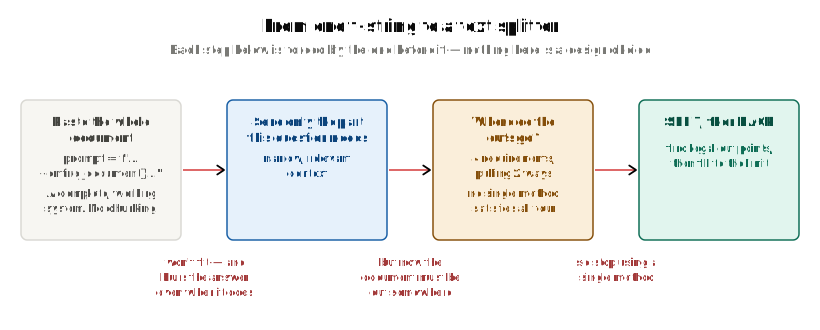
Here's the thing worth noticing: the simplest possible version of option 2 needs no database, no vectors, and no library. It's one f-string:
prompt = f"""Answer the question using only the document below.

{document}

Question: {question}"""

answer = llm(prompt)
That is a complete, working system. The model now "knows" your document. It can quote it. It will tell you when the answer isn't in there. And there is no chunking anywhere in it.
Keep this in mind for the whole post. If this worked at scale, nothing else here would need to exist.
The one sentence that matters
Before we go further, one idea has to be nailed down, because everything later depends on it:
The LLM never touches your files, your database, or your disk. It only ever sees text that was pasted into its prompt.
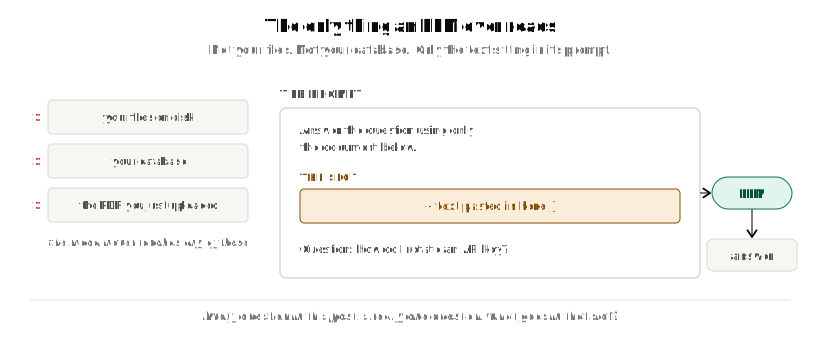
There's no connection between the model and your data. There's a slot in a string, and something has to fill it. Every question in this post is really the same question: what goes in that slot?
Right now, the answer is "the whole document." Let's find out why that stops working.
Why we can't just paste the whole document
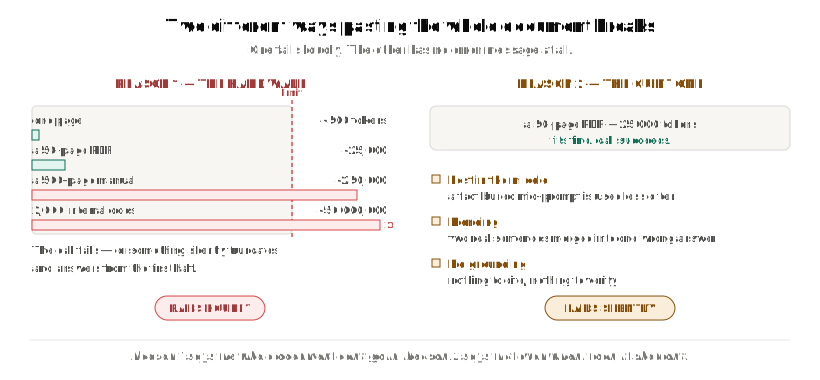
It breaks for two reasons. The first is a hard wall. The second is worse, because it has no error message.
Reason 1 — the context window is a hard wall
Every LLM API call accepts a maximum number of tokens. Your prompt, the conversation history and the generated answer all share that one budget. That ceiling is the context window.
A rough conversion for English text: 1 token ≈ 4 characters ≈ ¾ of a word.
| what you're sending | rough tokens | fits in a 200k window? |
|---|---|---|
| one page | ~500 | yes |
| a 50-page PDF | ~25,000 | yes |
| a 500-page manual | ~250,000 | no |
| 2,000 internal documents | ~50,000,000 | not remotely |
Three consequences fall out of that, in increasing order of importance:
- Go over the limit and the call fails — or worse, something in your chain silently truncates the text and the model answers from the first half of your document without telling you.
- You pay for the whole document on every single question. Cost and latency scale with document size, per call. A one-word question about page 300 costs exactly as much as a hard one, every time you ask it.
- It doesn't scale with your corpus. This is the one that actually kills the idea. The window is a per-call limit, but your knowledge base isn't one document — it's thousands of them. Bigger context windows raise the wall; they never remove it. And corpora grow faster than windows do.
So even the friendliest version of this — one document that happens to fit — falls apart the moment you have a collection instead of a file.
Reason 2 — even when it fits, the answer gets worse
This is the reason people underestimate, because there's nothing to catch. The call succeeds. The answer comes back fluent and confident. It's just wrong more often.
Three separate things go wrong:
Lost in the middle. Models attend most reliably to the beginning and the end of a long prompt. A fact buried in the middle of a 200k-token context is measurably less likely to be used than the exact same fact in a 2k-token context. Filling the window doesn't mean the model reads it evenly.
Blending. This is the failure mode that broad context specifically creates. With an entire manual in the prompt, a lot of passages look partly relevant to the question. The model has no signal telling it which ones are genuinely on topic — so it can take a sentence from the billing section and a sentence from the auth section and merge them into one confident, fluent, wrong answer.
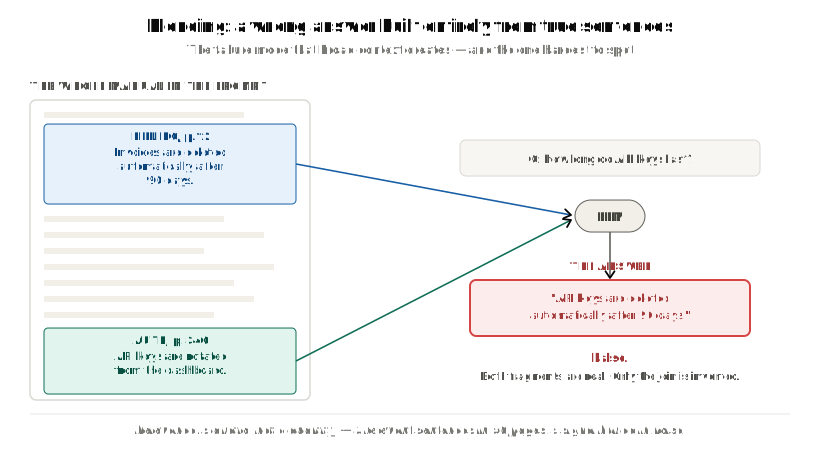
This one is worth naming precisely, because it isn't the hallucination people usually picture:
It isn't invented out of nothing. It's assembled from real sentences in your document that should never have been joined. Which makes it much harder to spot — every fragment checks out. Only the combination is false.
The mechanism behind it is simple. Relevance is a ratio, not a quantity:
3 relevant sentences  in  50 pages of context   ->  signal buried in noise
3 relevant sentences  in  1 paragraph           ->  nothing to confuse
No grounding to point at. If the context was "the whole document," the model can't tell you which part of it the answer came from — and neither can you. Citation and verification both disappear at the same time.
Put together, these two reasons say something that sounds backwards at first:
More context is not better context. Narrow, relevant context beats broad context — even when the broad context fits.
What both reasons demand
Reason 1 says the whole document can't go in. Reason 2 says that even when it can, it shouldn't. Both point at the same replacement:
Send only the part of the document that this specific question needs.
That single sentence creates two new problems that simply did not exist in the f-string version. Everything that follows descends from them:
| the new problem | what it's called |
|---|---|
| the document has to be divided into parts first | chunking |
| we have to pick the right parts per question, without reading them all | retrieval |
How do we find the right part without reading everything?
Let's deal with retrieval briefly, because it's what tells us how big a part is allowed to be.
We can't ask the LLM which parts are relevant — reading everything in order to decide what to read is the original problem all over again. We need a way to compare a question against every part cheaply.
So while we're storing the document, we precompute a numeric summary of each part: an embedding. That's a list of numbers positioning that text in a space where similar meanings sit close together. At question time we embed the question the same way and take the nearest ones. That's arithmetic, not inference — fast and cheap even over millions of parts.
Why the vector has to describe a part, not a document
At this point someone always suggests something reasonable: store one vector per document, find the right document, then paste it. Reason 1 already rules that out — but there's a separate problem worth seeing, because it constrains how big a part is allowed to be.
An embedding is a fixed-size vector — say 1,536 numbers — no matter how much text you feed it. Ten words in, 1,536 numbers out. Ten thousand words in, still 1,536 numbers out.
So if you embed a whole manual covering billing, authentication, deployment and troubleshooting, you get one point that is roughly the average of all four topics. It isn't near "billing." It isn't near "authentication." It's near the blurry centre of a document about nothing in particular.
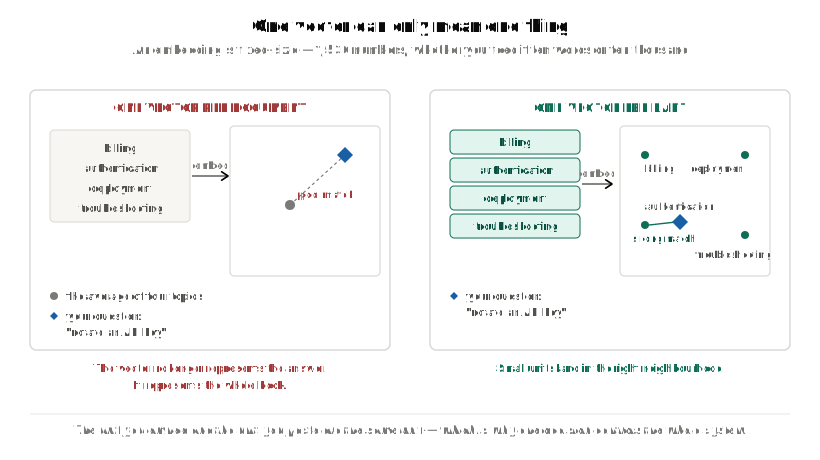
Ask "how do I rotate an API key?" and that big vector matches poorly — not because the answer isn't in the document, but because the vector no longer represents the answer. It represents the whole book.
One vector can only mean one thing. So a part has to be about one thing.
And notice what just happened, because it's the hinge of this entire post: the unit you embed and the unit you paste are the same unit. Making it smaller satisfies Reason 1, Reason 2 and vector precision all at once. That's why one decision — how big a part is, and where it ends — controls the whole system.
The pipeline this gives us
Now the standard RAG diagram is something we've derived rather than copied:
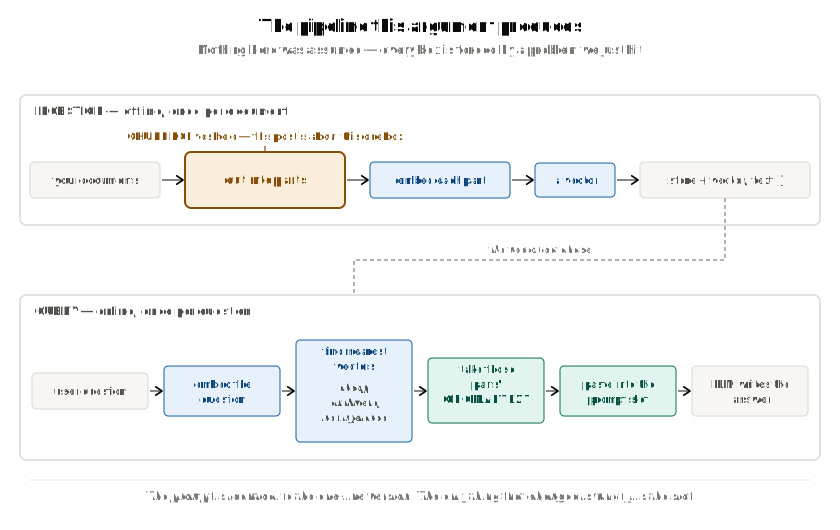
Compare the bottom lane with the f-string from earlier. The prompt is identical. The only thing that changed is what fills the slot.
Note one detail in that diagram that's easy to skim past: at query time we retrieve the vectors, but what we paste is the original text of those parts. The vector is only an address. The text is the payload.
The constraint that comes with it
Here's the part that makes chunking matter so much:
Retrieval can only ever return a whole part. It cannot return half a part, and it cannot assemble one for you.
Which means the quality ceiling of the entire system is fixed at ingestion time, by where the parts begin and end. If the answer to a question straddles two parts, then no re-ranker, no better embedding model and no smarter prompt will put it back together. The information to do so is already gone.
So: where do the cuts go?
We've established we have to store parts. The moment we say "parts," we've created a decision that didn't exist before — where does each part begin and end?
Chunking is that decision. Nothing more than that:
Chunking = choosing where to cut a document into the units you will embed and retrieve.
Each resulting unit is a chunk.
Four things a chunk has to be, all at once
Everything above quietly imposed a requirement. Collected in one place, a chunk has to satisfy four things simultaneously:
| requirement | where it came from | pushes chunks... |
|---|---|---|
| 1. under the size limit | Reason 1: the context window, plus the embedding model's own input cap | smaller |
| 2. about one idea | Reason 2 (blending), and "one vector can only mean one thing" | smaller |
| 3. self-contained — readable alone, no dangling references | the LLM only ever sees the text pasted into the slot | bigger |
| 4. doesn't start or end mid-thought | same, plus "retrieval returns whole parts only" | bigger |
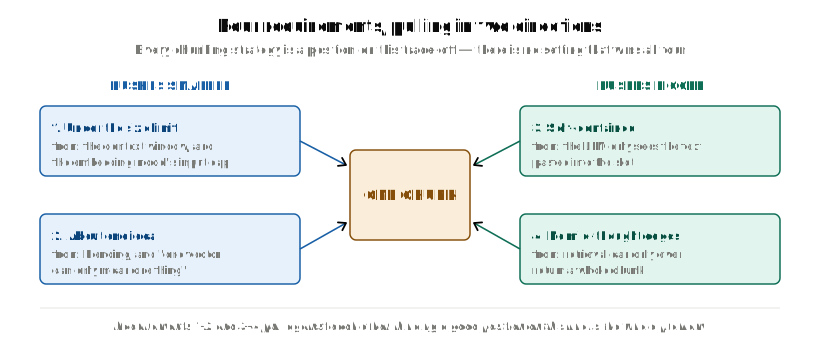
Read the last column. Requirements 1–2 and requirements 3–4 pull in opposite directions. There is no setting that maximises all four. Every chunking strategy that exists is a position on that trade-off, and the rest of this post is about finding a good one.
And you only get one shot at it
Chunking is the very first transformation in the pipeline, which means everything downstream inherits whatever it does. A badly cut chunk produces a bad vector. A bad vector gets retrieved for the wrong questions, or never retrieved at all. And then the LLM answers from text that doesn't contain the answer.
You cannot repair a bad chunk later in the pipeline. There is no later step that knows what was cut off.
So let's try to cut well. We'll start with the simplest thing that could possibly work, and see precisely which of the four requirements it breaks.
From here on, every example uses a size limit of 100 characters — small enough that you can do the arithmetic in your head. Everything scales identically to 1,500.
Attempt #1: cut every 100 characters
Requirement 1 is the only one that's easy to guarantee, so let's guarantee that one and see what happens to the rest.
chunks = [text[i:i+100] for i in range(0, len(text), 100)]
Count to 100, cut. Count to 100, cut. It's fast, it's trivially correct on size, and it is completely blind to meaning.
Run it on some real text:
text = ("Django models map to tables.\n\n"
        "Each field is a column.\n\n"
        "Migrations are versioned Python files that describe schema changes and "
        "apply them to the database in a deterministic order every single time.")
Here's what actually comes out:
[  0] 'Django models map to tables.\n\nEach field is a column.\n\nMigrations are versioned Python files that de'
[100] 'scribe schema changes and apply them to the database in a deterministic order every single time.'
Look at the seam: ...that de / scribe schema...
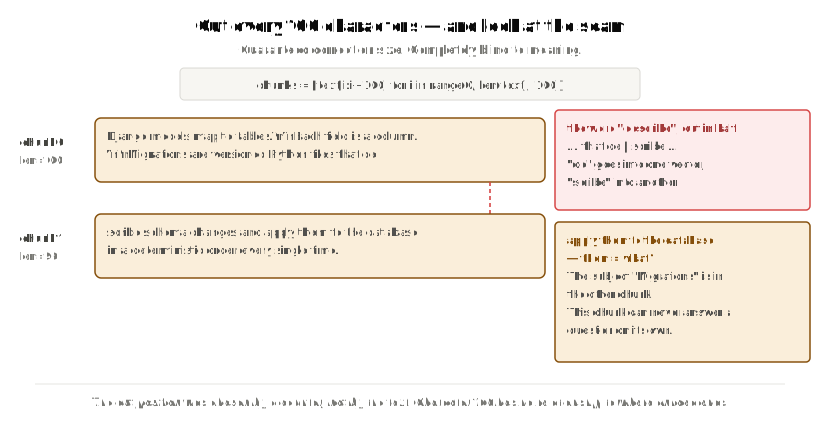
The word describe has been cut in half. de is going into one vector; scribe is going into another.
Check it against our four requirements:
| requirement | result |
|---|---|
| 1. under the size limit | ✅ guaranteed, always |
| 2. about one idea | ❌ chunk 0 holds models, fields and half of migrations |
| 3. self-contained | ❌ chunk 1 starts with scribe schema changes and apply them... — them = what? The subject Migrations is in the other chunk |
| 4. no mid-thought edges | ❌ mid-word, which is even worse than mid-thought |
Three out of four broken. The chopped-up word is what everybody notices first, but requirement 3 is what actually costs you retrieval quality. A chunk whose subject lives in a different chunk can never answer a question on its own — and remember, retrieval hands over whole chunks and nothing else.
The diagnosis is simple: the cut position was chosen by a counter, not by the text. Character 100 has no relationship whatsoever to where a word, a sentence or an idea ends.
Attempt #2: cut only where the text already breaks
The fix looks obvious. Stop letting a counter choose. Only cut where the text already has a natural break.
2a — cut at every space
text.split(" ")
The first eight items that come out:
['Django', 'models', 'map', 'to', 'tables.\n\nEach', 'field', 'is', 'a']
Nothing is broken now. And nothing is useful either. 'to' is a chunk. 'a' is a chunk. You are about to embed the word "a" and store it in a vector database.
| requirement | result |
|---|---|
| 1. under the size limit | ✅ (absurdly so) |
| 2. one idea | ❌ a word is not an idea |
| 3. self-contained | ❌ |
| 4. no mid-thought edges | ✅ |
We fixed requirement 4 and destroyed 2 and 3. Look carefully at what just happened — this is attempt #1's failure mirror-imaged:
- Attempt #1: right size, wrong boundaries.
- Attempt #2a: right boundaries, useless size.
2b — cut at every paragraph
Paragraphs are real units of meaning, so this ought to be much better:
text.split("\n\n")
Here are the lengths of the three pieces that come out, against our limit of 100:
[28, 23, 141] limit is 100
And there's the problem. The third paragraph is 141 characters against a 100-character limit.
Splitting at paragraphs gives you meaningful units, but hands you zero control over size — which is the one thing attempt #1 got right. Real documents have 30-character paragraphs and 3,000-character paragraphs sitting next to each other. The tiny ones waste a retrieval slot on almost no information. The huge ones don't fit into the embedding model at all.
| requirement | 2a: spaces | 2b: paragraphs |
|---|---|---|
| 1. under size limit | ✅ | ❌ no guarantee at all |
| 2. one idea | ❌ | ✅ |
| 3. self-contained | ❌ | ✅ |
| 4. no mid-thought edges | ✅ | ✅ |
The tension, stated plainly
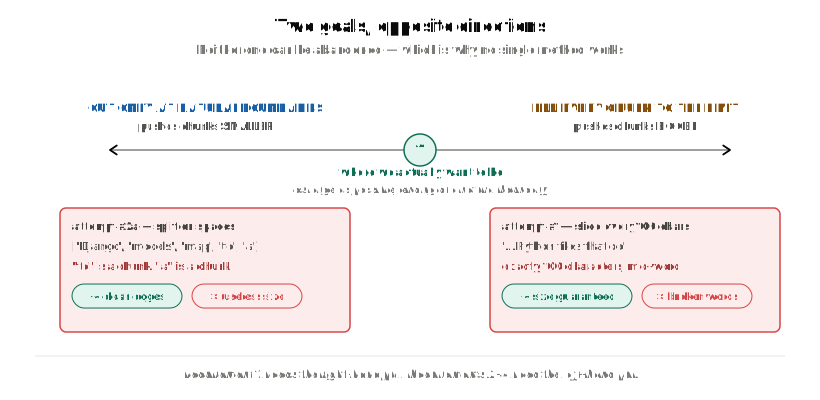
Neither goal can be dropped. Requirement 1 needs the right-hand pull. Requirements 2–4 need the left-hand pull. Every attempt so far has picked a side and lost the other one.
Hold that thought, though — because even if we solved this tension perfectly, there's a problem that neither attempt has addressed at all.
Attempt #3: let chunks share their edges
The problem a perfect cut still has
Take that third paragraph and cut it at a completely clean word boundary — the best possible cut, no counter involved:
'Migrations are versioned Python files that describe schema changes and'
' apply them to the database in a deterministic order every single time.'
Nothing is broken. Both halves are grammatical English. And the second chunk is still unusable on its own:
apply them to the database...
Them = migrations, and that word is in the other chunk.
The idea — "migrations are applied to the database in a deterministic order" — sits across the seam, so it lives complete in neither chunk. A question about applying migrations to a database matches neither one well.
Every cut, however clean, orphans whatever idea was spanning it. Better boundaries reduce this. Nothing eliminates it.
This is a different problem from the first two. It isn't about where the cut goes. It's about the fact that there is a cut.
The fix: overlap
If the problem is that a cut separates two things that belong together, the fix is to stop advancing by a full chunk each time. Advance by less, so that each chunk re-includes the tail of the one before it:
step = chunk_size - overlap          # 100 - 20 = 80
chunks = [text[i:i+100] for i in range(0, len(text), step)]
At size 100 with overlap 20, here's what comes out:
chunk 0 len=100: 'Django models map to tables.\n\nEach field is a column.\n\nMigrations are versioned Python files that de'
chunk 1 len=100: 'Python files that describe schema changes and apply them to the database in a deterministic order ev'
chunk 2 len= 36: 'terministic order every single time.'

measured overlaps: [20, 20]
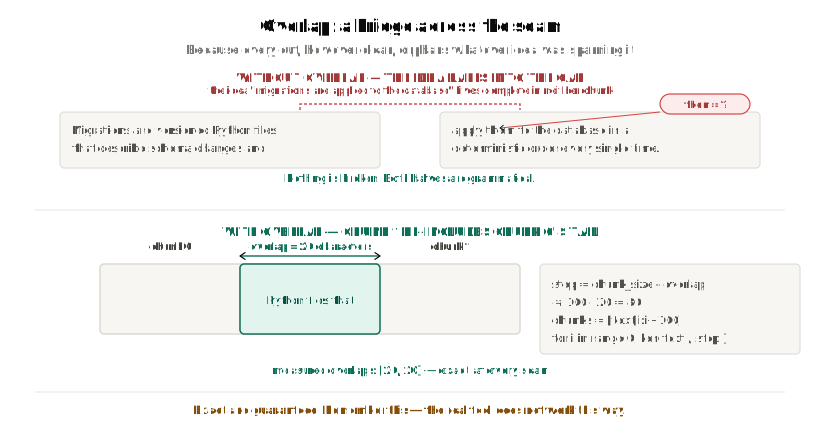
Chunk 1 now begins with Python files that..., which chunk 0 also ended with. The bridge exists. An idea spanning the seam now has a real chance of living complete inside at least one chunk.
Two things to remember about this overlap
Both of these matter later, so it's worth being precise now.
1. It is exact, and it is guaranteed. The measured overlap at every seam is [20, 20]. Not "about 20." Exactly 20, every single time, because the stride is pure arithmetic — i advances by 80, the window is 100 wide, so the last 20 characters always repeat.
Hold on to this one. It is the promise the real tool quietly breaks — and almost everybody assumes it doesn't. We'll come back to it at the end.
2. It costs storage and duplication. At 100/20 you store roughly 25% more text than the document actually contains, you embed 25% more, and the same sentence can now be returned twice inside one set of search results. Overlap is not free, which is exactly why you don't just set it to half your chunk size and stop thinking about it.
What overlap did not fix
Look at that output one more time: ...that de / terministic....
Still cutting mid-word. Overlap is orthogonal to boundary quality — it changes how much neighbouring chunks share, not where the cuts are.
| requirement | with naive overlap |
|---|---|
| 1. under size limit | ✅ |
| 2. one idea | ❌ still blind cutting |
| 3. self-contained | 🔶 improved by the bridge, but still mid-word |
| 4. no mid-thought edges | ❌ unchanged |
The scorecard: why no single method works
Three attempts, three partial solutions. Let's line them all up.
| 1. size limit | 2. one idea | 3. self-contained | 4. clean edges | |
|---|---|---|---|---|
| #1 fixed slicing | ✅ | ❌ | ❌ | ❌ |
| #2a split on spaces | ✅ | ❌ | ❌ | ✅ |
| #2b split on paragraphs | ❌ | ✅ | ✅ | ✅ |
| #3 slicing + overlap | ✅ | ❌ | 🔶 | ❌ |
Now here's the trick to reading this table: read the columns, not the rows.
Every column has a ✅ somewhere in it — so every individual requirement is solvable. But no single row has four of them.
And look at which methods hold which ✅:
- Column 1 (size) is held by the methods that count.
- Columns 2 and 4 (meaning, clean edges) are held by the method that respects the text's own structure.
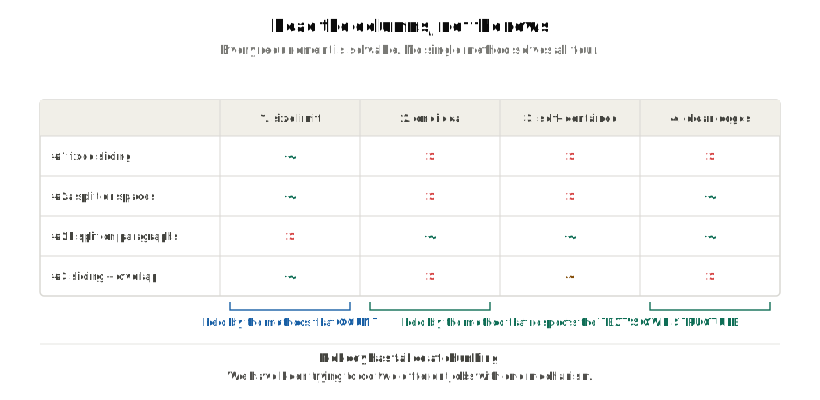
Counting and respecting structure are two genuinely different kinds of work, and each method only does one of them. Which gives us the actual insight, and it isn't the one you'd expect:
Nobody has failed at chunking. We've been trying to do two different jobs with one mechanism.
The idea that fixes it: two jobs, two mechanisms
So stop trying. Do them as two separate steps.
SPLIT and PACK
| job | the question it answers | what it produces |
|---|---|---|
| SPLIT | Where am I allowed to cut? | many small units, cut at natural boundaries |
| PACK | How many of those go into one chunk? | fewer, larger chunks, each under the limit |
SPLIT cuts the text down into the finest legal units it can find. It doesn't care about size at all — that isn't its job. PACK then glues those units back together until it's just under the limit. It doesn't care about meaning — SPLIT already guaranteed that every available boundary is a good one.
Run either one alone and you get an attempt we've already rejected:
- SPLIT alone → every chunk is one word. That's attempt #2a.
- PACK alone → there are no legal cut points, so it cuts at exactly character 100. That's attempt #1.
- SPLIT then PACK → as large as possible, ending at a natural boundary.
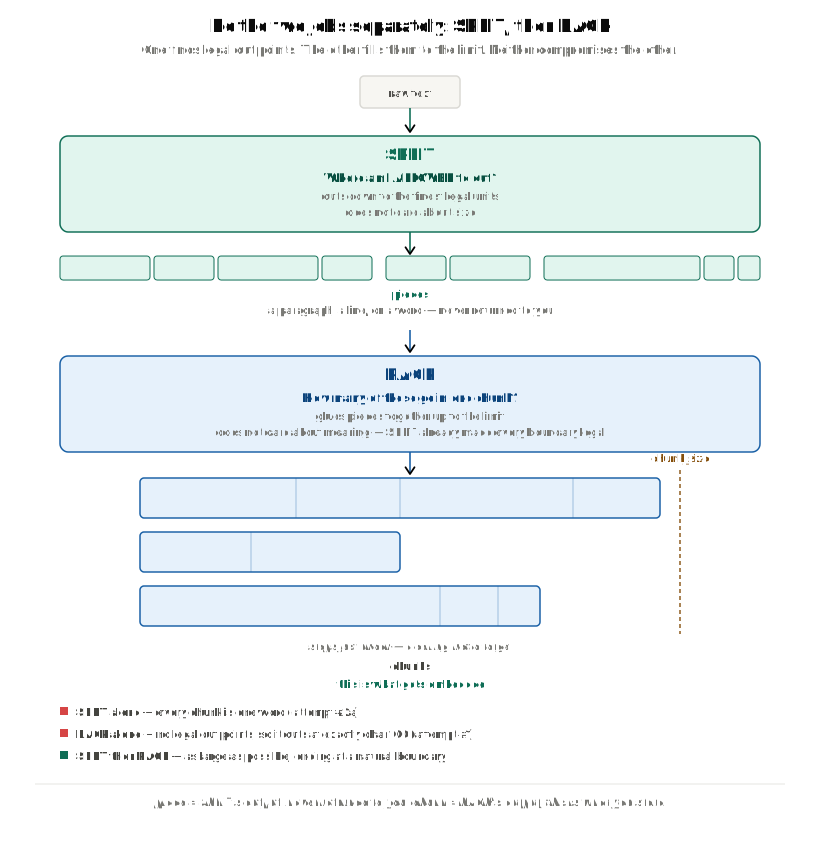
That round trip is the entire product. Both jobs get done properly, neither one compromises the other, and every requirement in the scorecard finally gets its ✅.
The tool that does this
The class that implements it is LangChain's:
from langchain_text_splitters import RecursiveCharacterTextSplitter

splitter = RecursiveCharacterTextSplitter(chunk_size=100, chunk_overlap=20)
chunks = splitter.split_text(text)
That's the line from the top of this post, and its name decodes as exactly what we just derived. It splits text. It will work all the way down to individual characters if it has to. And it does so recursively — when something is still too big, it retries on that piece with a finer kind of boundary.
One piece of vocabulary worth fixing
There's one distinction that decides whether this class ever makes sense to you, so let's pin it down:
- A piece is one output of SPLIT — a paragraph, a line, or a word. It is never returned to you. It's an intermediate ingredient.
- A chunk is one output of PACK, built by gluing several pieces together. This is what gets embedded and stored.
Everything up to this point has used "chunk" loosely, because there was only ever one kind of unit. Now there are two, and they behave very differently. LangChain's own source uses "split" and "chunk" loosely for both — which is precisely why people misread the algorithm when they go looking at it.
One more fact worth planting now, because most of the confusing behaviour in this class comes from forgetting it:
chunk_sizeandchunk_overlapare used only inside PACK. SPLIT has never heard ofchunk_overlap, and it useschunk_sizefor exactly one yes/no test.
Bringing it all together
Here's the whole path we walked, in order:
- The LLM only ever reads text pasted into its prompt. The simplest RAG system is one f-string, and it has no chunking in it at all.
- Pasting the whole document breaks twice: the context window is a per-call wall that a growing corpus will always beat, and even when the document fits, broad context makes answers worse — lost in the middle, blending real sentences into false ones, and nothing to cite.
- So we send only the part the question needs. That creates two new jobs: chunking (dividing the document) and retrieval (picking parts cheaply).
- Retrieval works by embedding. And because an embedding is fixed-size, a big unit becomes the blurry average of everything in it — so one vector can only mean one thing, and a part has to be about one thing. The unit you embed and the unit you paste are the same unit.
- Retrieval can only ever return a whole chunk, so the system's quality ceiling is set at ingestion time, by where the cuts went.
- A chunk must be under the size limit, about one idea, self-contained, and free of mid-thought edges — and those four requirements pull in opposite directions.
- Cutting every N characters guarantees size and breaks everything else. Cutting at natural boundaries preserves meaning and gives up all control of size. Overlap bridges ideas that span a seam, but doesn't move the seam.
- None of them wins because they're each doing half of a two-part job: finding legal boundaries and filling to a size are different kinds of work.
- Do them as two steps — SPLIT then PACK — and all four requirements can be satisfied at once. That's what
RecursiveCharacterTextSplitteris.
Where this leaves you. That line of code from the top of this post isn't arbitrary any more. chunk_size exists because the context window is a hard wall, and because broad context makes answers worse even when it fits. chunk_overlap exists because every cut, however clean, orphans whatever idea was spanning it. And the class is called recursive because SPLIT has to retry with a finer kind of boundary whenever a piece is still too big.
What we haven't done is watch the machine actually run — how SPLIT decides where it's allowed to cut, what it does with a paragraph too big to fit anywhere, and where the overlap really comes from inside PACK.
That last one deserves a warning before you go and configure anything, because it's the promise from attempt #3 that I asked you to hold on to. The overlap we built by hand there was exact: 20 characters at every seam, guaranteed by arithmetic. The overlap PACK produces is not. It's a residue — whatever happens to be left sitting in the buffer after the packer finishes throwing pieces away. Which is how a splitter configured with chunk_overlap=200 can quietly hand you zero overlap at every seam in a real document.
So if you take one practical thing from all this:
chunk_sizeandchunk_overlapare ceilings, not targets. You will never get more than you asked for. You will very often get less — and sometimes you will get none at all.
Measuring that on your own corpus, rather than assuming it, is the difference between a retrieval system you understand and one that merely runs.