What Is RAG, and Why Does Your LLM Need It?
A beginner-friendly introduction to Retrieval-Augmented Generation: why an LLM confidently makes things up about your data, why pasting all your documents into the prompt does not fix it, and how the RAG pipeline works, one step at a time.
Ask an LLM about your company's refund policy, and it will answer.
Fluently. Confidently. And often wrongly — because it has never read your refund policy, and nothing in it can tell you that.
RAG is the standard fix for that gap.
RAG stands for Retrieval-Augmented Generation, which sounds heavier than it is. It isn't a model, a framework, or a product you install. It's one idea: before you ask the LLM a question, go and find the few paragraphs that actually answer it, and hand those paragraphs with the question to the LLM.
That's the whole concept. Everything after this is detail about how you find those few paragraphs — and that detail is what decides whether the answers are any good.
Here's the shape of the finished system. It'll make sense by the end of the post; there's nothing you need to work out from it now.
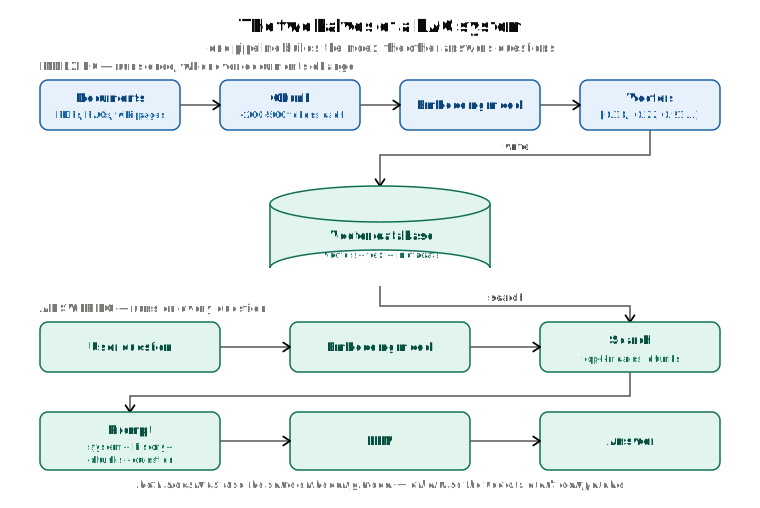
We'll get there slowly. First, why the two obvious alternatives don't work. Then the pipeline one step at a time, from a PDF sitting on disk to a grounded answer coming back to a user.
The problem: a model that has never seen your data
An LLM does exactly one thing: it predicts the next token, over and over. Everything it "knows" is a statistical residue of the text it was trained on. That gives it three specific blind spots.
- Anything after its training cutoff. It doesn't know what shipped last week.
- Anything private. Your internal wiki, your policy handbook, this particular user's transaction history — none of it was in the training set, and none of it should be.
- The fact that it doesn't know. This is the one that hurts. A bare model can't check whether it actually knows something. There is no part of it that stops and says "I'm not sure about this one." So when a question arrives that it can't answer, it does what it always does: predicts the most plausible-sounding next token. The result is a hallucination — a confident, well-formed, completely invented answer.
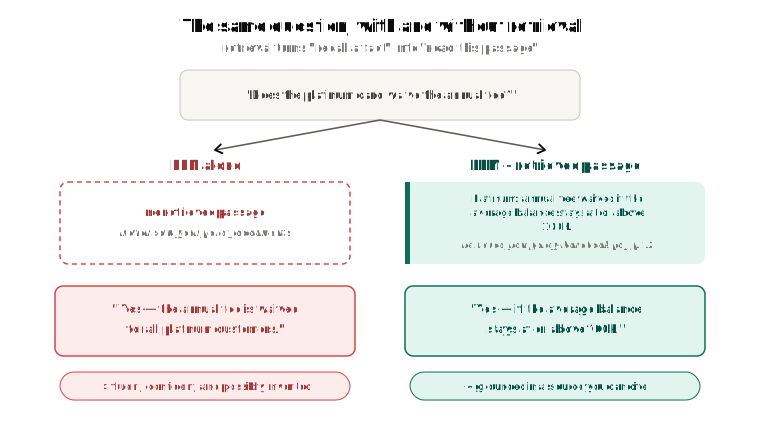
Say you're building a support assistant for a bank, and a customer asks:
Does the platinum card waive the annual fee?
A bare LLM will happily produce an answer. It will sound authoritative. It may even be right, by luck. But nothing in the system connects that sentence to your actual fee schedule, and nobody — including the model — can tell the difference between the lucky case and the invented one.
Two fixes that seem obvious, and why they fall short
"Fine-tune the model on our documents"
Fine-tuning continues training the model on your data, adjusting its weights. It's a real technique, but it's the wrong tool for this job:
- It's slow and expensive, and you have to redo it every time a document changes. Your policy handbook gets edited on a Tuesday afternoon; you are not retraining a model that afternoon.
- It teaches behaviour better than it teaches facts. Fine-tuning is excellent at "always answer in this tone, in this format, following these conventions." Getting a specific number to reliably come back out is a much shakier proposition.
- There are no sources. Once a fact is baked into the weights, it's mixed in with everything else. You can't show the user where the answer came from, and you can't audit it.
- You can't take it back. If a document is deleted, or a customer revokes consent, or one team's data should never be visible to another team — weights don't support deletion or access control.
"Just paste all our documents into the prompt"
More tempting, because context windows keep getting bigger. But the context window is a shared, finite budget, and everything competes for it: your system prompt, the chat history so far, whatever documents you've pasted in, the user's message — and the tokens the model still has to generate. The model's own answer is counted in the same window.
Even setting the ceiling aside:
- Cost and latency scale with tokens. You pay for every token you send, on every single request, whether or not it was relevant.
- Attention isn't free. Transformer self-attention cost grows roughly with the square of the input length. A very long prompt isn't just more expensive — it's slower.
- Models lose things in the middle. Give a model a huge block of text and it pays most attention to the beginning and the end. Facts buried in the middle get quietly under-weighted. This is common enough to have a name: the lost-in-the-middle problem.
- Almost all of it is noise. For any one question, 99.9% of your documentation is irrelevant. You'd be paying — in money, latency, and attention — to show the model 500 pages so it can use one paragraph.
And there's the insight the whole pattern is built on:
You don't need to give the model all of your documents. You need to give it the three paragraphs that answer this question.
Which reframes the problem entirely. "Find the few relevant passages in a big pile of text" isn't a language-model problem at all. It's a search problem. RAG is what you get when you put a search engine in front of the model.
What RAG actually is
Three steps, which is where the name comes from:
| Step | What happens |
|---|---|
| Retrieve | Search your own data for the passages most relevant to this question |
| Augment | Paste those passages into the prompt, alongside the question |
| Generate | Let the model answer from the passages in front of it |
The useful way to think about it: RAG changes the model's job from "recall a fact" to "read this passage and answer the question." The first is unreliable and unverifiable. The second is something language models do genuinely well.
It's the difference between a closed-book and an open-book exam. You're not asking the student to have memorized the textbook. You're handing them the right page.
Notice what falls out of that for free:
- The answer is grounded — you can cite the source, because you know exactly which chunks you passed in.
- Updating knowledge means updating a document, not retraining a model.
- Access control is possible, because retrieval is a query you can filter.
- "I don't know" becomes achievable: if retrieval returns nothing relevant, you can instruct the model to say so.
The two halves of a RAG system
Every RAG system is really two pipelines that meet at a database:
- Indexing runs offline. You do it once, ahead of time, and then again whenever your documents change. It turns a pile of documents into something searchable by meaning.
- Answering runs online, on every single question. It searches that index, builds a prompt, and calls the model.
People often conflate the two and end up confused about why some step exists. Keep them separate in your head. The rest of this post walks through each one.
Part 1 — Indexing: making documents searchable
Step 1: Extract the text
PDFs, Word documents, HTML pages, Notion exports, database rows — whatever the source, you first need plain text out of it, ideally with some structure preserved (headings, page numbers, section titles). Hold onto that structure. You'll want it later, both for chunking and for citations.
Step 2: Chunk it
You don't index whole documents. You split them into small pieces called chunks.
One term first, since the next line leans on it: an embedding model reads a piece of text and turns it into a list of numbers that captures what the text means. Those numbers — not the words themselves — are what you search. Step 3 covers it properly; for now, that's all you need.
Two reasons to chunk:
- Embedding models have token limits. Like an LLM, they can only take in so much text at once. You can't hand a 200-page manual to one.
- Retrieval works much better on small, focused pieces. A chunk about one topic produces a clean signal. A chunk covering nine topics is muddy — it's vaguely similar to everything and strongly similar to nothing.
The naive approach is to cut every N tokens, and it goes wrong immediately, because meaning doesn't respect token counts:
Chunk 1: …Premium customers can waive the annual
Chunk 2: credit card fee if they maintain…
Neither chunk states the rule. Whichever one gets retrieved produces a wrong or useless answer. Good chunking is both semantic-aware (split on natural boundaries — headings, sections, paragraphs, FAQ entries) and token-aware (respect the embedding model's limit).
And you add overlap: consecutive chunks share a small region at the seam.
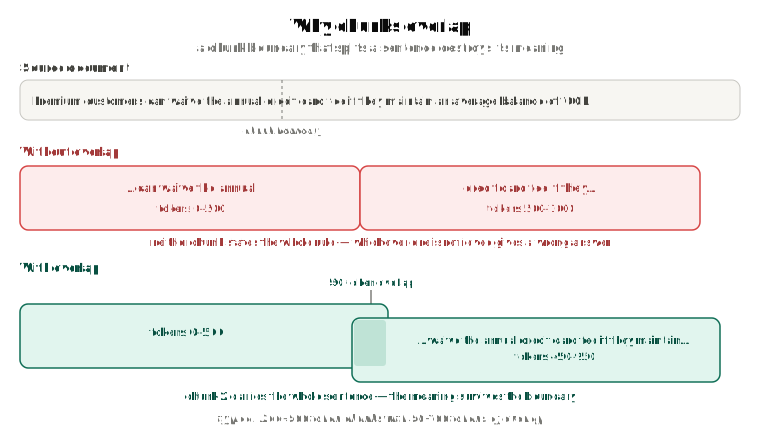
With chunk 1 covering tokens 0–500 and chunk 2 covering 450–950, chunk 2 starts before chunk 1 ends. The sentence that got cut in half now appears whole inside chunk 2. The idea survives the boundary.
A reasonable starting point:
| Setting | Typical value |
|---|---|
| Chunk size | 200–500 tokens |
| Overlap | 50–100 tokens |
Both directions have a failure mode. Chunks that are too large give you noisy retrieval and expensive prompts. Chunks that are too small lose the surrounding context that made them meaningful. Between those, the sweet spot depends on your documents — this is one of the highest-leverage things to tune, and it gets a post of its own.
Step 3: Turn each chunk into an embedding
Here's the piece that makes semantic search possible.
An embedding is a list of numbers — a vector — that represents the meaning of a piece of text. Text with similar meaning gets similar numbers. That's the entire trick.
"puppy"  → [ 0.12,  0.85, -0.23, ... ]
"dog"    → [ 0.14,  0.82, -0.21, ... ]   # very close to "puppy"
"rocket" → [-0.91,  0.01,  0.74, ... ]   # nowhere near either
Once meaning is expressed as coordinates, "how related are these two pieces of text?" becomes plain geometry: measure the angle between the two vectors. That measurement is cosine similarity — a small angle means closely related, a wide angle means unrelated.
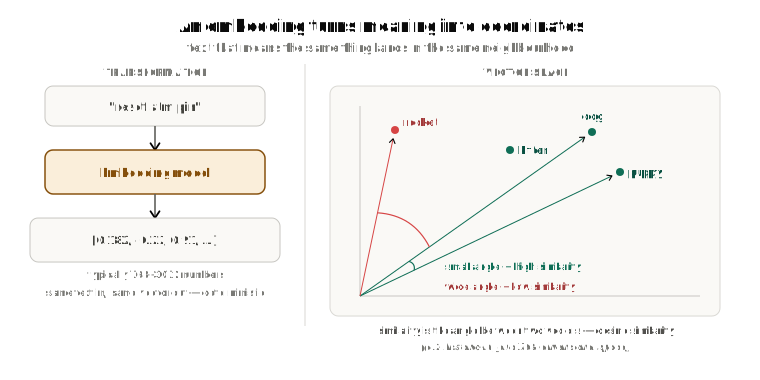
An embedding model is a different kind of model from the LLM you're chatting with:
| Input | Output | |
|---|---|---|
| LLM | text | text |
| Embedding model | text | a vector of numbers |
Real embeddings typically have 768 to 3072 dimensions, not the three shown above. And like LLMs, embedding models have their own token limits — another reason chunks have to be small.
Step 4: Store the vectors, with their metadata
Each chunk goes into a vector database as three things bundled together:
- the vector — what you search by
- the original text — what you'll actually put in the prompt
- the metadata — everything else you know about it
That metadata is not an afterthought. Typical fields:
user_id, tenant_id, document_id     # who is allowed to see this
source, category, tags              # what it is
page_number, chunk_index            # where it came from, for citations
created_at, updated_at              # how fresh it is
For the storage layer itself you have options, and the right one usually comes down to what you're already running:
- pgvector — a Postgres extension. If your app is already on Postgres, start here.
- Pinecone, Weaviate, Qdrant, Milvus — purpose-built vector databases, usually with hybrid search and filtering built in.
- FAISS — Meta's library. In-memory and self-hosted; no server or persistence of its own.
And that's the whole indexing pipeline. Note that all of it happens before any user asks anything.
Part 2 — Answering: what happens on every question
Now a question arrives. Here's what runs, in order.
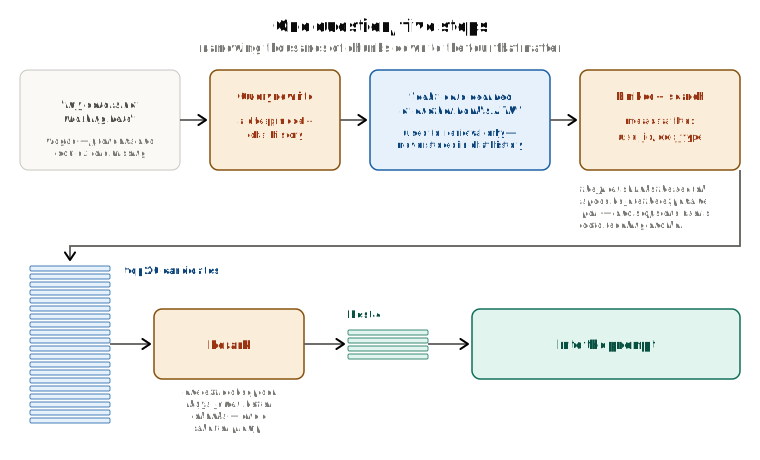
Step 1: Rewrite the query (optional, but it earns its keep)
Real questions don't arrive on their own. They arrive partway through a conversation, and half their meaning is in the turns above them.
Here's a support chat a few messages in:
User: my new debit card arrived yesterday
Assistant: Great — you can activate it in the app, under Cards → Activate.
User: done that. i'm at an ATM now, it's not my bank's
Assistant: Thanks. What happens when you put the card in?
User: my card is not working here
Take that last message on its own and it barely says anything. Which card? Where is "here"? What does "not working" mean? Embed those six words and you'll search for something close to meaningless.
Read the whole conversation, though, and nothing about it is vague. It's a debit card, at another bank's ATM, and it's being refused. The context was never missing — it just wasn't in the one sentence you were about to search with.
So you make a quick call to a small, cheap model: given this conversation, rewrite the user's last message as a standalone search query.
debit card declined at another bank's ATM
Now retrieval has something to work with. Two details matter:
- The rewritten query is used for retrieval only. It never goes into the prompt as the user's message.
- You store the original in chat history. The user's own wording, tone, and phrasing stay intact.
Step 2: Embed the query
Run the question through the exact same embedding model you used on your chunks. Every time.
That "same model" part is the rule that matters more than any other in RAG. In a moment you're going to compare this one query vector against all your stored chunk vectors — and two vectors can only be compared if the same model produced them. Different embedding models arrange meaning differently, so the same sentence lands in a different spot.
Get this wrong and nothing crashes. There's no error to catch. You just get back chunks that have nothing to do with the question, from a system that still looks like it's working. It's also why swapping embedding models later isn't a config change: you have to re-embed and re-index everything you've already stored.
Step 3: Search — and filter first
Now you find the nearest vectors. Two things are happening at once:
Vector search compares the query's vector against the stored chunk vectors and returns the top-k nearest — the passages closest in meaning. This is what people mean by semantic search: matching on meaning rather than on keywords. Two texts can share no words at all and still be near-identical in vector space. (Semantic search is the concept; vector search is how it's implemented.)
Metadata filtering constrains that search using the structured fields you stored alongside each vector. This is not optional polish — it does three jobs:
- Security.
WHERE user_id = :current_useris what stops one customer's documents from surfacing in another customer's answer. Pure similarity search has no notion of who is asking. - Efficiency. Shrinking the candidate set before the expensive similarity comparison makes the search faster.
- Relevance. Similarity is not the same as correctness. A chunk can be semantically close and still be from the wrong document, the wrong product, or last year's version.
Step 4: Rerank
Vector search is fast and approximate, so its top results might be good but noisy. A reranker is a second, more precise model that reads the query and each candidate chunk together and scores how well each one actually answers the question.
The usual shape:
retrieve top 20 (fast, approximate)
        ↓
rerank all 20 (slower, precise)
        ↓
keep the best 3–5
You're spending one extra cheap call to get fewer but better chunks. That pays for itself three ways: higher relevance, fewer tokens in the prompt, and less room for the model to be led astray by an irrelevant passage.
Step 5: Build the prompt
Now assemble what you're actually sending. A typical RAG prompt has four parts:
-
System prompt — the rules. This is where you make grounding explicit:
You are a banking support assistant. Answer only using the provided context. If the context does not contain the answer, say you do not know. Do not give financial advice. -
Chat history — trimmed or summarized, so it doesn't grow without bound.
-
Retrieved chunks — the passages you just fetched, clearly delimited so the model can tell them apart from the conversation.
-
The user's message — the original one, not the rewritten one.
And then the constraint that catches people out: you have to leave room for the answer. The context window covers input and output. If your model's window is 20,000 tokens and you want it to be able to write 3,000 tokens of answer, your input has to stop at 17,000.
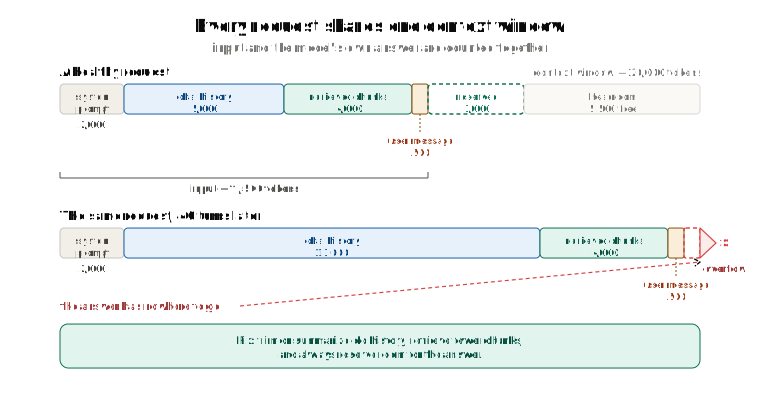
The dangerous part is that chat history grows on its own. A conversation that fit comfortably on turn 3 can crowd out the answer entirely by turn 40. So you count tokens before you send, and when you're getting close, you trim: keep the last N messages verbatim and summarize everything older, drop to fewer retrieved chunks, or compress the chunks themselves.
Step 6: Generate
Send it. The model reads the passages and answers from them.
One thing worth being explicit about: retrieved chunks are not stored. They exist for exactly one API call. The next message runs the whole retrieval pipeline again and gets whatever chunks that question needs. Chat history persists; retrieved context doesn't.
The whole thing, end to end
Following one question all the way through:
| # | Stage | What it produces |
|---|---|---|
| 1 | User sends a message | "my card is not working here" |
| 2 | Query rewrite | "debit card declined at another bank's ATM" |
| 3 | Embed the query | [0.18, -0.22, 0.91, …] |
| 4 | Vector search + metadata filter | 20 candidate chunks, scoped to this user |
| 5 | Rerank | the best 4 |
| 6 | Build the prompt | system rules + history + 4 chunks + original message |
| 7 | Token budget check | trim history if the input is crowding the answer |
| 8 | LLM call | a grounded answer, with a source you can cite |
Everything from step 2 to step 8 typically runs in a couple of seconds, and steps 2 through 5 are just plumbing — ordinary code, ordinary database queries. That's most of what a RAG system is.
What RAG fixes, and what it doesn't
It's worth being clear about the boundary, because RAG is often oversold.
What it fixes:
- Private and current knowledge, without touching the model.
- Citations, because you know exactly which chunks you passed in.
- Cheap updates — edit the document, re-index that document.
- Access control, via metadata filtering.
- Far fewer hallucinations, because the answer is anchored to text in front of the model.
What it doesn't fix:
- Bad retrieval. If the right chunk isn't in the top results, the model can't use it properly — and it will often answer anyway, from whatever it did get. This is the single most common source of bad RAG answers, and it's a retrieval bug wearing a hallucination costume.
- Bad chunking. A rule severed across a boundary is unretrievable no matter how good the rest of your stack is — and retrieval hands over whole chunks, so nothing downstream can put it back together. Where the cuts go is decided once, at indexing time.
- Long, unfocused context. Stuff 30 chunks in and lost-in-the-middle comes back.
- Ambiguous questions. If nobody can tell what the user meant, retrieval can't either.
- A model's eagerness to be helpful. Models would rather answer than say "I don't know." Your system prompt has to explicitly authorize the second option.
- Keeping the index in sync. When a source document changes, its chunks and embeddings are stale until you do something about it. Doing that efficiently — without re-embedding an entire corpus over a one-line edit — is a genuinely interesting problem, and a topic on its own.
Which leaves one rule worth writing on the wall:
RAG quality is retrieval quality. The generation step is rarely the bottleneck. When a RAG system gives a bad answer, the bug is almost always upstream of the LLM.
Recap
- An LLM predicts tokens. It has never seen your data, and it can't tell you when it doesn't know something.
- Fine-tuning is the wrong tool for facts. Pasting everything into the prompt doesn't scale, and buries the signal in noise.
- RAG retrieves the few relevant passages, augments the prompt with them, and lets the model generate from what's in front of it. It turns "recall a fact" into "read this and answer."
- Indexing (offline): extract text → chunk with overlap → embed → store vectors with metadata.
- Answering (per question): rewrite → embed → filter and search → rerank → build the prompt within the token budget → generate.
- The same embedding model must be used on both sides.
- Metadata filtering is a security boundary, not just a performance tweak.
- Always reserve context-window space for the answer.
Next up: we treated chunking as a solved problem with a table of recommended sizes, and it really isn't. Chunk boundaries decide what can be retrieved at all, and they're set before anyone asks a question.
How Does a Text Splitter Actually Chunk Your Documents? opens up the one everyone copies — the ladder of separators it walks down, how it packs the pieces back into chunks, and why chunk_overlap=200 so often hands you less overlap than you asked for, sometimes none at all.