How to Chunk Documents for RAG
What chunking actually is, what makes a chunk a good one, and how a text splitter decides where to cut — including why the overlap you configure is usually not the overlap you get.
The previous post in this series — What Is RAG, and Why Does Your LLM Need It? — was the overview: what retrieval and embeddings are, and how the parts of a RAG pipeline fit together. This post goes deep on one step of that pipeline. You don't need to have read it first; everything this post leans on is recapped below, and each term is explained where it first comes up.
Take a document — a PDF, a wiki page, a support ticket — and run it through that step. What comes out the other end isn't the document; it's a few hundred short passages, each just a few sentences long. Those passages are chunks, and producing them is chunking. It happens once, up front, before the system has been asked anything.
Those chunks are what gets searched, and what gets handed to the model when it answers a question — so where the cuts land decides what the system can find later. Which raises the two questions this post is about: what makes a cut a good one, and what actually decides where it lands?
Here's the route the post takes. It'll make sense by the end; there's nothing you need to work out from it now.
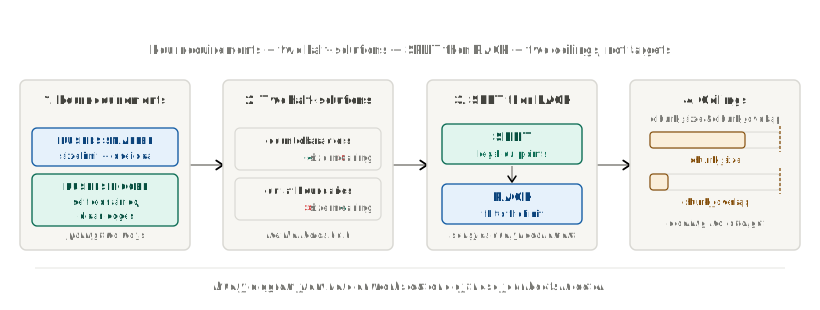
We'll get there in four steps. First, the four requirements a good chunk has to satisfy, and why they pull against each other. Then two obvious strategies, each of which solves half the problem and ignores the other half. Then the two-step design — SPLIT and PACK — that satisfies all four at once. And finally what that design means for the two settings you actually configure, chunk_size and chunk_overlap, where the second one turns out not to mean what its name suggests.
Why chunking exists, briefly
Two hard constraints force a document to be cut up before it's searchable: embedding models accept only so much text at once, and retrieval works better on small, focused chunks than on large, unfocused ones.
Those turn out to be one problem. An embedding is a fixed-size vector, no matter how much text goes in — one paragraph or ten pages, same number of dimensions back. A vector built from ten pages covering four topics lands near the blurry average of all four, not close to any one of them.
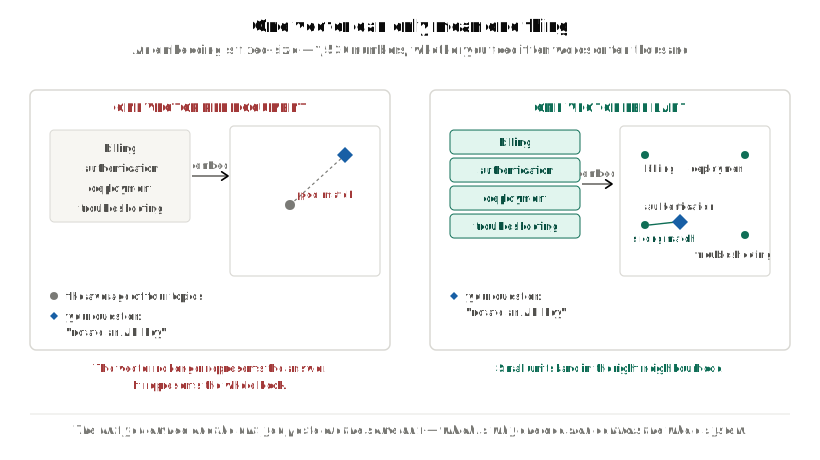
One vector can only mean one thing. So a chunk has to be about one thing.
There's a second constraint: retrieval only ever hands back a whole chunk, never something assembled from several. Wherever the cuts land decides, once, what this system can even retrieve later.
That's the short version — enough to follow everything below. This post makes the full case, including the context window and what happens downstream once the chunks exist.
What a good chunk has to be
Four requirements apply at once, and they don't all pull the same way.
| requirement | where it comes from | pushes chunks to be ... |
|---|---|---|
| 1. under the size limit | the embedding model's input cap | smaller |
| 2. about one idea | one vector can only mean one thing | smaller |
| 3. self-contained — readable alone, no dangling references | the model only ever sees the text you hand it, nothing else | bigger |
| 4. doesn't start or end mid-thought | retrieval hands back a whole chunk, never an assembled composite | bigger |
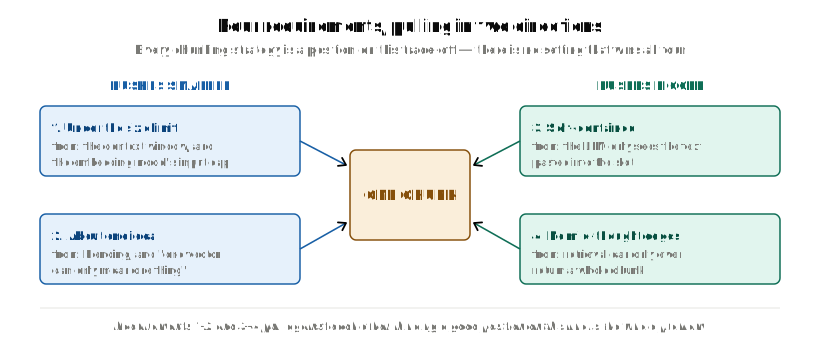
Requirements 1 and 2 pull toward smaller chunks. Requirements 3 and 4 pull toward bigger ones. There's no setting that maximizes all four at once — every chunking strategy is a position on that trade-off, and everything below is measured against this table.
The next few sections use a size limit of 100 characters — small enough to do the arithmetic in your head. Later sections scale it up to real document sizes; the arithmetic works the same way.
Attempt #1: cut every 100 characters
Count, and cut on a fixed size. The obvious first move: guarantee size by counting characters.
chunks = [text[i : i + 100] for i in range(0, len(text), 100)]
Run it on the running example for this post —
text = (
    "Django models map to tables.\n\n"
    "Each field is a column.\n\n"
    "Migrations are versioned Python files that describe schema changes and "
    "apply them to the database in a deterministic order every single time."
)
— and here is the chunk boundary, the place where one chunk ends and the next begins:
[  0] '...Migrations are versioned Python files that de'
[100] 'scribe schema changes and apply them to the database...'
describe is now de in one chunk and scribe in the other. The counter has no idea a word is even there, let alone an idea.
Boundaries are worth naming because the rest of this post keeps coming back to them. Cut a document into n chunks and you create n − 1 boundaries, and every one of them is a place where an idea might have been severed. Whether the two chunks either side of a boundary share any text — and how much — is the subject of the last half of this post.
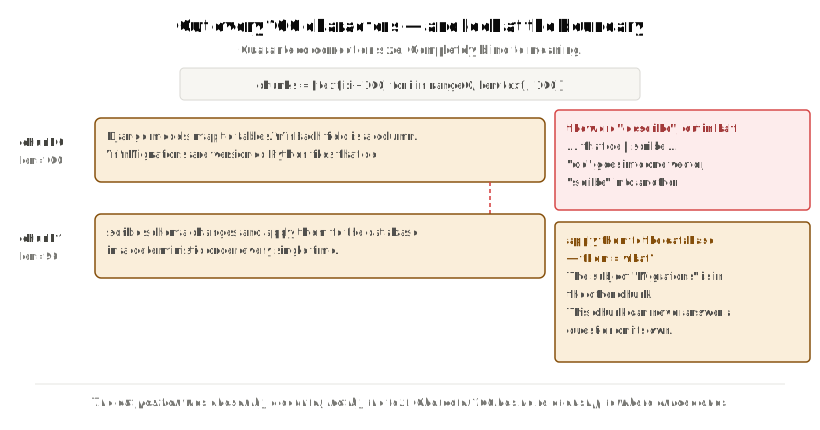
Size is guaranteed. Meaning is not.
The diagnosis is simple: the cut position was chosen by a counter, not by the text. Character 100 has no relationship whatsoever to where a word, a sentence or an idea ends.
Attempt #2: cut only where the text already breaks
The fix looks obvious: stop counting, and cut at the text's own break points instead.
(2a) By Space
Split on spaces (text.split(" ")) and 'to', 'a', 'is' come out as standalone chunks — safe cut points, but useless size, broken meaning.
(2b) By Paragraph
Split on paragraphs (text.split("\n\n")) and the running example's three paragraphs come out [28, 23, 141] characters long, against a 100-character limit — the third is over by 41%, and there's no lever to pull. Real documents may have 20-character paragraphs and 3,000-character ones sitting side by side.
Where that leaves us
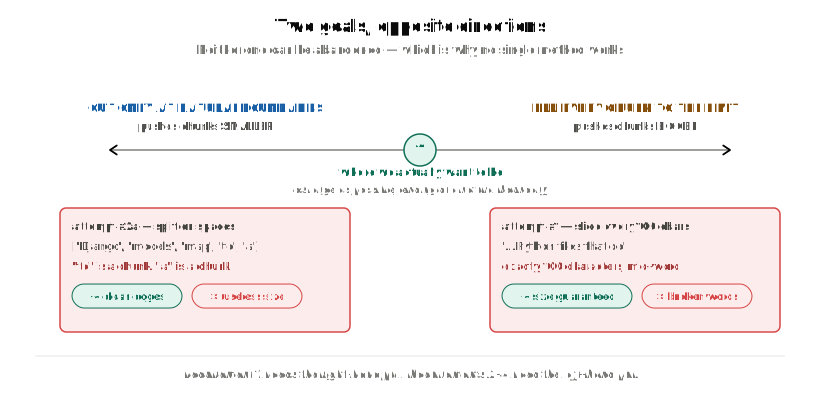
Counting solves size and ignores meaning. Respecting structure solves meaning and ignores size. Score them against the four requirements and the pattern is exact:
| 1. size limit | 2. one idea | 3. self-contained | 4. clean edges | |
|---|---|---|---|---|
| Fixed slicing | ✅ | ❌ | ❌ | ❌ |
| Split on spaces | ✅ | ❌ | ❌ | ✅ |
| Split on paragraphs | ❌ | ✅ | ✅ | ✅ |
Read the columns, not the rows: every requirement has a ✅ somewhere, held either by the methods that count or by the method that respects the text's own structure. No method holds all four, because counting and respecting structure are two different kinds of work, and each method here only does one of them.
Nobody has failed at chunking. We've been trying to do two different jobs with one mechanism.
Two jobs, two mechanisms
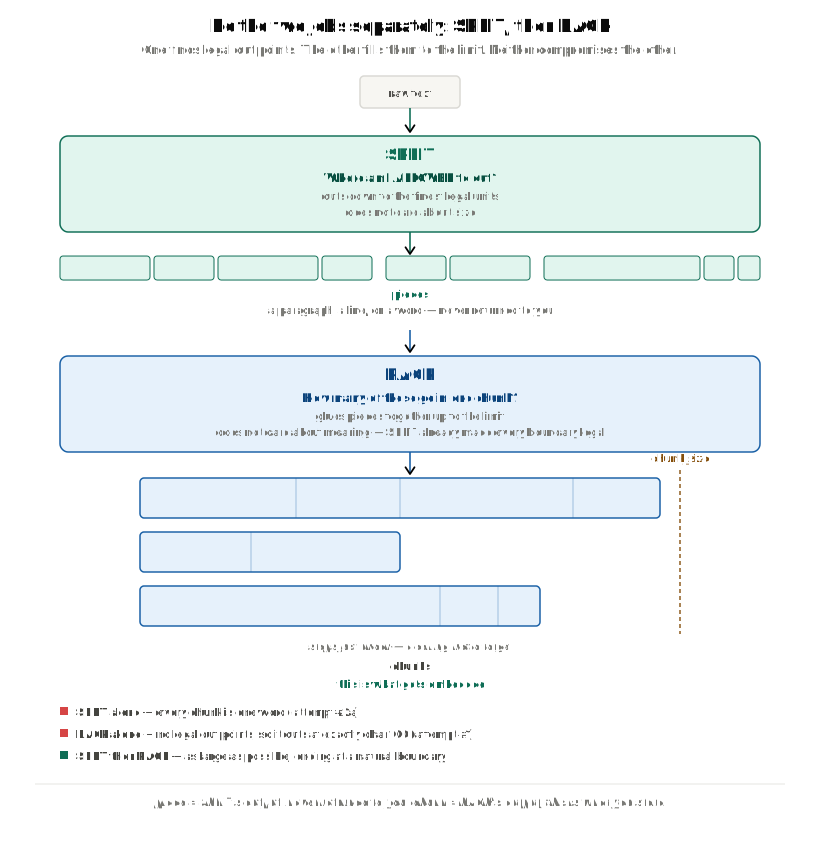
Look back at that table. Every ✅ in it comes from one of two kinds of work: counting, which guarantees the size limit, or respecting the text's own structure, which guarantees the other three. No method does both, because a pass that's watching a running total isn't, at the same time, hunting for a paragraph break — one pass, one job.
So do them one after another, and let each do only what it's good at. First, go through the text once and mark every place it would be safe to cut — a paragraph end, a sentence end, a space — without asking how big anything is. Then go through what that produced and gather it into groups that fit under the size limit, without asking what any of it means. The second step gets to ignore meaning only because the first step already threw out every cut that would have damaged it.
Those two steps need names, and there aren't official ones to reach for — so this post coins its own: call the first step SPLIT and the second PACK. Treat them as labels for this explanation, not as terminology you'll find anywhere else — LangChain's own methods, which both turn up later, are called _split_text and _merge_splits. SPLIT is the step that respects the text's own structure; PACK is the step that counts.
SPLIT answers one question: where am I allowed to cut? A blank line is a legal cut point — a place where cutting wouldn't damage anything — and so is the space between two words. The middle of the word describe is not: that's the cut attempt #1 made. Size never enters into it.
PACK answers the other question: how many of those go into one chunk? It glues what SPLIT produced back together, in order, until a chunk is nearly full, then starts another. Size is the only thing it looks at.
Watch both run on the running example.
SPLIT starts the same way attempt 2b did: cut on the blank lines. Three paragraphs come out, [28, 23, 141] characters. Each one is a piece — the word for a single unit of SPLIT's output.
A piece is scratch work, not a deliverable: it never reaches you, and it never reaches your vector database. It only ever goes to PACK.
The 28- and 23-character pieces are already comfortably under the 100-character limit, so SPLIT leaves them exactly as they are. The 141-character one is over, so SPLIT isn't finished with it — it goes back to work on that paragraph alone, hunting for a finer cut point inside it. There's no blank line in there, so it drops down a step, then another, and ends up cutting the paragraph at spaces: 22 individual words, each one safely under the limit.
Now PACK takes over. Its rule is simple: walk the pieces in order, keep a running total, and the moment the next piece would push that total past 100, close the current chunk and start a new one. Give it the 28- and 23-character pieces and they fit together into a single chunk, comfortably under the limit.
Give it the 22 words and they fill chunk after chunk, each one closing just before it would cross 100. What PACK hands back is a chunk — this is what actually gets embedded, stored, and handed back later by retrieval.
Neither step had to compromise. SPLIT never broke a word to hit a size, because size was never its problem. PACK never had to worry about breaking a word, because SPLIT had already made that impossible before PACK saw a single piece.
This is exactly what LangChain's RecursiveCharacterTextSplitter does:
from langchain_text_splitters import RecursiveCharacterTextSplitter

splitter = RecursiveCharacterTextSplitter(chunk_size=100, chunk_overlap=20)
chunks = splitter.split_text(text)
The name is a mouthful, but it's just a description of the machine you've been building:
- Splitter — it cuts text into pieces. That's SPLIT.
- Character — it measures length by counting characters, not words and not tokens.
- Recursive — when a piece comes out too big, it runs the same procedure again on that piece alone, cutting at something finer. That's exactly what just happened to the 141-character paragraph above — the next section walks through it step by step.
The two settings in that code are chunk_size=100, the same limit used throughout, and chunk_overlap=20, which does nothing at all until step 5 of the walkthrough below. SPLIT has never heard of it.
Inside the splitter, step by step
Everything up to here has been the design. Now watch the real machine run it, one move at a time, on the same three paragraphs and the same 100-character limit.
Start with the list SPLIT works from. SPLIT doesn't figure out good cut points by reading the text — it's handed a list of separators, written best-first:
"\n\n"— a blank line. A paragraph break is the clearest cut point a document has."\n"— a single line break. Weaker, but still a real cut point." "— a space between two words. Weak, though it never breaks a word in half.""— the empty string, which means "cut between any two characters". The last resort.
That list is the separator ladder: ["\n\n", "\n", " ", ""]. It isn't a new idea — it's the priority order SPLIT already needed, written down. SPLIT starts on the top rung and moves down only when it has to. (LangChain's method for this is _split_text(text, separators).)
The bottom rung is the one to remember. "" is the empty string, so every text contains it, always. That's what keeps the ladder from ever running out of options: there is always somewhere left to cut. A later section takes that rung away, and watches chunk_size stop being a guarantee.
SPLIT's rule has three parts:
- Pick a rung. Find the highest one that actually appears in this text, and cut the text there.
- Check each piece. Under
chunk_size? Then that piece is finished, and it goes to PACK. - Re-run on anything still too big. Take that piece on its own and apply these same three rules to it, starting one rung lower.
That last part is the whole meaning of "recursive": the procedure calling itself on part of its own output. Because each self-call starts a rung lower, every trip through cuts finer than the last.
The walkthrough below runs in five steps. The first three are SPLIT cutting the text down into pieces. The last two are PACK building chunks out of those pieces. There's a diagram of all five together at the end of the walkthrough, once each step means something.
Step 1 — cut on the blank lines
The text has blank lines in it, so the top rung, "\n\n", is the separator SPLIT uses. Cutting there gives three pieces:
[0] len= 28 'Django models map to tables.'
[1] len= 25 '\n\nEach field is a column.'
[2] len=143 '\n\nMigrations are versioned Python files that describe schema changes and apply them to the database in a deterministic order every single time.'
Two things to notice, and the second one matters more.
The lengths shifted. Earlier, these same three paragraphs measured [28, 23, 141]; here they're 28, 25 and 143. The text didn't change. The splitter keeps each separator attached to the front of the piece that follows it instead of throwing it away, so pieces 1 and 2 each carry a \n\n — two extra characters apiece. That whitespace gets stripped later, from the outer edges of a finished chunk, which is why the finished chunks start at Migrations rather than at a blank line.
PACK runs now, not at the end. Pieces 0 and 1 are both under 100, so both are finished. Piece 2 is 143 and isn't. The moment SPLIT sees that third piece is too big, it hands the finished pair to PACK — and PACK closes them into a chunk right there, before SPLIT has started cutting the third piece up.
That chunk is done and gone. It's the first of the three chunks this document produces: 53 characters, the two short paragraphs and nothing else. It never picks up a single word from the third paragraph, because it was sealed before the third paragraph had been cut up at all.
That ordering is the one place the design and the code differ. "Two jobs, two mechanisms" described SPLIT and PACK as two clean passes: mark every legal cut in the whole document, then glue the results into chunks. As a picture of the design that's exactly right, and it's the picture to keep. The code just doesn't run in that order. PACK is called from inside SPLIT, so it runs many times over one document — once per group it's handed — and never once over everything SPLIT eventually produces. The two steps interleave.
Step 2 — the piece that didn't fit
Piece 2 is over the limit, so SPLIT recurses into it alone, carrying the rest of the ladder: ["\n", " ", ""]. The top rung of what's left is "\n", so that's the cut:
[0] len=  1 '\n'
[1] len=142 '\nMigrations are versioned Python files that describe schema changes and apply them to the database in a deterministic order every single time.'
Barely any progress — piece [1] is still 142 characters, over the limit again. Down another rung.
Step 3 — down to single words
Splitting that piece on " " gives 22 pieces, one per word.
[0] len= 11 '\nMigrations'
[1] len=  4 ' are'
[2] len= 10 ' versioned'
[3] len=  7 ' Python'
[4] len=  6 ' files'
[5] len=  5 ' that'
[6] len=  9 ' describe'
[7] len=  7 ' schema'
[8] len=  8 ' chnages'
[9] len=  4 ' and'
[10] len=  6 ' apply'
[11] len=  5 ' them'
[12] len=  3 ' to'
[13] len=  4 ' the'
[14] len=  9 ' database'
[15] len=  3 ' in'
[16] len=  2 ' a'
[17] len=  14 ' deterministic'
[18] len=  6 ' order'
[19] len=  6 ' every'
[20] len=  7 ' single'
[21] len=  6 ' time.'
All 22 are under 100, so the recursion stops here — nothing has to fall to the bottom rung and get cut character by character.
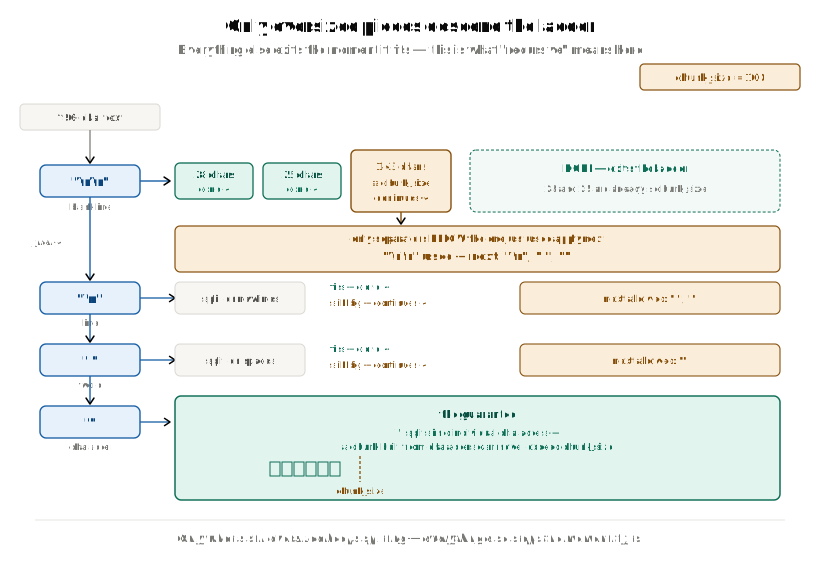
SPLIT is finished. Everything it was ever going to produce now exists: the two short paragraphs from step 1, which are already packed and gone, and these 22 words. So there's exactly one job left — turn 22 words into chunks. That's PACK, and it's the next two steps.
Step 4 — PACK fills a chunk
PACK has almost no memory. It keeps two things, and that's the whole of it:
- a buffer — the pieces going into the chunk it's building right now
- a total — their combined length
Its rule is just as short. Take the pieces in order, add each one to the buffer, and keep the total updated. When the next piece would take the total over chunk_size, close the chunk and start a new one.
Here it is on the 22 words. They go in one at a time, and the total climbs:
'\nMigrations'  11  ->  total  11
' are'           4  ->  total  15
' versioned'    10  ->  total  25
' Python'        7  ->  total  32
' files'         6  ->  total  38
' that'          5  ->  total  43
' describe'      9  ->  total  52
' schema'        7  ->  total  59
' changes'       8  ->  total  67
' and'           4  ->  total  71
' apply'         6  ->  total  77
' them'          5  ->  total  82
' to'            3  ->  total  85
' the'           4  ->  total  89
' database'      9  ->  total  98
First fifteen words in, 98 characters. The sixteenth word is ' in', three characters long. 98 + 3 = 101, cross the limit — so the chunk closes.
Two details here, both worth slowing down for.
' in' is not in the chunk. The chunk closes with what was already in the buffer. The word that triggered the close is exactly the word being kept out — it goes on to start the next chunk instead.
The chunk is 97 characters, not 100. The buffer totalled 98, and the leading \n gets stripped off the finished chunk, leaving 97. PACK stopped there because the only way to get closer to 100 was to take a word that didn't fit, and it moves whole words only — never parts of them. That restriction is the entire reason chunks don't end mid-word, and the gap under the limit is what it costs. chunk_size is a ceiling, not a target.
That's the second of the three chunks, finished and emitted. Seven of the 22 words are still outside it: ' in', which caused the close, and the six that come after it.
Step 5 — the drain, and the words that survive
Now the part the fill rule left out. The chunk has been emitted, but the buffer still holds all fifteen words that went into it.
Before the trace, one thing worth fixing in place, because it's the easiest thing here to get backwards. The drain is not cleanup. It isn't there to empty the buffer. It exists to decide exactly one thing: what the next chunk in this run starts with. Whatever it drops, it drops because it isn't needed for that.
Which tells you when it runs — only when a chunk closes and another one is still coming in the same run. That's what "a piece didn't fit" amounts to: ' in' couldn't go in, so a chunk had to close and a new one has to start, and something has to decide what carries over into it. In the code, the pop loop sits inside that very if.
It also answers the obvious follow-up: if the drain is skipped, who empties the buffer? Nobody does. PACK's buffer is a local variable belonging to one run — created empty when the run starts, gone when the run returns. There is no line anywhere in the splitter that clears it. That is simply what became of the buffer holding those two short paragraphs in step 1: PACK ran out of pieces, emitted what it had, and returned, and the buffer went with it.
Here, though, PACK does have a next chunk to seed. So it drops words from the front, one at a time, for as long as what's left is bigger than chunk_overlap:
pop '\nMigrations'  ->  total 87        87 > 20, keep going
pop ' are'          ->  total 83
pop ' versioned'    ->  total 73
pop ' Python'       ->  total 66
pop ' files'        ->  total 60
pop ' that'         ->  total 55
pop ' describe'     ->  total 46
pop ' schema'       ->  total 39
pop ' changes'      ->  total 31
pop ' and'          ->  total 27
pop ' apply'        ->  total 21        21 > 20, one more
pop ' them'         ->  total 16        16 is not > 20  ->  stop
Three words are left standing: ' to', ' the', ' database' — 16 characters.
Those three words are the overlap. Nothing was copied to produce them. They're baked into the chunk that just closed, which can't change now; and they're also still sitting in the buffer, which is where the next chunk gets built. The same three words end up in two chunks at once.
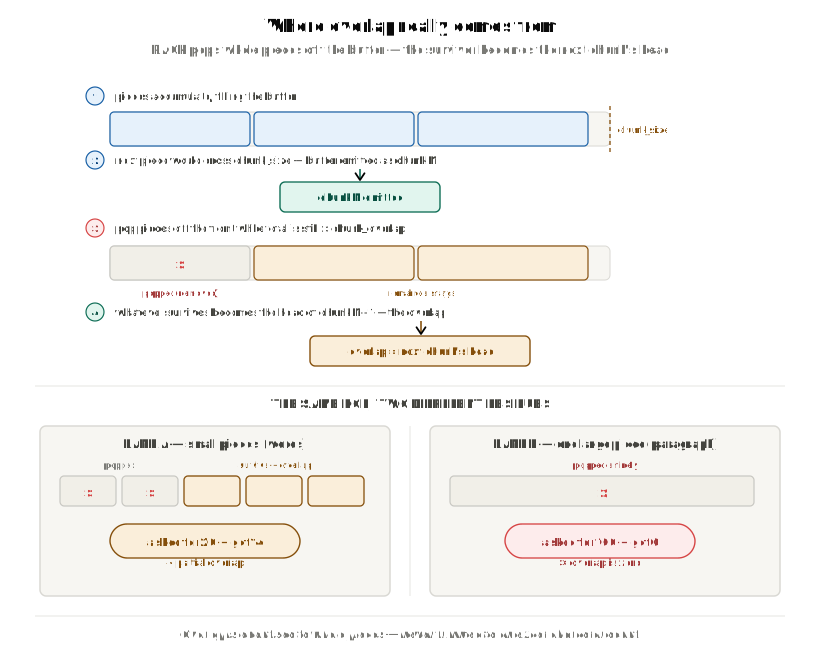
Why drop from the front? Because the words at the back of the buffer are the ones touching the boundary — where the chunk that just closed meets the one about to start — and they're the context the next chunk needs. The words at the front are furthest from the next chunk, and the chunk that just closed already covers them.
With the drain done, PACK simply continues on filling, from where it left, ' in'. ' in' finally goes in, bringing the total to 19, the last six words follow, and the words run out at a total of 60. There's nothing left to overflow anything, so the buffer is emitted as the third and final chunk — 59 characters after stripping.
That's the whole machine. Which leaves one sentence, and it explains every strange number in the rest of this post:
Overlap is a leftover, not an allocation. Nobody measures out 20 characters. 20 is where the dropping stops, and the overlap is whatever happens to still be standing.
Because PACK only ever moves whole pieces, that leftover lands on whatever number the piece sizes allow — 16 here, and 15 once the leading space is stripped. Not 20. chunk_overlap is a ceiling too.
Here are all five steps in one picture, in the order they ran:
All five steps, in code
Two functions. Steps 1 to 3 are _split_text; steps 4 and 5 are _merge_splits. Both are simplified for readability — shorter names, no class, no generics — but the control flow is the real one. I checked the _merge_splits below against the library by capturing every call the real splitter made across four documents and six chunk_size/chunk_overlap settings, and running this version on the same inputs: 168 calls, identical output every time.
Steps 1 to 3 — SPLIT:
def _split_text(text, separators):
    # use the first separator this text actually contains;
    # "" means "split into individual characters"
    separator, finer_separators = _first_present(text, separators)
    pieces = text.split(separator) if separator else list(text)

    good, final_chunks = [], []
    for piece in pieces:
        if len(piece) < chunk_size:          # strictly less than
            good.append(piece)
        else:
            if good:
                final_chunks += _merge_splits(good, separator)
                good = []
            if finer_separators:
                final_chunks += _split_text(piece, finer_separators)  # recurse
            else:
                final_chunks.append(piece)   # nothing finer left; keep it oversized

    if good:
        final_chunks += _merge_splits(good, separator)
    return final_chunks
Both _merge_splits(...) calls in there are PACK, and the walkthrough used one of each. The first fired in step 1, the moment SPLIT met the oversized third paragraph — that's the flush that produced chunk [0]. The second fired at the end of the loop that had just cut the 22 words, with nothing left to walk; that's the run you followed through steps 4 and 5. PACK never runs anywhere except from inside SPLIT, which is the interleaving, sitting in the code itself.
Steps 4 and 5 — PACK. This is the function those two calls land in. The drain is the while loop in the middle:
def _merge_splits(pieces, separator):
    chunks = []
    buffer, total = [], 0                   # step 4: the buffer, and its running total

    def close():                            # join, strip, and drop an all-blank result
        text = separator.join(buffer).strip()
        if text:
            chunks.append(text)

    for piece in pieces:
        added = len(piece) + (len(separator) if buffer else 0)

        if total + added > chunk_size:                  # this piece does not fit
            if total > chunk_size:
                warn(f"Created a chunk of size {total}, longer than {chunk_size}")
            if buffer:
                close()                                 # close, WITHOUT this piece

                # step 5 — the drain. Nested this deep on purpose: it runs only
                # when a piece did not fit, which is the only time another chunk
                # is coming that could use whatever survives.
                while total > chunk_overlap or (
                    total + added > chunk_size and total > 0
                ):
                    total -= len(buffer[0]) + (len(separator) if len(buffer) > 1 else 0)
                    buffer.pop(0)                       # pop from the FRONT
                # whatever is still in `buffer` becomes the next chunk's head

        buffer.append(piece)
        total += added

    close()                                 # pieces ran out — no drain runs here
    return chunks                           # `buffer` was local; it ends with the call
Look at how deeply that while is nested: inside if total + added > chunk_size — a piece didn't fit — and then inside if buffer — there's something to close. That nesting is the whole answer to why chunk [0] has no overlap. Its run was handed two pieces totalling 53, so the outer if never fired even once, and execution never got within two levels of the drain. It fell out of the loop, hit the if buffer at the bottom, emitted one chunk and returned.
Notice too what the function doesn't contain: any line that empties buffer. It's created empty on the way in, and it's gone when the function returns. Compare good = [] up in _split_text — SPLIT clears its pending list deliberately, because SPLIT carries on walking pieces after a hand-off. PACK has nothing to carry on for.
What comes out
Both halves have now run. Here is everything the splitter hands back:
chunk [0] len= 53 'Django models map to tables.\n\nEach field is a column.'
chunk [1] len= 97 'Migrations are versioned Python files that describe schema changes and apply them to the database'
chunk [2] len= 59 'to the database in a deterministic order every single time.'
Chunk [0] was closed back in step 1. Chunks [1] and [2] are the two that steps 4 and 5 built out of the 22 words.
Now look closely at where chunk [1] ends and chunk [2] begins:
[1]  ... schema changes and apply them to the database
[2]                                    to the database in a deterministic order ...
to the database — those are the three words that survived the drain in step 5, 15 characters once the leading space is gone. They're in both chunks. That shared text is overlap, and the previous post covers why chunks are built to share their edges at all.
So one of the two boundaries got a bridge, and the other got nothing:
| boundary | overlap |
|---|---|
chunk [0] → [1] | 0 |
chunk [1] → [2] | 15 |
Same document, same run, the same chunk_overlap=20 for both. So why did one boundary get 15 characters and the other none at all?
Why the first boundary has no overlap
There are two separate reasons, and either one alone would have been enough.
Reason 1 — nothing ever failed to fit in that buffer. Chunk [0] came from the PACK run that was handed exactly two pieces, 28 and 25 characters. They went into the buffer exactly the way the 22 words did in step 4 — same buffer, same rule, running total 28 then 53. The difference is how that run ended: it ran out of pieces. Nothing overflowed, so the branch the drain lives in never fired, and the buffer was joined and returned untouched.
What actually closed that chunk was SPLIT meeting the oversized third paragraph and handing off what it had, back in step 1. That's a different kind of close, and it carries nothing forward.
Reason 2 — there was nowhere to carry it to. Even if the drain had run, its survivors would have gone nowhere. Chunk [0] came out of one PACK run; chunk [1] came out of a different one, on a completely different group of pieces. The buffer belongs to a single run — created empty, and gone when that run returns — so nothing from the earlier run can reach the later one.
That gives a rule worth keeping:
Overlap can only ever appear between two chunks emitted by the same PACK run. Every boundary where SPLIT switched groups is a hard cut — at any settings, on any document.
Seam [1]→[2] sits inside one run, on word-sized pieces, so the drain worked normally. Seam [0]→[1] spans two runs, so no mechanism existed that could have bridged it.
Three ways a chunk closes
Worth collecting, because only one of the three can produce overlap at all:
| how the chunk closed | does the drain run? | overlap |
|---|---|---|
| a piece wouldn't fit — overflow | yes | 0 up to chunk_overlap |
| SPLIT met an oversized piece and handed off | no | none |
| the pieces simply ran out | no | none |
The rule underneath: popping happens when a chunk closes and the run keeps going. If the chunk closed because the run is ending — the pieces ran out, or SPLIT is leaving to go split something else — there's no next chunk to hand a tail to, so nothing is kept.
And even the top row can give you zero. The drain has a second condition alongside the one you watched. It also keeps popping while what's left, plus the piece that's about to go in, would still overflow.
That's a safety net. There's no point keeping a tail for the next chunk if the piece starting that chunk already needs the whole 100 characters to itself.
Which means the piece after a boundary helps decide whether that boundary gets a bridge at all. Here are two runs that are identical until the very last piece:
buffer when the chunk closes:  [32, 27, 17, 10, 9]  =  95

if next piece is 55
  pop 32, 27, 17  ->  [10, 9] = 19    19 + 55 =  74, fits  ->  stop.  overlap 17

if next piece is 97
  pop 32, 27, 17  ->  [10, 9] = 19    19 + 97 = 116, no    ->  keep popping
  pop 10          ->  [9]     =  9     9 + 97 = 106, no    ->  keep popping
  pop 9           ->  []      =  0                         ->  stop.  overlap 0
The 10 and the 9 are small enough to survive — 19 is under the 20 ceiling, and in the first run they do. The second run throws them out anyway, because nothing can sit beside a 95-character piece in a 100-character chunk.
There's one more way to get zero from that top row, and it's the most common of all in real documents. That's the next section.
The overlap you asked for is a ceiling
If you've ever written a sliding window by hand, overlap was exact: advance by 80, take a window of 100, and the last 20 characters repeat every single time. That's the intuition the name chunk_overlap inherits. PACK doesn't slide a window — it drains a buffer — so the numbers come out somewhere else entirely.
To see where the number really comes from, here's a second example — deliberately small, so every step fits on one line. Four short paragraphs:
text = (
    "Models map to tables. Fields are columns.\n\n"
    "Indexes speed lookups. Keys enforce links.\n\n"
    "Migrations version changes. Order matters.\n\n"
    "Backups run nightly. Restores are tested."
)
SPLIT cuts it on blank lines and hands PACK four pieces:
[41, 44, 44, 43] the last three each carry their leading "\n\n"
chunk_size is still 100, the same limit used all through this post.
One PACK run, from the first piece to the last
One thing about this document is different from the first one, and it is the thing that makes overlap possible at all. Every piece is under 100, so SPLIT never meets an oversized piece and never has to break off and go split something. It hands all four pieces over in one batch, so the whole document is packed by a single PACK run — one buffer, alive from the first piece to the last.
That's the opposite of the first example, where a 143-character paragraph interrupted SPLIT and chunks [0] and [1] ended up coming out of different PACK runs, on different buffers. Here every boundary sits inside one run, which is the only place a drain can carry anything across.
PACK fills that buffer the way you watched it in step 4:
+41  ->  total  41
+44  ->  total  85
 44  ->  85 + 44 = 129, over 100  ->  close chunk [0] at 85
That close is the top row of the table above: a piece wouldn't fit. And the run is not over — two pieces are still waiting to go in, so there is a next chunk to hand something to. The drain runs right there, mid-run, on that same buffer, and then the loop picks up where it left off.
What the drain keeps is the only open question left, and that is what chunk_overlap decides.
Ask for 20
pop 41  ->  44 left      44 > 20, keep going
pop 44  ->   0 left      buffer empty  ->  stop
Both pieces are longer than 20, so neither survives. The run carries on with an empty buffer, exactly as if it had just started:
+44 -> 44 +43 -> 87 pieces run out -> close chunk [1] at 85
That second close is the table's bottom row — the pieces ran out — so no drain follows it, and the run ends. Here is everything it produced:
[0]  85 chars
     Models map to tables. Fields are columns.

     Indexes speed lookups. Keys enforce links.

[1]  85 chars
     Migrations version changes. Order matters.

     Backups run nightly. Restores are tested.
Four paragraphs in, two chunks out, and not one word appears twice. Asked for 20, measured 0.
(The buffer held 87 at that last close but the chunk is 85: the piece leading it still carries its "\n\n", and joining strips whitespace off both ends.)
Ask for 30
Identical, line for line — 44 is still bigger than 30, so both pieces still get popped and the buffer still empties. The output is the same two chunks, byte for byte:
[0]  85 chars   Models map to tables. … Keys enforce links.
[1]  85 chars   Migrations version changes. … Restores are tested.
Asked for 30, measured 0.
Ask for 50
pop 41 -> 44 left 44 > 50? no -> stop
This time the second paragraph survives. It stays in the buffer, and the run continues on top of it — so it ends up in two chunks at once:
+44  ->  88      88 + 43 = 131, over 100  ->  close chunk [1] at 86, drain again
pop 44  ->  44 left      stop
+43  ->  87      pieces run out           ->  close chunk [2] at 85
Two overflow closes in one run, so the drain fires twice — and this is what that changes in the output:
[0]  85 chars
     Models map to tables. Fields are columns.

     Indexes speed lookups. Keys enforce links.

[1]  86 chars
     Indexes speed lookups. Keys enforce links.      <- kept by the first drain

     Migrations version changes. Order matters.

[2]  85 chars
     Migrations version changes. Order matters.      <- kept by the second drain

     Backups run nightly. Restores are tested.
The same four paragraphs, but three chunks now, and each middle paragraph appears twice — once as the tail of one chunk, once as the head of the next. That repeated paragraph measures 42 characters: 44 minus the leading blank line, stripped off the front of the chunk it starts. Asked for 50, measured 42.
What that adds up to
Those three runs, plus one more at 60:
chunk_overlap asked for | chunks out | overlap measured |
|---|---|---|
| 20 | 2 | [0] |
| 30 | 2 | [0] |
| 50 | 3 | [42, 42] |
| 60 | 3 | [42, 42] |
Four settings, two outcomes: nothing, or one whole paragraph. Nothing in between is reachable, because the drain moves whole pieces and the pieces here are paragraphs. You cannot ask this document for 30 characters of overlap and get 30; there is no arrangement of whole paragraphs that adds up to 30.
That is the whole meaning of the word ceiling:
chunk_overlapis the most you can get, not the fixed amount you get. A piece longer thanchunk_overlapcan never survive the drain — on any document, at any other setting. So compare your typical paragraph length againstchunk_overlap, and you can predict the zeros before you index anything.
It explains the pair most tutorials use, too — chunk_size=1000, chunk_overlap=200. Whether it gives you anything at all depends entirely on your prose. A paragraph longer than 200 characters can never survive the drain, no matter what else you change; one shorter than 200 has a chance. Being small enough is required, but it is not a guarantee on its own.
Notice one more thing in that table. Going from 30 to 50 didn't just add overlap — it turned 2 chunks into 3. The repeated text has to live somewhere, so asking for more overlap means storing and embedding more text, and the same paragraph can come back twice in one search result. Overlap is not free.
When the splitter quietly ignores chunk_size
Everything above assumed chunk_size is a hard ceiling. It only is because of one detail: the default ladder ends in "", and "" is the one separator guaranteed to exist in any text — so there's always somewhere left for the recursion to go.
Remove it, and that guarantee goes with it:
UNSPLIT = "a" * 250
RecursiveCharacterTextSplitter(
    chunk_size=100,
    chunk_overlap=20,
    separators=["\n\n", "\n", " "],  # no "" at the end
)
Result: if there is a word that have 250 characters, it will produce a single 250-characters chunk, against a chunk_size of 100 — with no warning logged at all.
But with the default separators, which do end in "", that same string comes back as [100, 100, 90] where chunk range is [0-99, 80-179, 160-249] .
It's tempting to assume the library would at least tell you. There is a warning for exactly this case — "Created a chunk of size %d, which is longer than the specified %d" — but it lives inside _merge_splits — it's the warn(...) line in the code above — and an unsplittable piece never gets there. Look back at the _split_text code: when there's no finer ladder left, the oversized piece goes straight onto final_chunks, bypassing PACK entirely.
The warning is real and reachable — CharacterTextSplitter( chunk_size=100, chunk_overlap=20) splitting "x"*150 + "\n\n" + "y"*150 logs it verbatim: Created a chunk of size 150, which is longer than the specified 100. It just can't fire on the path you're actually using. The trailing "" is what turns chunk_size into a real guarantee instead of a suggestion.
Configuring it for your own documents
The ladder is a real design decision, not a default to leave alone — it decides how big your pieces are, and piece size decides everything else.
The repair that doesn't work
The rule above says overlap dies when the pieces are bigger than chunk_overlap. So the obvious repair is to make the pieces smaller by adding a sentence separator to the ladder:
RecursiveCharacterTextSplitter(
    chunk_size=100,
    chunk_overlap=20,
    separators=["\n\n", "\n", ". ", " ", ""],  # looks right
)
Those four paragraphs are two sentences each, so ". " genuinely occurs in the text. Run it against the default ladder anyway:
default ladder    ->  2 chunks, lengths [85, 85], overlaps [0]
with ". " added   ->  2 chunks, lengths [85, 85], overlaps [0]
Byte for byte identical. The reason is step 1 of SPLIT's rule: it uses the highest rung that appears in the text, and cuts on that one only. This document has blank lines, so "\n\n" wins and the ladder stops there. ". " is never reached, because a lower rung is only ever used inside a piece that was already too big on its own — and every paragraph here is well under 100.
That is worth stating as its own rule, because it is the most common misunderstanding of this class:
Adding a finer separator below one that already appears in your text changes nothing at all. The ladder is "use the first one present", not "try them all".
So if your paragraphs are shorter than chunk_size, there are only two levers that do anything: raise chunk_overlap past your paragraph length, which you just saw turn 2 chunks into 3, or change which rung gets picked first — which is the next section.
Match the ladder to your document
The default ladder is tuned for prose. Point it at Markdown and headings land in the wrong place:
MD = (
    "# Billing\n\n"
    "Invoices are generated on the first of each month for the previous period.\n\n"
    "## Refunds\n\n"
    "A refund can be requested within 30 days of the original charge date.\n\n"
    "## Disputes\n\n"
    "Disputes are handled by the payments team and resolved within 10 days."
)
Default separators, chunk_size=120, chunk_overlap=0:
[0] len= 97 '# Billing\n\nInvoices are generated on the first of each month for the previous period.\n\n## Refunds'
[1] len= 82 'A refund can be requested within 30 days of the original charge date.\n\n## Disputes'
[2] len= 70 'Disputes are handled by the payments team and resolved within 10 days.'
Every heading is stranded at the end of the chunk before it, not attached to the section it names — ## Refunds sits at the bottom of chunk 0, and the text it introduces starts chunk 1. Give the ladder headings as its top rung instead:
splitter = RecursiveCharacterTextSplitter(
    chunk_size=120,
    chunk_overlap=0,
    separators=["\n## ", "\n# ", "\n\n", "\n", " ", ""],
)
[0] len= 85 '# Billing\n\nInvoices are generated on the first of each month for the previous period.'
[1] len= 81 '## Refunds\n\nA refund can be requested within 30 days of the original charge date.'
[2] len= 83 '## Disputes\n\nDisputes are handled by the payments team and resolved within 10 days.'
Each heading now travels with its own section, because it's the first thing the ladder looks for rather than the last.
Count tokens, not characters
Everything in this post has counted characters, because length_function defaults to len. Your embedding model doesn't count characters. It counts tokens — the units its tokenizer chops text into, mostly whole words, with punctuation and common word-endings split off.
Run the first paragraph of the small example through one and you can see them:
'Models map to tables. Fields are columns.'                            41 characters

['Models', ' map', ' to', ' tables', '.', ' Fields', ' are', ' columns', '.']    9 tokens
That list should look familiar. It's almost exactly what SPLIT produced back in step 3 when it cut on " " — words, each carrying the space in front of it. For ordinary prose, a token is roughly a word.
Why the ruler matters. The model has a hard token limit, and a hundred characters is not a fixed number of tokens. It depends entirely on what the text is:
| text | characters | tokens | characters per token |
|---|---|---|---|
| plain English | 52 | 11 | 4.73 |
| a URL | 55 | 14 | 3.93 |
| a line of pandas | 60 | 21 | 2.86 |
RecursiveCharacterTextSplitter | 30 | 5 | 6.00 |
Same ruler, wildly different readings. Take 512 characters of each: as English prose that's 106 tokens, as dense code it's 176 tokens — a 66% swing from one setting. Size your chunks in characters and you are guessing at the limit you actually have to respect, with the guess being worst exactly where documents are hardest.
So hand the splitter your model's tokenizer, and chunk_size starts meaning what you meant by it:
RecursiveCharacterTextSplitter(
    chunk_size=512,        # now 512 tokens
    chunk_overlap=64,      # now 64 tokens
    length_function=lambda s: len(tokenizer.encode(s)),   # your model's tokenizer
)
Nothing else changes. That's the part worth holding on to. SPLIT still walks the same ladder and cuts in the same places — the ladder is about separators, and separators don't care how you measure. PACK still fills a buffer, still overflows, still drains from the front. Only the ruler changed.
Here is the small example again, run both ways. Its four pieces are 41, 44, 44 and 43 characters — or 9, 10, 9 and 11 tokens:
chunk_size=100 ch, chunk_overlap=20 ch  ->  2 chunks  [85, 85] ch      overlap 0
chunk_size= 25 tk, chunk_overlap= 5 tk  ->  2 chunks  [18, 18] tk      overlap 0

chunk_size=100 ch, chunk_overlap=50 ch  ->  3 chunks  [85, 86, 85] ch  overlap 42, 42 ch
chunk_size= 25 tk, chunk_overlap=12 tk  ->  3 chunks  [18, 17, 18] tk  overlap  9,  8 tk
The same chunks, split at the same boundaries, with the same paragraph repeated. Only the numbers on the dial are in a different unit.
And the ceiling rule survives the translation exactly. At 12 tokens of overlap, the piece that survives the drain is 10 tokens; it measures 9 in the output, because its leading "\n\n" is one token and gets stripped off the front — the same single character-pair that turned 44 characters into 42. So:
A piece longer than
chunk_overlapcan never survive the drain, whichever ruler you are using. Switching to tokens doesn't fix a zero-overlap document — it just tells you the truth about it in the units your model cares about.
Measure it on your own documents
Every number in this post came from running the splitter against real text and counting what came back, not from reading the constructor arguments. That's the habit worth taking away, because the two settings you type in are the two things that don't tell you what you'll get — your separator ladder, your paragraph lengths and your heading structure do.
Point this at your own corpus before you trust a chunk_overlap value:
def overlap(a, b):
    for k in range(min(len(a), len(b)), 0, -1):
        if a[-k:] == b[:k]:
            return k
    return 0


chunks = splitter.split_text(your_document)
boundaries = [overlap(chunks[i], chunks[i + 1]) for i in range(len(chunks) - 1)]
print(f"{sum(1 for b in boundaries if b)}/{len(boundaries)} boundaries have overlap")
print(f"chunk sizes: {[len(c) for c in chunks]}")
Two numbers, and between them they answer the two questions this post has been about: how many of your boundaries actually got a bridge, and whether your chunks are anywhere near the size you asked for. On the Markdown document from the last section it prints 0/2 boundaries have overlap and chunk sizes: [85, 81, 83] — a chunk_size of 120 that never gets close, and a chunk_overlap of 0 doing exactly what it says.
Recap
RecursiveCharacterTextSplitterdoes two separate jobs. SPLIT finds legal cut points by walking a ladder of separators (default["\n\n", "\n", " ", ""]), recursing into finer ones only on pieces still at or overchunk_size. PACK glues those pieces into chunks, filling a buffer until the next piece won't fit.- They interleave. PACK is called from inside SPLIT and runs once per group of pieces handed to it, not once over the document.
- The ladder's trailing
""is what turnschunk_sizeinto a real guarantee — drop it and the splitter can silently return a chunk far larger than you asked for, with no warning logged anywhere. - Only the highest rung present in the text is used. Adding a finer separator below one that's already present changes nothing.
chunk_sizeis a ceiling, not a target: PACK moves whole pieces, so a chunk stops wherever the last piece that fits ends.- Overlap isn't measured out. After an overflow close, PACK pops whole pieces off the front of its buffer until what's left fits under
chunk_overlap— and whatever survives is already sitting there when the next chunk starts. That leftover is the overlap, which is why it lands on 42 when you asked for 50, and on 15 when you asked for 20. - A piece longer than
chunk_overlapcan never survive the drain. Compare your typical paragraph length against your overlap setting and you can predict the zeros before you index anything. - Overlap is not free. The repeated text has to be stored somewhere, so raising
chunk_overlappast your paragraph length adds chunks as well as overlap, and the same paragraph can come back twice in one search result. - Two of the three ways a chunk can close produce no overlap at all, and overlap never crosses from one PACK run to the next.
chunk_sizeandchunk_overlapare ceilings, not targets. You will never get more than you asked for. You will often get less — sometimes none at all. Measuring what your configuration actually produces, on your own corpus, is the only way to know which one you have.