How Do You Stop a Database From Losing Your Update?
The lost update is the concurrency bug that raises no error: two transactions read the same value, each computes a new one in application code, and the second write silently erases the first. This post covers the four production fixes — arithmetic in SQL, SELECT … FOR UPDATE, a version column, and a higher isolation level — a retry loop that actually works, where an isolation level is even set, and the gotchas that bite in production.
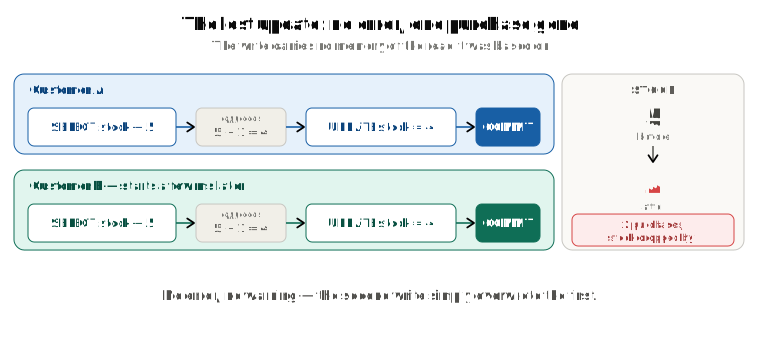
The previous post ended on a gap. When two transactions write the same row, Postgres handles it: the second waits for the first, and then either quietly re-checks the row (Read Committed) or stops you with an error (Repeatable Read). But that protection covers a single SQL statement. The moment your read and your write are two separate statements with application code in between, Postgres has nothing to re-check — and the bug that falls through that gap is the most common concurrency bug in production, because it raises no error at all.
You don't need the previous post to follow this one. It helps to know that Postgres keeps old versions of a row and that a transaction reads through a snapshot — a fixed view of who had committed at one moment — but every fact this post leans on is restated where it's used.
Here's the plan. First the bug itself, and why the default isolation level can't see it. Then the four fixes, and which one fits which situation. Then the two things every "just retry" explanation skips: how to write the retry loop, and where an isolation level is actually set. Finally the gotchas, and a cheat sheet for the whole series.
The problem: the same purchase, written as two statements
Same shop as last time. Product 42, 5 in stock. Here's the code most apps have somewhere:
# BAD — this is the real production bug
product = Product.objects.get(id=42)      # SELECT stock  → 5
if product.stock > 0:
    product.stock -= 1                     # arithmetic in PYTHON, not SQL
    product.save()                         # UPDATE products SET stock = 4 WHERE id = 42
Read, decide, write. Nothing looks wrong. Now two customers run it at the same moment:
Customer A                                Customer B
----------------------------------------  ----------------------------------------
SELECT stock FROM products WHERE id=42
  → 5
                                          SELECT stock FROM products WHERE id=42
                                            → 5
-- Python: 5 - 1 = 4
UPDATE products SET stock = 4
  WHERE id = 42
COMMIT
                                          -- Python: 5 - 1 = 4
                                          UPDATE products SET stock = 4
                                            WHERE id = 42
                                          COMMIT
Two purchases. Stock went from 5 to 4. No error, no warning, nothing in the logs. Customer A's purchase has simply vanished from the count. (Run it — the final SELECT really does say 4.)
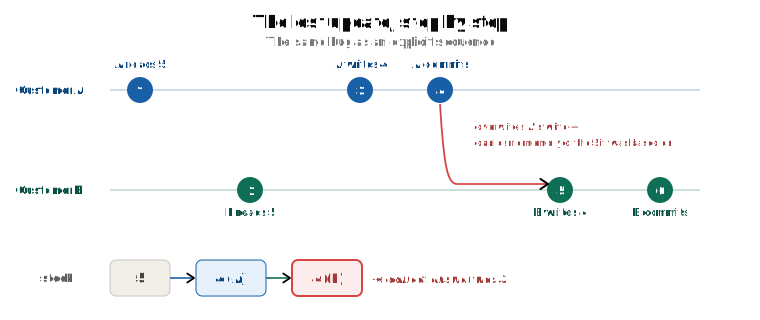
Lost update — two transactions read the same value, each computes a new value from it in application code, and the second write blindly overwrites the first. The first update is lost.
Why Read Committed doesn't save you
Read Committed — the default — does have a safety net for writes. When an UPDATE finds that its row was changed by someone who committed in the meantime, it follows the row to the newest version, re-checks the WHERE clause there, and applies the update on top. (That's EvalPlanQual, from the previous post.)
Look at what B's UPDATE actually says: SET stock = 4 WHERE id = 42. There's no arithmetic in it for Postgres to redo — the 5 - 1 happened in Python. And id = 42 is still true, so the re-check passes. Postgres does exactly what it was asked: set the stock to 4. There's nothing for the database to reconcile, because the statement carries no memory of the value it was based on.
Why Repeatable Read does — at a price
Run the same two customers at Repeatable Read and B's UPDATE fails:
ERROR: could not serialize access due to concurrent update
B's snapshot saw the row before A's commit; the row moved after that snapshot; Repeatable Read refuses to write over a moved row. That's fix (d) below — and it's a real fix. But now B's transaction is dead and something has to retry it. So even the level that catches the bug hands you a job.
First, decide what your write means
Before picking a fix, answer one question: what does the write mean? stock = 5. A wants to make it 4. B wants to make it 4. There are two very different situations hiding in that sentence.
Absolute writes — "set the value to X". Two admins each edit a product's description. They genuinely disagree about what the text should be; there's no arithmetic to preserve. Last commit wins, and the earlier write is simply gone. Often that's fine. If it's not fine, you need to detect the collision and tell somebody — that's fix (c).
Relative writes — "subtract one". This is the dangerous one, and it's the usual real case: money, stock, counters, vote tallies. The correct answer is 5 - 1 - 1 = 3. A naive read-then-write produces 4. Something silently vanishes.
Everything below is about relative writes, with one fix that's really for absolute ones.
The four fixes
(a) Do the arithmetic in the database, in one statement
UPDATE products SET stock = stock - 1 WHERE id = 42 AND stock > 0;
That's the whole fix. Postgres reads the current live value at write time, holds the row for that instant, and subtracts. Two of these back to back give the correct 3 — measured: A's UPDATE in an open transaction, B's UPDATE waited about a second for A to commit, then applied on top, and the final stock was 3. There's no window between the read and the write because there is no separate read.
In Django, that's an F() expression:
from django.db.models import F
Product.objects.filter(id=42, stock__gt=0).update(stock=F('stock') - 1)
Prefer this always for counters, balances and stock. It's the cheapest fix, it works at the default isolation level, and it needs no retry loop.
Isolation-level note: at Read Committed this is silent and correct. At Repeatable Read the same statement still raises the serialization error if the row moved after your snapshot — correct, but you need a retry loop.
(b) Lock the row when you read it
Sometimes you genuinely must read, think in application code, and then write — a bank transfer that checks two balances, a seat booking that checks a seating rule. You can't collapse that into one statement. So make the read itself claim the row:
BEGIN;
SELECT stock FROM products WHERE id = 42 FOR UPDATE;   -- a second FOR UPDATE here waits
-- application decides
UPDATE products SET stock = :new WHERE id = 42;
COMMIT;
# Django
with transaction.atomic():
    product = Product.objects.select_for_update().get(id=42)
    product.stock -= 1
    product.save()
FOR UPDATE claims the row at read time. A second transaction running the same SELECT … FOR UPDATE waits until the first commits, and then reads the fresh value. Measured: B's FOR UPDATE waited the 1.5 seconds A held the row, then returned A's committed value. The gap from the bug is closed, because the second customer can't even see the stock until the first has finished with it.
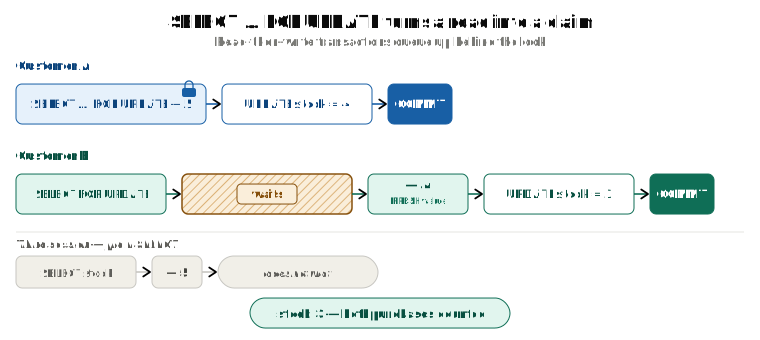
"Wait — the last post said reads never wait in Postgres. Why does this one?" Because SELECT … FOR UPDATE is not a read in the MVCC sense. A plain SELECT picks a version through its snapshot and stops. FOR UPDATE goes one step further: it claims the head of the row exactly as an UPDATE would, by writing its own transaction ID into the version's xmax (with a flag that says "locking, not replacing"). So it runs the same wait-or-proceed check as any writer, and if another transaction has already claimed the row — with an UPDATE, a DELETE, or another FOR UPDATE — it sleeps until that transaction finishes. Plain SELECTs from other sessions are not affected at all; they keep reading the old version and never wait. (Measured: a plain SELECT from a third session, while the row was locked, returned in a millisecond.)
Two variants worth knowing:
FOR UPDATE NOWAIT— error immediately instead of waiting:ERROR: could not obtain lock on row in relation "products".FOR UPDATE SKIP LOCKED— quietly skip rows someone else has locked. This is the standard job-queue pattern: each worker grabs different rows and nobody blocks.
Isolation-level note: "wait, then read fresh" is Read Committed behaviour. At Repeatable Read, a SELECT … FOR UPDATE on a row that changed after your snapshot raises could not serialize access due to concurrent update instead of returning the fresh value. So (b) replaces retry logic at Read Committed, but causes it at Repeatable Read.
(c) Detect the collision with a version column
Some reads and writes are minutes apart: a user opens an edit form, thinks, and saves. You can't hold a row lock for five minutes. What you can do is notice that the row changed underneath them:
-- the form loaded:  name = 'Lamp', version = 7
UPDATE products SET name = 'Desk lamp', version = 8
WHERE id = 42 AND version = 7;
-- UPDATE 1  → saved
-- UPDATE 0  → someone else saved first; reload and show them
Measured: two sessions that both loaded version 7 — the first UPDATE returned UPDATE 1, the second returned UPDATE 0 and changed nothing.
# Django — the version check written by hand
from django.db.models import F

def update_product(request, pk):
    updated = Product.objects.filter(
        pk=pk,
        version=request.data['version'],     # the version the client loaded
    ).update(
        name=request.data.get('name', F('name')),
        version=F('version') + 1,
    )
    if updated == 0:
        return Response({'error': 'Changed by someone else. Please reload.'}, status=409)
No lock is held while the user thinks. This is what Rails (lock_version) and Hibernate (@Version) do under the hood; Django has no built-in equivalent — its admin is plain last-write-wins — so you write the check yourself. It's the right fix for absolute writes where silently losing the earlier edit isn't acceptable.
(d) Raise the isolation level and retry
Run at Repeatable Read or Serializable and let the database be your conflict detector. We saw it catch the bug above. Your application just needs a retry loop — and that's the whole next section, because "just retry" is where most implementations go wrong.
Reach for this when the rule you're protecting spans several rows and no single-row lock can express it — the "at least one person on shift" case from the previous post, where the two transactions never touch the same row and only Serializable notices.
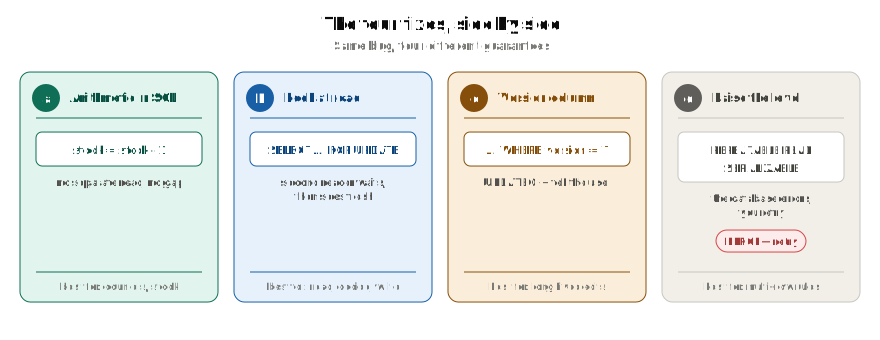
Which fix for which situation
| Real scenario | The risk | Reach for |
|---|---|---|
| Stock decrement, unread counters, vote tallies | Lost update (relative write) | (a) atomic UPDATE … SET x = x - 1 |
| Bank transfer, seat booking — must read, decide, then write | Lost update across app code | (b) SELECT … FOR UPDATE |
| Job queue — many workers pulling tasks | Two workers grabbing the same task | (b) with SKIP LOCKED |
| User editing a form over several minutes | Stale overwrite of a long-lived edit | (c) version column |
| Multi-row rule ("at least one on shift") | Write skew — no single row lock catches it | (d) Serializable + retry, or give the rule its own row |
| Two admins editing a description | Last write wins | Nothing — or (c) if collisions must be surfaced |
Production rule: for money, stock and counters, never do read-modify-write in application code without one of these. "Last write wins" is only acceptable when losing the earlier write genuinely doesn't matter — and that should be a decision you made on purpose, not an accident.
Retry logic, properly
Every explanation says "just retry". Almost none say how. Here is how.
Catch by SQLSTATE, never by message text
Every Postgres error carries a five-character SQLSTATE code. Message strings change between versions and languages; the code doesn't. Two codes mean "this transaction was cancelled through no fault of its own, run it again":
| SQLSTATE | Name | Meaning |
|---|---|---|
40001 | serialization_failure | Both the Repeatable Read "concurrent update" error and the Serializable "read/write dependencies" error |
40P01 | deadlock_detected | Two transactions each waiting for the other's row; Postgres picked yours as the victim |
import random, time
from django.db import transaction, OperationalError

RETRYABLE = {'40001', '40P01'}

def run_with_retry(fn, attempts=5):
    for attempt in range(attempts):
        try:
            with transaction.atomic():          # must be the OUTERMOST atomic block
                return fn()                     # re-runs the whole thing and reads fresh
        except OperationalError as e:
            cause = e.__cause__                 # the raw driver error Django wrapped
            code = getattr(cause, 'sqlstate', None) or getattr(cause, 'pgcode', None)
            # psycopg 3 exposes .sqlstate; psycopg2 exposes .pgcode
            if code not in RETRYABLE or attempt == attempts - 1:
                raise
            time.sleep((2 ** attempt) * 0.05 * (0.5 + random.random()))  # backoff+jitter
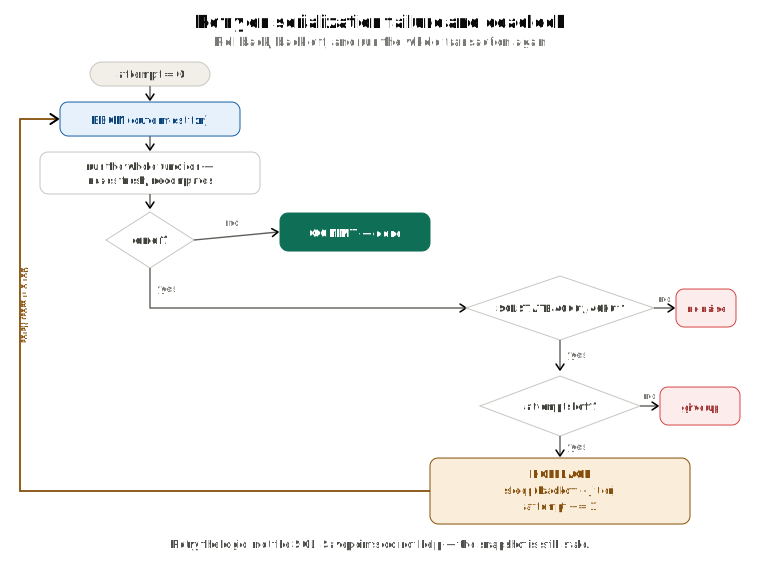
Four rules that are easy to get wrong
1. Retry the application logic, not the SQL. The whole point is to read fresh data and recompute. Re-issuing the same UPDATE with the same precomputed value isn't a retry — it's the lost update bug wearing a hat.
2. Wrap the outermost transaction. Once any statement raises an error, the transaction is aborted and every further query in it fails (current transaction is aborted, commands ignored until end of transaction block; in Django, a TransactionManagementError). Savepoints don't rescue you: Postgres will let you ROLLBACK TO SAVEPOINT past the error, but the reason for the error is still there — your snapshot is still stale — so the retried statement fails again. Measured: after ROLLBACK TO SAVEPOINT, the same UPDATE raised the same 40001. You have to start the transaction over, which is what gives you a new snapshot.
3. Bound the attempts and back off with jitter. Unbounded retries under load produce a retry storm: every transaction retries, collides again, and throughput collapses. Five attempts with growing, randomised sleeps is a sane default.
4. At Serializable, readers need this too. A read-only transaction can be the one Postgres cancels — see the previous post. Wrap your reports as well.
Where the isolation level actually comes from
Nothing in ordinary application code looks like it sets an isolation level. You call transaction.atomic(), or the ORM opens a transaction for you, and the level is never mentioned. That's because the level is a setting with a default, and the default is Read Committed. You can override it at three scopes, from widest to narrowest, and the narrowest wins.
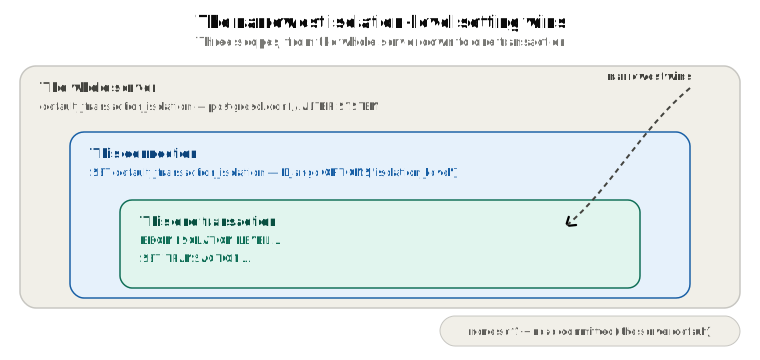
The whole server. One line in postgresql.conf, or the same thing from SQL as a superuser:
ALTER SYSTEM SET default_transaction_isolation = 'repeatable read';
SELECT pg_reload_conf();
Every new transaction on every connection now starts at Repeatable Read unless something narrower says otherwise. Out of the box this is read committed, and almost nobody changes it — it's the wrong place for a decision that should depend on what each transaction does.
This connection. Right after connecting, the client runs:
SET default_transaction_isolation = 'repeatable read';
Every transaction on this connection now starts at Repeatable Read; other connections are untouched. Nobody types this by hand — the driver sends it when you configure it. In Django that's the database OPTIONS:
# settings.py — every transaction on this connection
from psycopg import IsolationLevel          # psycopg 3

DATABASES = {
    'default': {
        'ENGINE': 'django.db.backends.postgresql',
        # ...
        'OPTIONS': {'isolation_level': IsolationLevel.REPEATABLE_READ},
    }
}
This one transaction. Say it at the start, before the first query:
BEGIN ISOLATION LEVEL REPEATABLE READ;
-- or:
BEGIN;
SET TRANSACTION ISOLATION LEVEL REPEATABLE READ;   -- must come before any query
# Django — just this transaction.
# Must be the FIRST statement inside the outermost atomic() block.
from django.db import connection, transaction

with transaction.atomic():
    with connection.cursor() as cur:
        cur.execute("SET TRANSACTION ISOLATION LEVEL REPEATABLE READ")
    # ... your queries; the snapshot is taken at the first one ...
Only this transaction is affected. The next BEGIN on the same connection is back to the connection's default.
If you've done none of these, you're at Read Committed — the server default, inherited by every connection, inherited by every transaction. That's why a Django app that only ever calls transaction.atomic() is at Read Committed: atomic() sends BEGIN (or SAVEPOINT when nested) and says nothing about the level. You can check from inside any transaction:
SHOW transaction_isolation; -- the level THIS transaction is running at
The connection scope is the usual choice when a whole service should run higher; the transaction scope is for the handful of transactions that need it while the rest of the app stays at the default. Whichever you pick, the retry loop goes in first.
How to choose
| Level | Use it when | Cost |
|---|---|---|
| Read Committed | The vast majority of application work — web requests, CRUD, short transactions | You handle lost updates yourself, with (a), (b) or (c) |
| Repeatable Read | A transaction reads the same data several times and needs one stable, self-consistent view: reports, multi-step calculations, pg_dump | Serialization errors → retry loop |
| Serializable | Correctness under concurrency is critical and subtle multi-row rules must hold: finance, inventory, booking, staffing rules | Most retries; predicate-lock overhead; every participant must be Serializable |
Rule of thumb: start at Read Committed. Escalate only when you have a specific consistency requirement it can't meet. And when you escalate, write the retry loop first — an escalated isolation level without retry logic is worse than the default, because it fails loudly and randomly under exactly the load you were trying to protect against.
Gotchas
1. The snapshot is taken at the first query, not at BEGIN. And SET TRANSACTION ISOLATION LEVEL must come before that first query, or you get SET TRANSACTION ISOLATION LEVEL must be called before any query.
2. transaction.atomic() does not set an isolation level. It opens a transaction (or a savepoint) at whatever the connection default is — Read Committed unless somebody changed it. Setting the level is a separate action.
3. Constraints don't respect your snapshot. A unique index is checked against the live index, not your snapshot. A Repeatable Read transaction can therefore be blocked by, and then fail on, a row its own snapshot can't see. Measured: with another session's uncommitted INSERT of the same email, the Repeatable Read INSERT waited for that session to commit, then failed with duplicate key value violates unique constraint. "Frozen world" applies to row visibility, not to constraint enforcement.
4. Deadlock detection is not instant. A waiting transaction only starts looking for a lock cycle after deadlock_timeout — 1 second by default. Then Postgres picks a victim and aborts it with deadlock detected (measured: the victim's UPDATE failed at 1.0 seconds, and the other transaction carried on). Consistent lock ordering in your code prevents most deadlocks — if every code path locks row 1 before row 2, a cycle can't form.
5. READ UNCOMMITTED exists in the syntax but does nothing. Postgres accepts it, and SHOW transaction_isolation will even report read uncommitted — but it behaves exactly like Read Committed. Measured: with another session's uncommitted UPDATE, a READ UNCOMMITTED transaction still saw the old value. There is no dirty-read mode.
6. "Read Committed never errors" has rare exceptions. MERGE can raise could not serialize access at Read Committed. Updating a row's partition key can raise tuple to be locked was already moved to another partition due to concurrent update. BEFORE triggers can raise tuple to be updated was already modified by an operation triggered by the current command. Rare, but "effectively never" is the honest phrasing, not "never".
7. Row locks are released only at commit or abort. Long transactions hold them the whole time. This is the single most common cause of mysterious production blocking — a transaction that touched a hot row and then went idle waiting on something else.
Cheat sheet
Snapshots
- Read Committed → new snapshot per statement
- Repeatable Read / Serializable → one snapshot per transaction, taken at the first query
BEGINnever takes a snapshot- The level comes from: this transaction → this connection → server default (
read committed).transaction.atomic()sets none of them - Plain reads never wait and never make anyone wait. Only
UPDATE,DELETEandSELECT … FOR UPDATEclaim a row
Writes to the same row
- The wait is universal: one uncommitted writer per row, at every level
- The outcome branches when the first writer commits: Read Committed re-checks the
WHEREand applies on top, silently; Repeatable Read and Serializable raisecould not serialize access— retry from the top - The Repeatable Read error fires when the version you see has a committed
xmax— a replacement committed after your snapshot. You can get it without ever waiting
Errors
40001serialization_failure— retry the whole transaction40P01deadlock_detected— retry the whole transaction- Serializable can raise at
COMMIT, and can cancel read-only transactions
Lost updates
- Read-then-write split across app code is unprotected at Read Committed
- (a) arithmetic in SQL · (b)
FOR UPDATE· (c) version column · (d) raise the level + retry
The whole series in one line
The isolation level decides when your snapshot is taken. Locking decides who waits. What happens when the waiter wakes up is decided by the isolation level — and everything your application has to handle flows from that one branch.
Bringing it all together
- A lost update is read-then-write split across application code. The second write carries no memory of the value it was based on, so Postgres has nothing to re-check, and the first write is silently erased. No error is raised.
- Before fixing it, decide what the write means: an absolute "set it to X" (last write wins, sometimes fine) or a relative "subtract one" (never fine).
- (a) Put the arithmetic in the
UPDATE— the best default for stock, balances and counters. (b)SELECT … FOR UPDATEwhen you must read, decide, then write — it claims the row like anUPDATEwould, so the second reader waits and then sees fresh data. (c) A version column when the read and the write are minutes apart. (d) Repeatable Read or Serializable plus a retry loop when the rule spans several rows. - Retry properly: catch
40001and40P01by SQLSTATE, wrap the outermost transaction, re-run the logic (not the SQL), bound the attempts, add jitter — and at Serializable, wrap readers too. - The isolation level is a setting with a default. It can come from the server, the connection, or the transaction; the narrowest wins; if you've set none, you're at Read Committed. Write the retry loop before you raise it.