How Does a Database Actually Store Your Data?
A deep dive into pages, slotted pages, heap files, and full table scans — the physical layer underneath every SQL query we write.
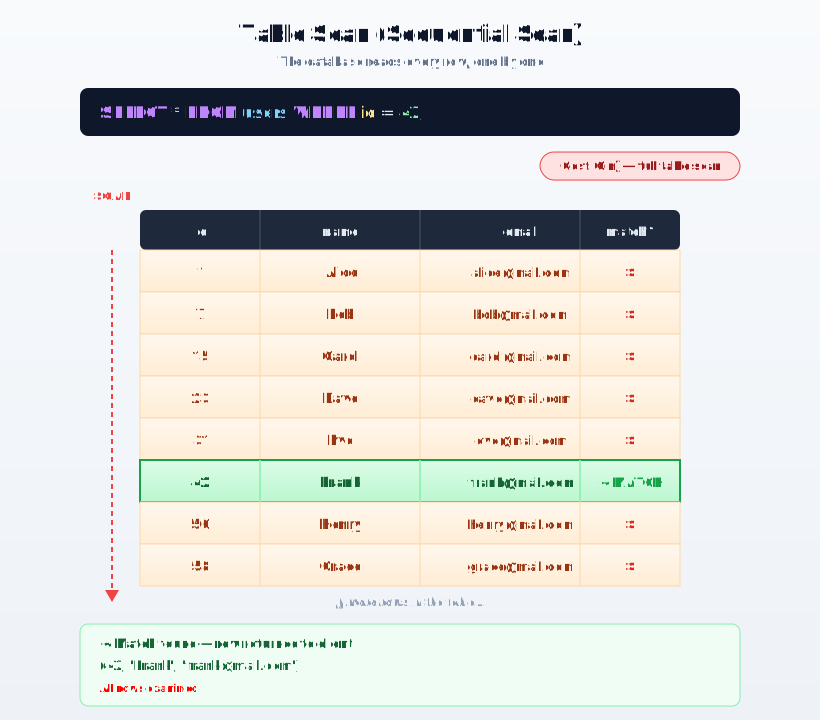
Every backend engineer has used queries like SELECT * FROM users WHERE id = 42 a thousand times without thinking twice. It just works. But have you ever wondered what actually happens between hitting enter and getting your row back?
It's easy to picture a table as a neat spreadsheet sitting on disk, and the database as something that just "goes and grabs the row." In reality, there are a few layers of structure in between. Once you understand them, you'll actually know how data is stored on disk, how the database reads from disk, and why adding an index makes a query faster — instead of just knowing that it does.
In this post, we'll build that picture step by step: starting from a simple limitation of disks, moving to how rows are packed together, how those packs are organized into files, and finally why a query with no index has to do so much extra work.
The problem: disks can't read one row at a time
You'd think a database could just say "give me row 42" and the disk would hand over exactly those bytes. But that's not how disks (or SSDs) work.
Disks and the operating system move data in fixed-size chunks called blocks — often 4KB at a time. There's no way to read just one byte, or just one row. If your row lives anywhere inside a 4KB block, the database has to read that whole block, whether it needed 5 bytes or 4000.
Because of this, every database defines its own storage unit that matches this reality. That unit is called a page.
- A page is the smallest chunk of data a database reads or writes in one go.
- PostgreSQL & SQL Server use 8KB pages, MySQL/InnoDB uses 16KB.
- Almost everything a database does — caching, locking, saving to disk — works in terms of pages, not individual rows.
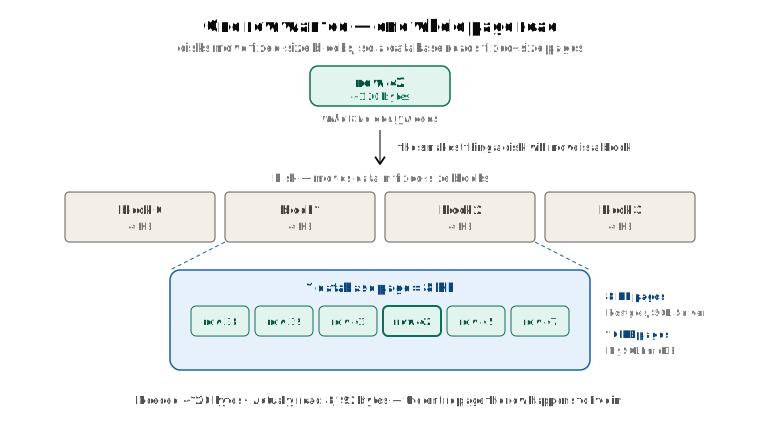
So here's the first idea to hold onto: a database never reads just one row from disk. It reads the whole page that row lives in, then picks the row out of that page.
How rows are packed inside a page
A page holds many rows, but rows aren't all the same size. A users row with a short name takes less space than one with a long bio. So how do you fit rows of different sizes neatly into a fixed 8KB box?
Most databases solve this with something called a slotted page. Think of a page as split into three parts:
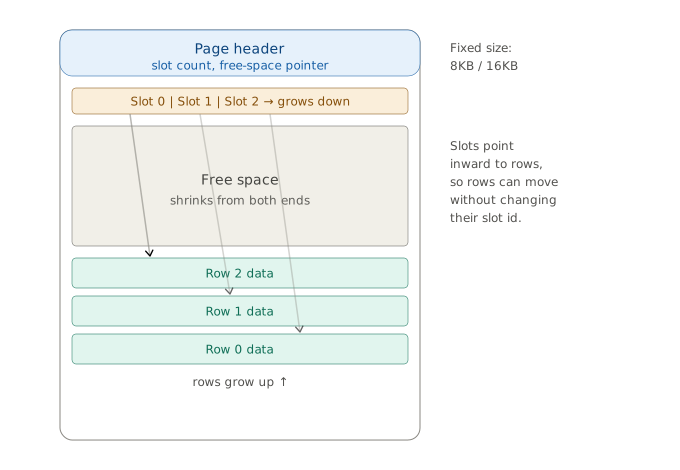
- A header at the top. It's just a small note that says how many rows are in this page and where the free space currently starts.
- A slot array right after the header. Each "slot" is a tiny pointer that says: the row for this slot starts at this exact spot in the page, and is this many bytes long. The slot array grows downward as more rows are added.
- The actual row data, packed in from the bottom of the page and growing upward.
As if two people filling a room from opposite ends: the slot array fills in from the top, the row data fills in from the bottom, and the free space in the middle keeps shrinking as both sides grow.
Why are we going through this trouble instead of just listing rows one after another? Because it gives every row a short, stable address: (page number, slot number). Postgres calls this a CTID. Oracle calls it a ROWID. Later, when we build an index, this is exactly the address the index stores — not the row itself, just this small pointer to jump in.
This setup also explains something that surprises a lot of people: when you delete a row, it doesn't actually disappear from the disk right away. It stays on the disk but not every transaction can see it.
This is really just a glimpse of MVCC, which is a deep topic on its own — and it's exactly what the next post digs into: How Does a Database Let Everyone Read and Write at Once?
One more simple rule: a page always belongs to exactly one table. A page will never hold some users rows mixed with some orders rows.
How does the database decide where a new row goes?
When you insert a row, the database doesn't just store it onto the newest page. It checks a small lookup table called the free space map, which tracks which pages still have room, and drops the row into the first page that fits. Only when no page has enough space to store a row that we are trying to insert then database create a brand-new page.
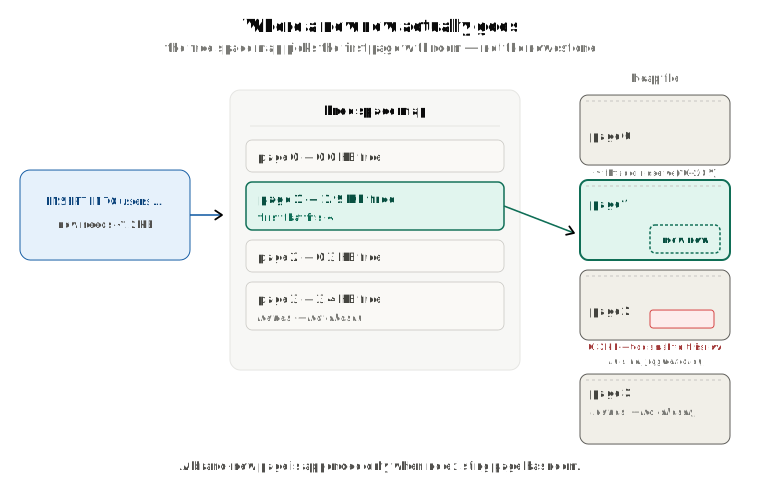
This can leave small gaps or some unused space in the existing pages — that's normal, and it's called internal fragmentation. A page might not have room for a big row, but that same leftover space works fine to insert a smaller row later.
Databases also purposely leave a little extra empty space(10% - 20%, configurable) on each page, controlled by a setting called fillfactor. This spare room is used for HOT updates. This is also a separate topic worth covering when we will learn database indexing.
This is one reason a table's file on disk is usually bigger than the raw size of its data — you're seeing the data plus some intentional extra space in the disk.
There's one exception worth knowing: what if a single value — like a huge block of text — is too big to fit on any page at all? In that case, the database stores that oversized value separately, in what's called an overflow page, and just leaves a small pointer to it in the original row. PostgreSQL calls this TOAST. Other databases have their own version of the same idea.
Heap files: a pile of pages
Zoom out one level. A table isn't just one page — it can be made of millions of them. How does the database keep track of all those pages?
The simplest approach, and the default one most databases use, is called a heap file. Think of it as an unordered pile of pages, numbered in the order they were created: page 0, page 1, page 2, and so on.
Here's how the pile grows:
- A brand-new, empty table starts as just page 0, with nothing in it.
- As rows come in, page 0 fills up.
- Once page 0 has no more room or can store a new insert, the database adds page 1.
- Once page 1 fills up too, it adds page 2. And so on.
A full table scan is exactly this: reading page 0, then page 1, then page 2, all the way through the last page, checking every row along the way.
The page numbers don't tell you where the pages physically are
Here's a small but important detail. The database numbers its pages neatly — 0, 1, 2, 3 — but where those pages actually sit on the physical disk is decided by the operating system, not the database.
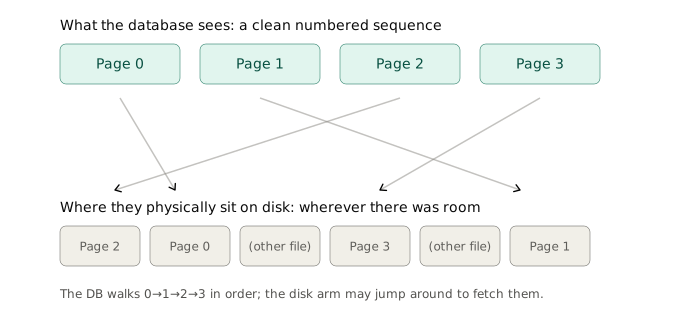
When the database asks for one more page, the OS just hands back whatever free space it currently has. Sometimes that's right next to the last page. Sometimes it's in a totally different spot on the disk. So "page 5 comes after page 4" is true in the database's bookkeeping, but it says nothing about them being physically next to each other on the disk.
Each table gets its own separate pile
Just like a single page can't mix two tables, one heap file never mixes pages from two tables either. Each table has its own pile, and its own numbering, starting from 0:
userstable → its own page 0, page 1, page 2...menustable → a completely separate page 0, page 1, page 2...
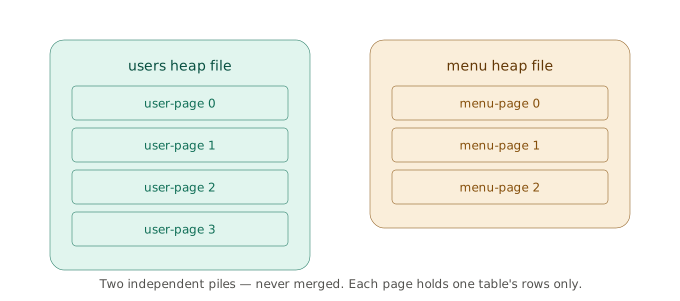
These piles never merge, and they grow independently. If you scan the users table, the database only touches users pages — it never even looks at menus pages.
How inserts really pick a page
Tying this back together: when you insert a row, the database looks at the free space map for any page with room — not necessarily the latest one — and drops the row into an open slot there. Find a spot, insert. That's it.
This simple rule is what makes inserts fast. And it's not permanent filling — once rows are deleted from a page and then cleaned up by vacuum, that space shows up again in the free space map, available for the next insert.
Why "no index" means "check every single page"
This simplicity has a real cost when it's time to find a row. Say you run:
SELECT _ FROM user WHERE id = 42;
With no index, the database has no idea which page holds the row id = 42.
Remember — when we insert new rows, these land wherever there's free space, not in any particular order. So the only way to be sure it finds the right row is to check every page, one by one. This is a full table scan, and the amount of work grows directly with the number of pages in the table.
This is exactly the problem an index solves. An index (usually a structure called a B+tree) is a separate, sorted list that maps values — like id = 42 — directly to a (page, slot) address. Instead of checking every page, the database can jump straight to the right one. The actual row data still lives in the heap, in one place; the index is just a fast shortcut pointing into it. A table can have several indexes, each built for a different kind of lookup.
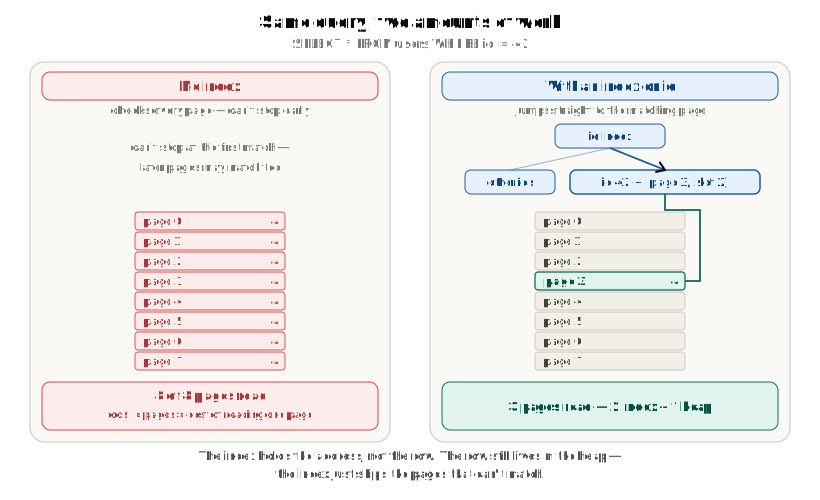
A table with no indexes at all means every single lookup, no matter how specific, has to scan the whole thing.
And also worth mentioning here, an having index does not mean the query will always use the index; database query optimizer plans how it will run the query and will use the index or not. We will discuss this in database indexing.
Walking through a scan, step by step
Take a query like SELECT * FROM users WHERE age = 30, with no faster way to find matching rows. Here's what the database does:
- Read page 0. Check every row on it for
age = 30. - Read page 1. Check every row on it.
- Repeat, page after page, all the way to the last page.
Notice it can't stop early just because it found one match on page 3 — there might be more matching rows on page 50. So it has to check every page to be sure it hasn't missed any.
Why this gets slower as the table grows
The amount of work scales directly with the size of the table. Double the number of rows, and you roughly double the number of pages — and roughly double the time the scan takes.
- A small table, with only a few pages, scans almost instantly.
- A huge table, with millions of pages, means reading that much data off disk. A 20GB table means the scan reads 20GB. There's no shortcut hiding inside the heap itself.
The real cost is best measured in pages read, not rows checked, since many rows share one page:
cost ≈ number of pages × cost of reading one page
The part that's easy to get wrong
Here's the key thing to understand: a full table scan is slow on a big table, not because the reading itself is done badly. It's slow simply because there's so much to read.
Imagine flipping through every page of a book to find one specific word.
- Flipping the pages in order — page 1, then 2, then 3 — is actually the fastest possible way to flip through a book.
- What makes the search slow isn't a bad way of flipping. It's that the book has a million pages, and you have to look at all of them.
A full table scan works the exact same way. The database reads pages in order — 0, 1, 2, 3 — which is also the fastest possible pattern for reading off disk, since the disk can just hand over one page after another without jumping around. So the way it reads isn't the problem. The problem is simply the amount it has to read.
Now add in the fact that disks are much slower than memory: a full scan means:
- Go through page by page
- Read all data in the page(page read means disk read) and move the data from disk to memory
- This moving data from disk to memory is the slowest part of this flow
- Disks are slow(SSDs are faster than hard drives, but still take some time to read; not as fast as memory)
- In memory than it checks all the rows of that page
- Read all data in the page(page read means disk read) and move the data from disk to memory
- Small table → small amount to move → fast.
- Big table → large amount to move → slow.
No matter how neatly the pages are read, reading a lot of pages always takes a lot of time.
Bringing it all together
Here's the full picture, step by step:
- Disks read and write in fixed-size blocks, so a database defines its own matching unit: the page.
- Rows of different sizes are packed into fixed-size pages using a slotted page layout — a header, a slot array that grows down, and row data that grows up. This gives every row a stable
(page, slot)address. - A table's pages are collected into a heap file: an unordered, ever-growing pile, numbered in order but not necessarily sitting next to each other on the physical disk.
- Inserts are simple on purpose — find any page with room, drop the row in — which keeps writes fast, but scatters a table's rows across the pile with no particular order.
- That scattering is exactly why a lookup with no index has no choice but to check every page — a full table scan. It reads pages in the most efficient order possible, but it still has to read all of them.
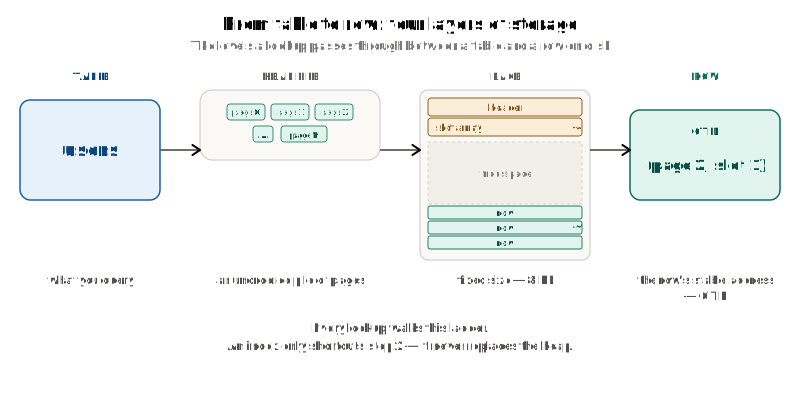
Next up: we saw that a deleted row lingers on disk, and that inserts drop rows wherever there's space. Both are fingerprints of MVCC — the mechanism that lets many transactions read and write the same table at once without blocking each other. That's the whole subject of the next post: How Does a Database Let Everyone Read and Write at Once?